TIX · Volume 9
The Collected Projects
The same clock built two ways — gweeds' discrete-AVR-in-wood DIY TiX and ujjaldey's shift-register-Arduino-in-plastic uTixClock, decision by decision
Two makers built the same clock. Both start from the same idea — the count-the-cells TIX encoding of Vol 2, the four colour fields and twenty-seven LEDs of Vol 3 — and both end at the same place: a small box on a shelf that re-rolls a random light pattern every minute and reads 24-hour time to anyone who will count. In between, they agree on almost nothing. Where one reaches for a soldering iron and a strip of Veroboard and a transistor for every row, the other reaches for a pre-made Arduino module and a shift register; where one keeps time on the microcontroller’s own crystal and lets it drift when unplugged, the other bolts on a battery-backed real-time-clock chip; where one mills a case from New Zealand hardwood on a lathe, the other prints one in PLA+ on a desktop machine and snaps it shut with magnets.
This is the “two philosophies of one clock” volume. The engineering volumes (Vols 3–5) treated the display, the driver, the timebase and the firmware as subsystems, drawing on both builds for examples; Vol 6 walked each build start to finish as a build. This volume sets the two designs side by side on every axis at once so you can see each decision made two ways and judge which half to copy onto your own bench. The framing is deliberate: neither build is “right.” They are two coherent answers to the same brief, and the gap between them is the most instructive thing in this hub.
We also clear up a piece of housekeeping at the end: a third PDF in this subproject’s inputs is not a TIX clock at all, and should be moved.
9.1 The two builds, in one paragraph each
Project 1 — “DIY TiX Clock” by gweeds (Guido Seevens). Published on Instructables (the build
write-up dates to 2011; the PCB silkscreen reads “Colour Clock PCB Rev 2.1 / Designed by Guido
Seevens 2008”, so the design itself is older).1 It is a discrete-electronics, AVR clock: an
ATmega-class microcontroller programmed in BASCOM-AVR BASIC scans a multiplexed LED matrix
through discrete transistors — one transistor per row, with optional transistor arrays on the
columns — and keeps time on the AVR’s own crystal. It began life on Vero strip board and graduated
to a single-sided Eagle PCB that carries the controller and the display on one board. The set
buttons are lathe-turned by hand; the case is milled Rimu (a New Zealand native timber)
with a slide-in diffuser sandwich. The whole project — source, schematic, PCB — ships as
tixclock.zip. Seevens also sold finished TIX clocks commercially, so this is a design that was
built in numbers, not once.
Project 2 — “uTixClock” by ujjaldey. Published on Instructables (author site ujjaldey.in); it
credits Guido Seevens’s design and the author says he was prompted to build it after seeing a
TIX clock featured on the SmarterEveryDay YouTube channel.2 It is a module-and-Arduino
clock: an Arduino Nano drives twenty-seven 5 mm LEDs (yellow ×3, red ×9, blue ×6, green ×9)
through two 74HC595 shift registers that expand the Nano’s pins to scan the grid, keeps time on
a DS1302 battery-backed real-time clock so it survives a power-off, and auto-dims to ambient
light through an LDR. The firmware is Arduino C++ (built with PlatformIO, using an
RtcDS1302 library, Serial at 9600). It is built on dotted/striped veroboard — prototyped first
as a 4×3 matrix on a breadboard driven by a single 595 — and lives in a 3D-printed PLA+ case
(designed in Fusion 360) held together with neodymium magnets, with a transparent-paper diffuser
behind a black-acrylic window. It runs from USB. ujjaldey has also built nixie, VFD and
LED-matrix clocks, and reports — as gweeds does — that the enclosure was the hardest part.
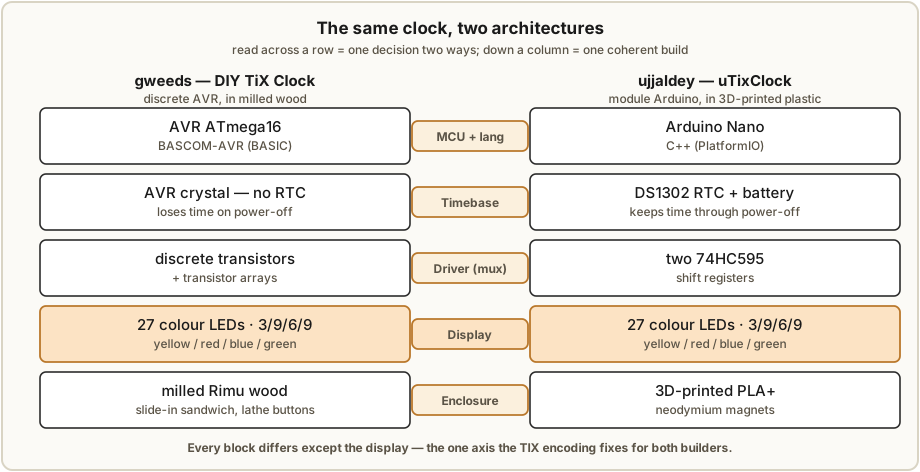
9.2 Walking the same axes
What makes the comparison worth drawing is that the two builds disagree at almost every layer while agreeing on the result. We walk the layers in the same order for each, so the contrast lines up.
9.2.1 The display — where they agree
Start with the one axis where the two builds essentially converge, because it makes the divergence everywhere else sharper. Both use the conventional TIX layout: four colour fields, sized to the largest digit each must show, totalling twenty-seven cells — 3 / 9 / 6 / 9, yellow / red / blue / green, for tens-of-hours / units-of-hours / tens-of-minutes / units-of-minutes (Vol 3). ujjaldey’s build states the per-field count explicitly (Y3 / R9 / B6 / G9); gweeds’ “Colour Clock” uses the same four-colour scheme. Both read 24-hour time by counting lit cells, left to right, exactly as Vol 2 describes.
The display is the part of a TIX clock with the least room for opinion: the encoding fixes the field sizes and the colour count, so two independent builders arrive at nearly the same grid. Every other axis below is where the philosophies part.
9.2.2 The drive — discrete transistors vs a shift-register pair
Both builds multiplex: rather than give every one of twenty-seven LEDs its own driven pin, they arrange the LEDs as a scanned matrix and light it a slice at a time, fast enough that the eye sees a steady display (Vol 4). What differs is how the matrix is driven.
- gweeds — discrete transistors. A transistor per row supplies the row drive, and the columns are handled by transistor arrays (these are noted as optional in the source — the design can be populated with discrete column drivers instead). This is the classic discrete-multiplex approach: every driver is a part you can see, probe and replace, and the design carries no programmable-logic driver chip at all. The cost is part count and board area — a transistor and its base resistor for each line.
- ujjaldey — two 74HC595 shift registers. Instead of discrete row/column drivers, two daisy-chained 74HC595 shift registers expand the Nano’s pins so a handful of microcontroller lines can address the whole grid; the build lists 3 × 33 Ω + 1 × 10 kΩ resistors around them. The 595 is the workhorse of the Arduino-clock world: shift the bit pattern in serially, latch it, and the parallel outputs drive the matrix lines. Fewer discrete parts, but a CMOS driver chip you must clock correctly in firmware. (The exact matrix wiring is not exhaustively detailed in the source; Vol 4 reconstructs the scan.)
The teaching point: discrete transistors put the driver in hardware you can see; the 595 puts it in a chip you must talk to. One is a soldering and board-layout exercise; the other is a firmware-and-timing exercise. Vol 4 builds up both current-limiting schemes in full.
9.2.3 The timebase — bare AVR crystal vs DS1302 RTC
This is the axis with the clearest functional consequence for the user.
- gweeds — the AVR’s own crystal. Timekeeping is derived from the microcontroller’s crystal; there is no separate RTC chip and no backup cell. The clock keeps good time while powered, but loses the time on power-off and must be re-set when it comes back. For a desk clock that lives on a USB cable this is often acceptable — and it removes a chip, a crystal-load network and a battery from the bill of materials.
- ujjaldey — a DS1302 RTC. A dedicated DS1302 real-time-clock chip with a battery backup
keeps the time through a power-off: unplug it, plug it back in tomorrow, and it is still
right. The cost is one more module, the
RtcDS1302library, and a backup cell to replace eventually.
The lesson is the cleanest trade in the whole comparison: an RTC is the price of surviving a power cut. If “I never want to set it twice” matters, add the DS1302 (or any RTC) as ujjaldey did; if the clock will always be powered and you would rather drop parts, the bare-crystal gweeds approach is legitimate. Vol 5 covers both timebases and the set logic each implies.
9.2.4 The firmware — BASCOM-AVR BASIC vs Arduino C++
Both firmwares do the same three jobs — keep time, compute the four digit counts, and randomly choose which cells to light to reach each count (the per-minute re-roll that defines the technology, Vol 5) — in very different idioms.
- gweeds — BASCOM-AVR. The firmware is written in BASCOM-AVR, a BASIC dialect for AVR
microcontrollers, and ships in
tixclock.zipalongside the schematic and PCB. BASCOM is a commercial-but-approachable BASIC with built-in keywords for the AVR’s peripherals; it suits a builder who wants a procedural, all-in-one-IDE flow and does not mind a non-C toolchain. - ujjaldey — Arduino C++. The firmware is C++, built with PlatformIO (Arduino
framework), pulling in an
RtcDS1302library for the clock chip and logging over Serial at 9600. This is the mainstream maker toolchain: huge library ecosystem, familiar C++, and a serial console for debugging.
The teaching point: the language follows the platform. Choose the AVR-discrete path and you inherit BASCOM (or AVR-C); choose the Arduino path and you inherit C++ and the library ecosystem. Neither randomiser is exotic — both pick cells at random to hit a target count — but the two source trees read very differently. Vol 5 sets the two firmwares side by side.
9.2.5 The boards and fabrication — Vero→Eagle PCB vs veroboard throughout
Both builders prototyped on strip/perf board first, which is itself a lesson: even a clean design earns a breadboard or Vero stage before it earns copper.
- gweeds — Vero, then a single-sided Eagle PCB. The build began on Vero strip board and graduated to a single-sided PCB laid out in Eagle that combines the controller and the display on one board. A fabrication detail worth keeping: the LEDs are through-hole and the ICs sit on the copper side, so you solder the LEDs first — because once the AVR is seated it physically covers some of the LED pads. This is a real, transferable assembly-order tip.
- ujjaldey — veroboard throughout (dotted + stripped). The shipped build stays on veroboard (both dotted/perf and stripped varieties), having first prototyped a 4×3 matrix on a breadboard driven by a single 595 to prove the scan before committing the full grid. No custom PCB — the modules (Nano, DS1302, 595s) do the integration that a PCB would otherwise do.
The teaching point: a custom PCB buys you a clean, repeatable, sellable board; modules-on-veroboard buys you a one-off you can finish in an evening. gweeds sold finished clocks, so a PCB paid for itself; ujjaldey built one, so veroboard sufficed. Vol 6 walks both fabrication routes.
9.2.6 The set method — lathe-turned buttons vs (effectively) compile-time
- gweeds — physical buttons. The clock has lathe-turned buttons for setting the time — a hardware UI, machined to match the case. With no RTC, you will use them after every power interruption.
- ujjaldey — no button UI in the shipped build. The delivered uTixClock has no set buttons; time is set at compile time (or over serial). The author lists a button set UI among planned features, alongside a date display, an adjustable pattern-change interval, a 12/24-hour toggle and a “nicer midnight.” Because the DS1302 holds the time, the absence of a runtime UI stings far less than it would on the bare-crystal build.
There is a neat interaction here worth naming: the timebase choice and the set-UI choice are coupled. gweeds needs good buttons precisely because the crystal loses time; ujjaldey can defer a button UI precisely because the RTC does not. A weakness on one axis is bought back by a strength on another.
9.2.7 The enclosure — milled Rimu wood vs 3D-printed PLA+
This is the axis the two authors most visibly diverge on, and — per both of them — the axis that costs the most hours.
- gweeds — milled Rimu, with a slide-in diffuser sandwich. The case is milled from Rimu, a New Zealand timber, with a thin plastic back. The diffuser is a slide-in sandwich: smoked perspex (the window), tracing paper (the diffuser), an office-light louvre reflector grid to give each LED its own square cell, and an optional foil layer. It is a woodworking-and-machining finish: a mill and a lathe in the toolchain.
- ujjaldey — 3D-printed PLA+, snap-together. The case is 3D-printed in PLA+ (designed in Fusion 360), assembled with neodymium magnets, with a transparent-paper diffuser behind a black-acrylic window. It is a CAD-and-printer finish: design on screen, print overnight, snap together.
Same optical goal — turn bare round LEDs into crisp, evenly-lit squares behind a dark window — reached through completely different shops. The diffuser stack is conceptually the same in both (a window, a paper diffuser, a cell structure); only the materials and the fabrication differ. Vol 8 is the full treatment of the diffuser sandwich and the wood-vs-print case decision.
9.2.8 Standout strengths and weaknesses
- gweeds DIY TiX — strengths: a complete, sold-in-numbers design with source/schematic/PCB in one zip; every driver is discrete and probeable; a beautiful machined-wood finish; a real PCB you can reproduce. Weaknesses: loses time on power-off (no RTC); the BASCOM toolchain is less familiar than Arduino C++; the case demands a mill and a lathe most benches don’t have.
- ujjaldey uTixClock — strengths: keeps time through a power cut (DS1302); LDR auto-dim; the mainstream Arduino/PlatformIO/C++ toolchain and library ecosystem; a printable, magnet-snap case most makers can reproduce. Weaknesses: no runtime set UI in the shipped build; a known quirk that 00:00 shows a blank display (all four counts zero → nothing lit); several nice features (buttons, date, 12/24 toggle, nicer midnight) are still on the to-do list.
9.3 The two builds, side by side
The whole comparison on one page. Read down a column for one coherent build; read across a row to see the same decision made two ways.
Table 1 — 9.3 The two builds, side by side
| Axis | gweeds — “DIY TiX Clock” | ujjaldey — “uTixClock” |
|---|---|---|
| Author / source | Guido Seevens (“gweeds”), Instructables (write-up 2011; PCB silkscreen 2008)1 | ujjaldey, Instructables; credits Seevens; prompted by SmarterEveryDay2 |
| Display | 27 LEDs, 3/9/6/9, yellow/red/blue/green | 27 LEDs, 3/9/6/9 (Y3/R9/B6/G9) |
| Read as | count lit cells → 24 h HH:MM | count lit cells → 24 h HH:MM |
| Drive | multiplexed matrix; discrete transistor row drivers + transistor-array column drivers (arrays optional) | multiplexed matrix scanned via two 74HC595 shift registers (3×33 Ω + 1×10 kΩ) |
| MCU | AVR (ATmega16 in schematic) | Arduino Nano |
| Firmware | BASCOM-AVR (BASIC) | C++ (PlatformIO / Arduino, RtcDS1302, Serial 9600) |
| Timebase | the AVR’s own crystal — no RTC → loses time on power-off | DS1302 battery-backed RTC → keeps time through power-off |
| Auto-dim | not in source | LDR ambient auto-dim |
| Boards | Vero strip board → single-sided Eagle PCB (controller + display on one board) | dotted + stripped veroboard (prototyped 4×3 matrix on breadboard with one 595) |
| Assembly note | LEDs through-hole, ICs on copper side — solder LEDs first (AVR covers pads) | modules-on-veroboard; no custom PCB |
| Set method | physical lathe-turned buttons | no button UI shipped (set at compile / serial); button set is a planned feature |
| Enclosure | milled Rimu wood; slide-in diffuser sandwich (smoked perspex / tracing paper / louvre reflector grid / optional foil); thin plastic back | 3D-printed PLA+ (Fusion 360); magnets; transparent-paper diffuser; black-acrylic window |
| Power | 5 V (USB-class) | USB |
| Deliverable | tixclock.zip (source + schematic + PCB) | published build + firmware |
| Known quirk | re-set after every power loss | 00:00 shows a blank display |
| Standout strength | complete, sold-in-numbers, all-discrete, machined-wood finish | RTC + LDR + mainstream toolchain + printable case |
| Standout weakness | no RTC; BASCOM; needs a mill/lathe | no runtime set UI; blank-at-midnight quirk |
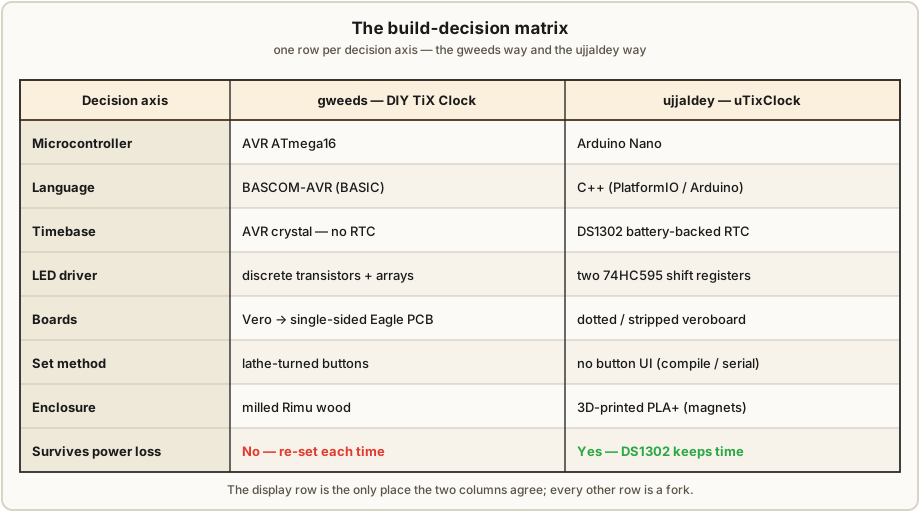
9.4 Which half to copy onto your bench
The point of laying the builds side by side is not to crown a winner — it is to let you mix the two. Almost every axis is independent of the others, so you can take the half that fits your shop and your taste. A few concrete recommendations, tied to the engineering volumes:
- You have a 3D printer and live in the Arduino world → start from ujjaldey: Nano, two 595s, DS1302, printed case. It is the most reproducible build for a modern maker bench (Vols 4–6).
- You have a wood shop (or a mill and a lathe) and want an heirloom object → start from gweeds: the machined Rimu case and lathe-turned buttons are the soul of that build, and the single-sided Eagle PCB is genuinely sellable (Vols 6, 8).
- You want the time to survive a power cut → take ujjaldey’s DS1302 regardless of which driver you choose; an RTC bolts onto either MCU (Vol 5).
- You want every driver visible and probeable (for teaching, or because you distrust a CMOS chip you can’t see inside) → take gweeds’ discrete-transistor mux; if you’d rather cut part count and don’t mind clocking a chip, take the 74HC595 pair (Vol 4).
- You prefer C++ and a library ecosystem → the Arduino path and its firmware; if you’d rather a procedural BASIC and one IDE → BASCOM on the AVR (Vol 5).
- Whatever you pick, budget most of your time for the enclosure → Vol 8, and the next section.
A perfectly sensible “best of both” clock exists in the gap between them: gweeds’ machined wood case and slide-in louvre-grid diffuser, wrapped around ujjaldey’s Nano + 595 + DS1302 + LDR electronics. Neither author built that clock; you can.
9.5 The shared lesson: the enclosure is the hard part
Strip away every disagreement in §9.2 and one sentence survives that both authors say out loud: the electronics were the easy part; the enclosure and the diffusion were the hard part. ujjaldey states plainly that the enclosure was the hardest part of the whole project; gweeds’ build pours its craft into the milled Rimu case, the lathe-turned buttons and the four-layer slide-in diffuser sandwich — far more effort than the (genuinely simple) scanned-LED circuit demanded.
This is the through-line of the entire TIX hub, stated in Vol 1 and proven here by two independent builders working in two different materials: a TIX clock is a friendly weekend of electronics wrapped in a much longer project of making it look finished. The scanned matrix lights the first time; the difference between a science-fair breadboard and a thing visitors pick up off the shelf is the diffuser stack — a window, a paper diffuser, and a per-LED cell structure that turns round 5 mm LEDs into crisp, even squares with no hot-spot and no bleed. Both builds get there; both authors agree it is where the hours go. Vol 8 is that volume.
9.6 Finished-clock photographs (the visual record)
Neither finished clock is reproduced here: the build photographs belong to their Instructables authors and are referenced, not copied (Vol 1’s photo policy). The slots below mark where, in the rendered deep dive, the owner’s own photographs would sit if Jeff builds either design; until then they point to the authors’ write-ups.
9.7 Housekeeping: the misfiled file
For completeness, this subproject’s 02-inputs/ holds a third PDF that the casual reader will
assume is a TIX project and that this volume must explicitly exclude.
Lantern-Clock.pdf is not a TIX clock. It is a steampunk nixie “lantern” clock by an author
posting as “hellboy”: it uses a petes_kits nixie-prototyper board and IN-style nixie tubes,
runs from 9 VAC (with the attendant ~170 V cold-cathode high voltage), and is built into
brass / walnut / maple lantern fixtures. It shares nothing with the TIX builds — no LED count
encoding, no colour fields, no per-minute re-roll, and it carries a genuine high-voltage hazard the
TIX clocks do not. It was filed here only because “lantern clock” reads as a novelty readout.
Recommendation: relocate Lantern-Clock.pdf to the Steampunk subproject (or the Nixie subproject).
It is governed by the nixie hub’s high-voltage safety rules, not this hub’s 5 V baseline, and it is
analysed nowhere in this TIX deep dive. (This matches the misfile note in Vol 1.)
9.8 References (Vol 9)
-
Cross-references. The driver architectures (discrete-transistor mux vs 74HC595) are built up in Vol 4; the timebases (AVR crystal vs DS1302), the firmwares (BASCOM-AVR vs Arduino C++) and the per-minute randomiser in Vol 5; the two builds start-to-finish in Vol 6; and the diffuser sandwich and the wood-vs-3D-print enclosure decision in Vol 8. The shared display encoding is Vols 2–3.
-
Misfiled reference.
Lantern-Clock.pdf(steampunk nixie “lantern” clock by “hellboy”; petes_kits nixie board, IN-style tubes, 9 VAC, brass/walnut/maple) — not a TIX clock; recommended for relocation to the Steampunk (or Nixie) subproject. Held, for now, in02-inputs/Lantern-Clock.pdf. Not analysed in this deep dive.
Footnotes
-
DIY TiX Clock by gweeds (Guido Seevens), Instructables — http://www.instructables.com/id/DIY-TiX-Clock/. The write-up dates to 2011; the PCB silkscreen reads “Colour Clock PCB Rev 2.1 / Designed by Guido Seevens 2008.” AVR (ATmega16 in the schematic) in BASCOM-AVR; discrete-transistor multiplexed matrix (transistor arrays on the columns, noted optional); timekeeping on the AVR crystal (no RTC, loses time on power-off); Vero strip board → single-sided Eagle PCB combining controller and display (LEDs through-hole and soldered first, ICs on the copper side); lathe-turned set buttons; milled Rimu case with a slide-in smoked-perspex / tracing-paper / louvre-grid / optional-foil diffuser and a thin plastic back. Source, schematic and PCB ship as
tixclock.zip. The author also sold finished TIX clocks commercially. Held in02-inputs/DIY-TiX-Clock.pdf. ↩ ↩2 -
uTixClock by ujjaldey, Instructables — https://www.instructables.com/id/UTixClock/ (author site https://ujjaldey.in/). Credits Guido Seevens’s design; the author was prompted by a TIX clock shown on the SmarterEveryDay YouTube channel. Arduino Nano in C++ (PlatformIO / Arduino,
RtcDS1302library, Serial 9600); 27 LEDs (Y3 / R9 / B6 / G9) scanned through two 74HC595 shift registers (3×33 Ω + 1×10 kΩ); DS1302 battery-backed RTC (keeps time through power-off); LDR auto-dim; USB power; 24-hour. Built on dotted/stripped veroboard (prototyped a 4×3 matrix on a breadboard with one 595 first); no button UI shipped (button set, date, pattern-interval, 12/24 toggle and a nicer midnight are planned); known quirk: 00:00 shows a blank display. Enclosure 3D-printed in PLA+ (Fusion 360), held with neodymium magnets, transparent-paper diffuser, black-acrylic window. The author has also built nixie, VFD and LED-matrix clocks and reports the enclosure was the hardest part. Held in02-inputs/UTixClock.pdf. ↩ ↩2
Comments (0)