TIX · Volume 8
Enclosure, Diffusion & Finishing
The diffuser sandwich, the square-cell grid, the window, and the case — the volume that makes or breaks the look
The electronics of a TIX clock work the first time. The look does not. Every other volume in this series can be got right with a meter and patience; this one is the only place a build goes wrong in a way no schematic will show you, because the difference between a science-fair board and an object people pick up and turn over is not in the circuit at all — it is in the few millimetres of paper, plastic and timber stacked in front of the LEDs. Both authors collected in this hub say the same thing in almost the same words: the enclosure and its diffuser were by far the hardest part of the whole project. ujjaldey spent roughly two months learning Fusion 360 just to make the front face; gweeds iterated the window from clear to smoked and built a milled-timber case with lathe-turned buttons. If the electronics are a weekend, the finish is the fortnight.
This volume is the recipe for that finish: why round LEDs read as crisp squares (it is diffusion, not LED shape — Vol 3), the diffuser stack front-to-back in both collected approaches, the square-cell grid two ways, the window two ways, the two case routes (milled wood and 3D-printed), how all of it maps onto Jeff’s bench, and the Steampunk cross-link for anyone who wants a brass shell over the panel.
8.1 Why a TIX clock reads as square cells
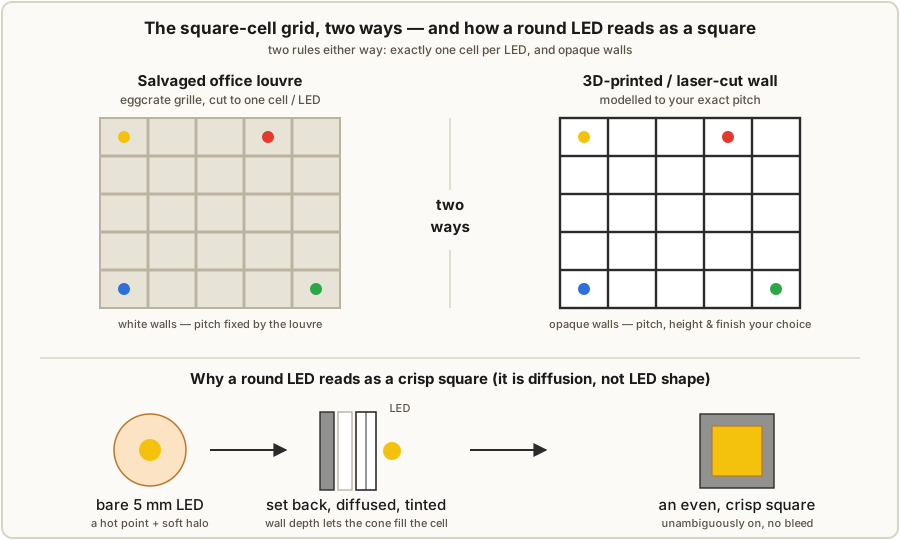
A bare 5 mm LED is a point source behind a rounded lens. Power it and you see a bright dot with a hot centre and a soft halo — nothing square about it, and nothing even. Put twenty-seven of them in a grid and you get exactly what an undiffused TIX panel looks like: a scatter of glowing dots, the colour right but the shape wrong, no two cells the same brightness, and light from each LED bleeding sideways into its neighbours so you cannot tell where one cell ends and the next begins. That panel is unreadable at a glance, which defeats the entire point of a clock you read by counting cells.
The signature TIX look — a flat grid of evenly-lit squares, each cell either plainly on or plainly off — is manufactured by three optical jobs done in front of the LEDs, and it is worth naming them separately because each is a different layer in the stack:
- Diffusion scatters each LED’s point of light into an even glow. A translucent sheet (tracing paper, transparent printer paper, frosted acrylic) sits in the light path; light hits it, scatters in every direction, and the sheet re-emits as a soft, uniform luminance instead of a hot dot. This is what turns a point into a fill.
- Cell separation stops one LED’s light reaching the cell next door. A grid of opaque cell walls — one square box per LED — boxes each LED into its own compartment, so the glow you see in a square is only its own LED. This is what turns a fill into a discrete square with a hard edge, and it is the layer most often missing from a disappointing build.
- Contrast keeps the dark cells dark. A tinted or dark window over the whole face lets the lit cells through while sinking ambient room light that would otherwise wash out the unlit cells in daylight. This is what makes the off cells read as off (§8.4).
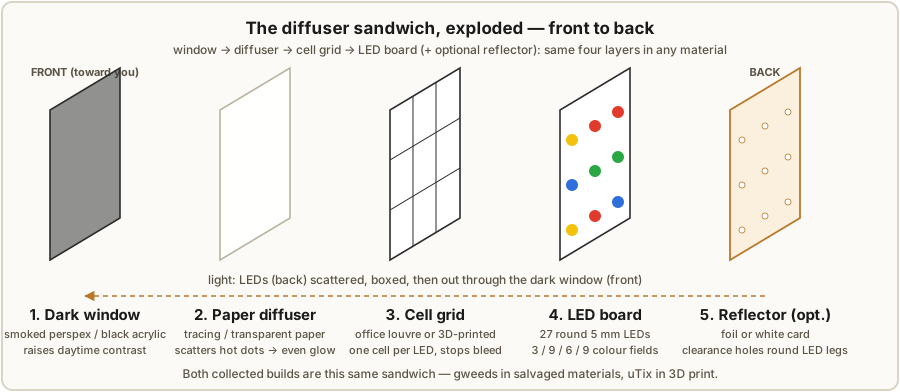
Do all three and a round LED behind a square compartment, seen through paper and a dark window, reads as a clean square that is unambiguously lit or unlit. Skip the grid and you get soft circles that bleed; skip the diffuser and you get hot dots; skip the dark window and the whole face greys out in daylight. The order they stack, front to back, is window → diffuser → cell grid → LED board — and that order is the subject of the next section.
8.2 The diffuser stack, front to back — both collected builds
Both collected builds are the same sandwich — window, diffuser, cell grid, LED board — executed in different materials. Reading them side by side is the fastest way to see what each layer is for, because where one author uses paper the other uses paper, and where one mills a grid the other prints one, but the job each layer does is identical.
8.2.1 Build A — gweeds “DIY TiX Clock” (salvaged materials)
Front to back, the gweeds sandwich is:
- Smoked perspex window. The outermost face. gweeds began with clear perspex and deliberately swapped it for smoked — in the author’s words, “for a classier look and better readability during daytime.” That switch is the single most instructive decision in the whole finishing story (§8.4): the dark tint costs a little brightness but buys a lot of daytime contrast.
- A diffuser — thick draughtsman’s tracing paper. A single sheet of heavy tracing paper does the scattering. It is cheap, flat, holds a crease badly (which is good — it lies flat), and is exactly the translucency you want: enough to kill the hot dot, little enough to stay bright.
- A square reflector grid — office-light louvre, cut to size. The cell walls are the eggcrate louvre salvaged from a fluorescent office-light fitting — the white plastic grille that sits under the tubes to cut glare. Cut down so there is one square cell per LED, it drops straight onto the LED board as a ready-made reflector grid. This is the cleverest reuse in the build: the part exists to even out and box in light, which is exactly the job here.
- The LED display board. The 27 LEDs stand up through the louvre’s cells.
- Optional: a sheet of tinfoil under the LEDs. For extra forward reflection, gweeds notes you can lay tinfoil beneath the LEDs to bounce stray light back toward the face — but cut a clearance hole in the foil around each LED’s legs so the conductive foil cannot bridge the leads and short the LED. (A safer modern substitute is white paint or a matte-white card with the same clearance holes — non-conductive, no short risk; §8.3.)
The whole stack slides into the case as a unit (§8.5).
8.2.2 Build B — ujjaldey “uTixClock” (3D-printed)
Front to back, the uTix sandwich is:
- A black transparent acrylic plexiglass window. A sheet of dark-tinted acrylic on top — the same daytime-contrast job as gweeds’s smoked perspex, in acrylic.
- A transparent-paper diffuser. A sheet of transparent/translucent printer paper does the scattering — gweeds’s tracing paper by another name.
- A 3D-printed square-cell grid, printed into the front face. Here the cell walls are not a separate part — the enclosure’s front face has the square cell grid printed directly into it, one printed-wall cell per LED. The grid and the bezel are one piece off the printer.
- The LED circuit board behind the printed face.
The lid and the circuit boards are held not with screws but with 3 mm neodymium magnets glued in with quick-fix glue, so the clock snaps apart for service (§8.5). The enclosure was designed in Fusion 360 and printed in PLA+; the author ordered the print online for roughly 56 SGD, and notes that SLA would have been about 4× the cost but came out smoother. ujjaldey is blunt that this enclosure — the printed face with its cell grid — was the hardest and longest part of the entire build, about two months of CAD and printing.
8.2.3 The two stacks at a glance
Table 1 — 8.2.3 The two stacks at a glance
| Layer (front → back) | gweeds DIY TiX (salvaged) | ujjaldey uTix (printed) |
|---|---|---|
| Window | Smoked perspex (was clear) | Black transparent acrylic |
| Diffuser | Thick tracing paper | Transparent printer paper |
| Cell grid | Office-louvre eggcrate, cut to one cell/LED | Cell walls printed into the front face |
| LED board | Discrete LEDs through the grid | Circuit board behind the printed face |
| Optional reflector | Tinfoil under LEDs, holes round legs | (grid interior serves) |
| Held together | Slides into milled case from below | 3 mm neodymium magnets |
The lesson of the table: same four layers, every time. Whatever you build from, window-diffuser-grid-board is the recipe, and the only real choices are what each layer is made of and how the cell grid is produced — which is the next section.
8.3 The square-cell grid, two ways
The cell grid is the layer that does the most to make or break the look, because it is the one that creates the edges of the squares. There are two collected ways to make it, and a couple more open on a bench like Jeff’s.
8.3.1 Salvaged office louvre (gweeds)
A fluorescent-fitting eggcrate louvre is a moulded plastic grille of square cells, usually white or silvered, designed to sit under office tubes and cut glare by boxing the light. It is, by happy accident, exactly a TIX reflector grid: square cells, light walls, made to even out and contain light. Salvage one (skips, lighting-shop offcuts, a recycled fitting), then cut it down so the cell pitch matches the LED pitch — one cell per LED. The white interior of each cell reflects stray light forward and helps the fill stay even. Cost: effectively nothing. The catch is the pitch is fixed by the louvre — you must lay out the LED board to match the grille’s cell spacing, not the other way round, or cut and re-bond cells to a custom pitch.
8.3.2 Printed (or laser-cut, or stacked) cell wall (uTix and beyond)
The modern route is to make the grid to your exact pitch instead of finding one:
- 3D-printed cell wall (uTix). Model a grid of square wells — one per LED, walls a millimetre or so thick — and print it, either as its own part or, as uTix does, printed straight into the front face. You control pitch, wall height (the LED-to-diffuser distance, §8.3.3), and interior finish exactly.
- Laser-cut and stacked. Cut a sheet of square holes from opaque acrylic, MDF or card, and stack two or three layers to build wall height. Crisp, fast, repeatable, and the obvious move on a laser bench (§8.6).
- Laser-cut interlocking fins. Cut slotted strips (the classic “comb” eggcrate) and slot them into a lattice — the same construction as a wine-divider, made to your pitch.
Whichever way, the two rules are the same: exactly one cell per LED, and opaque walls. One cell per LED is what makes each LED read as one square; opaque walls are what stop the bleed. A grid that shares a cell between two LEDs, or whose walls leak light, undoes the whole effect.
8.3.3 Getting an even fill with no hot-spot
A boxed, diffused LED can still look bad if it shows a bright spot in the middle of the cell rather than an even square. Three levers fix that, and they are worth tuning by eye on a single test cell before committing the whole face:
- LED-to-diffuser distance. This is the biggest lever. An LED pressed against the diffuser shows a hot dot; the same LED set back by the depth of a cell wall lets its cone spread and fill the square before it reaches the paper. Taller cell walls = more even fill (at the cost of depth). Tune the wall height — or recess the LED — until the dot disappears.
- White / frosted cell interior. A matte-white or frosted cell interior bounces the off-axis light around inside the box and fills the corners, evening out the square. (The office louvre is white for exactly this reason; paint a printed grid’s interior white, or print it in white filament.)
- A frosted, not clear, diffuser. Match the diffuser’s translucency to the setback: more diffusion (heavier paper, a second sheet) for a shallow box, less for a deep one.
This is the one place in the whole clock to prototype and look: build one cell three ways, light it, and pick the combination of wall height, interior finish and diffuser that gives a flat, even square. Then replicate it twenty-seven times.
8.4 The window — clear vs smoked vs black acrylic
The outermost layer is a flat sheet over the whole face, and its only job is contrast. A lit cell is bright enough to punch through a fair amount of tint; an unlit cell is just dark plastic, and in a bright room it reflects and scatters ambient light and goes grey — which is exactly the failure mode a dark window cures. Sink the room light in the tint and the off cells stay convincingly off, so the contrast between lit and unlit cells — the thing your eye actually counts — goes up, even though the absolute brightness goes down a little.
The collected builds bracket the choices:
- Clear perspex — what gweeds tried first. Maximum brightness, minimum contrast: in daylight the unlit cells grey out and the face looks washed and a bit cheap.
- Smoked perspex — what gweeds switched to, explicitly “for a classier look and better readability during daytime.” This is the canonical TIX window: dark enough that off cells read as black, clear enough that lit cells shine through.
- Black transparent acrylic — the uTix choice, the same idea in acrylic: a dark, barely-translucent sheet that the LEDs punch through while everything else stays black.
The trade-off to hold in mind: darker window = better daytime contrast, lower absolute brightness. Because a TIX clock often runs an LDR auto-dim (Vol 4) and lives indoors, the contrast win almost always beats the brightness cost — which is why both independent builds landed on a dark window, and why gweeds’s clear→smoked switch is the single most repeated piece of finishing advice in this hub. If you over-darken and the lit cells look weak, raise LED current or back off one shade of tint rather than going back to clear.
8.5 The case, two routes
The case holds the sandwich square and flat behind the window and gives the clock its material character. The two builds take opposite routes — subtractive timber and additive plastic — and both are worth understanding because they map onto different benches.
8.5.1 Milled wood (gweeds — Rimu)
gweeds’s case is Rimu, a New Zealand native timber, and the construction is a small lesson in designing for a mill:
- Milled slide-in recesses. Rather than screw a stack of layers down, gweeds mills tracks (recesses) into the case so the whole sandwich — window, paper, grid, board — slides in from the bottom as a unit and is held by the tracks. Clean front face, no visible fasteners, serviceable by sliding the stack back out.
- A thin plastic sheet for the rear, sitting in its own milled recess, closes the back.
- Lathe-turned buttons. The time-set buttons are turned on a lathe to match the timber — the kind of detail that lifts the object from “project” to “made thing.”
Rimu is a regional choice; any stable hardwood (walnut, maple, oak) mills and finishes the same way. The design idea worth stealing is the bottom slide-in track: it hides all the layers behind a seamless face and keeps the build serviceable.
8.5.2 3D-printed (uTix — PLA+ with magnets)
ujjaldey’s case is 3D-printed, designed in Fusion 360 and printed in PLA+, with the cell grid printed into the front face (§8.3.2). Two decisions stand out:
- Magnets instead of screws. The lid and the circuit boards are held with 3 mm neodymium magnets, glued in with quick-fix glue. The clock snaps together and snaps apart for service — no visible fasteners, no threaded inserts, and a satisfying close.
- PLA+ vs SLA — a finish/cost trade. The PLA+ print was ordered online for ~56 SGD. ujjaldey notes SLA resin would have been roughly 4× the cost but come out smoother — the standing trade between cheap-and-layer-lined (FDM/PLA+) and pricey-and-glassy (SLA). For a face you look at every day, a smoother print or a light sand-and-paint pays off; for the body it rarely matters.
This was, by the author’s own account, the hardest and longest part of the build — about two months of learning Fusion 360 and iterating the printed face. Treat that as the honest baseline if you go the printed route from zero CAD experience.
8.5.3 Choosing a route
No 3D printer and you like the look of timber → mill (or hand-build) a wood case with a bottom slide-in track, gweeds-style. A 3D printer and you want the cell grid and bezel as one part → print the case, uTix-style, magnets and all. The electronics are identical either way — the case is pure finish, and the right answer is whatever your bench and taste favour.
8.6 Jeff’s-lab options
Jeff’s bench — multiple 3D printers, a CNC, a laser cutter, and a full bench — covers every layer of this volume, and in several cases offers a cleaner route than either collected build improvised:
- Laser-cut the window. Cut a smoked-acrylic or black-acrylic window to an exact rectangle with crisp edges and, if wanted, an engraved bezel — no hand-sawing perspex.
- Laser-cut and stack the cell grid. Cut square-hole sheets from opaque acrylic or MDF and stack two or three to build wall height to your exact pitch (§8.3.2) — the fastest, most repeatable grid, and trivially re-cut if the first pitch is off.
- 3D-print the cell wall. Print the uTix-style grid — its own part or fused into a printed bezel — with the interior in white filament for an even fill (§8.3.3), and tune wall height in CAD to kill hot-spots without trial pieces.
- CNC the wood case. Mill the gweeds-style timber case directly — including the bottom slide-in tracks and the rear recess — and turn matching buttons on a lathe. The CNC does in one setup what gweeds did by hand.
The practical recommendation for this bench: laser-cut the window and a stacked acrylic cell grid, CNC a hardwood body with a bottom slide-in track. That pairs the crispest possible square cells with a timber case, and uses the tools that exist rather than salvaging a louvre or outsourcing a print. The 3D-printed route remains the fastest path to a one-piece bezel-plus-grid if you want the whole face off a single printer.
8.7 The Steampunk cross-link
A TIX panel is, electrically, a self-contained 5 V module behind a flat face — which makes it an easy thing to drop into a decorative shell. The natural cross-link in this hub is Steampunk: a brass-and-glass or Victorian-instrument housing wrapped around a TIX panel, the count-the-cells face glowing through a porthole or an etched-brass bezel instead of a plain dark window. The diffuser stack of this volume is unchanged — you still need window, diffuser, grid and board — but the outer case becomes an aesthetic object in its own right. For that work, see the Steampunk deep dive; this volume gives you the panel, that one gives you the shell.
One housekeeping note carried from Vol 1: the file Lantern-Clock.pdf sitting in this
subproject’s inputs is not a TIX build and contributes nothing to this volume’s recipe.
It is a steampunk nixie lantern clock — neon tubes in a brass-and-walnut lantern
fixture, running from mains-derived high voltage — and it belongs in the Steampunk (or
Nixie) subproject, not here. It is mentioned only so that anyone who opens it does not
mistake its HV lantern for a TIX enclosure technique. (A real steampunk-over-TIX build
inherits no high voltage; a steampunk-over-nixie build inherits the nixie hub’s HV
rules — Vol 1 §1.11.)
8.8 Honest note — budget your time here
It is worth ending where both authors did. The electronics of a TIX clock are friendly and forgiving; the enclosure and diffusion are the hard part, and they are hard in a way that does not announce itself until you light the panel and it looks like a science fair. ujjaldey put two months into the printed face alone; gweeds iterated the window through a full material change and turned buttons on a lathe. Neither got the look on the first try. Plan for prototype cells, a test window or two, and at least one re-cut grid, and treat this volume — not the soldering — as the real project. Get it right and round LEDs read as crisp squares behind a dark window; get it wrong and the cleverest firmware in the series still looks like nine bright dots.
For where the panel itself comes from, see the LED display (Vol 3); for the full build that this finish wraps, see Build It Yourself (Vol 6) and the side-by-side walk-through of both collected designs (Vol 9).
8.9 References (Vol 8)
The two collected builds are the sole sources for the construction details in this volume; everything optical (diffusion, cell-wall bleed, contrast, hot-spot evening) is general knowledge applied to them, and the bench options in §8.6 are this hub’s own recommendations, not claims from either source.1
- DIY TiX Clock — gweeds (Guido Seevens), Instructables, 2011. Diffuser sandwich
(smoked perspex / tracing paper / office-louvre square grid / LED board / optional
foil), milled Rimu case with bottom slide-in tracks, lathe-turned buttons. Held in
02-inputs/DIY-TiX-Clock.pdf. Source: http://www.instructables.com/id/DIY-TiX-Clock/. - uTixClock — ujjaldey, Instructables. Diffuser sandwich (black acrylic / transparent
paper / printed-in cell-wall grid), Fusion 360 PLA+ enclosure with neodymium magnets.
Held in
02-inputs/UTixClock.pdf. Source: https://www.instructables.com/id/UTixClock/. - Cross-references: Vol 3 (the LED display the diffuser wraps), Vol 6 (the full build), Vol 9 (both collected designs side by side), Vol 1 §1.8/§1.11 (the misfiled steampunk nixie “lantern clock” and the HV note), and the Steampunk deep dive (a decorative shell over a TIX panel).
Footnotes
-
Build A — DIY TiX Clock by gweeds (Guido Seevens), Instructables, 2011 — http://www.instructables.com/id/DIY-TiX-Clock/. Source for: smoked-perspex window (originally clear, swapped “for a classier look and better readability during daytime”), thick draughtsman’s tracing-paper diffuser, office-light louvre cut to a one-cell-per-LED square reflector grid, optional tinfoil-under-LEDs reflector with clearance holes around the legs, milled Rimu case with bottom slide-in tracks and a thin plastic rear in its own recess, and lathe-turned buttons. Build B — uTixClock by ujjaldey, Instructables — https://www.instructables.com/id/UTixClock/. Source for: black transparent acrylic window, transparent-paper diffuser, square cell grid printed into the 3D-printed front face, Fusion 360 design, PLA+ print ordered ~56 SGD (SLA noted ~4× cost, smoother), 3 mm neodymium magnets (quick-fix glue) in place of screws, and the author’s statement that the enclosure was by far the hardest, ~two-month part of the build. ↩
Comments (0)