TIX · Volume 4
Driving the LEDs
Why 27 LEDs need a matrix, the multiplexing math, and the two ways this hub scans it — discrete transistors versus shift registers
A TIX clock has twenty-seven LEDs (the classic 3 / 9 / 6 / 9 fields — yellow, red, blue, green — Vol 3), and the temptation, the first time you lay them out, is to give each LED its own microcontroller pin and be done. You cannot. An Arduino Nano has roughly twenty usable I/O pins; an ATmega16 has thirty-two but you need some for the timebase, the buttons, and the LDR. Twenty-seven LEDs is already more than a small MCU can spare one pin each, and even if it could, twenty-seven current-limiting resistors and twenty-seven traces is a board you do not want to route on a single-sided PCB. So both builds in this hub do the same thing every LED display of any size does: they arrange the LEDs into a matrix and scan it, lighting one slice at a time, fast enough that your eye fuses the slices into a steady picture.
This is the central engineering volume. It builds up the matrix-and-scan idea and its arithmetic — duty cycle, peak versus average current, refresh rate, the flicker threshold — then walks the two driver architectures this hub holds: the gweeds DIY TiX, which scans the matrix with discrete transistors and transistor-array ICs, and the ujjaldey uTixClock, which scans it through two 74HC595 shift registers that expand three Nano pins into sixteen drive lines. Along the way it sizes the current-limiting resistors with worked numbers, shows why one resistor value cannot make all four colours equally bright, and sets up the LDR auto-dimming the firmware will run (Vol 5). The LEDs themselves — colours, fields, V_f — are Vol 3; here we make them light.
4.1 Why you cannot just wire 27 LEDs to 27 pins
The naive drive is static, one pin per LED: each LED gets a dedicated output, a series resistor, and stays on continuously while its field count calls for it. It is the simplest thing to reason about — no timing, no flicker, full DC brightness — and for a handful of LEDs it is the right answer. It does not scale to twenty-seven:
- Pin count. Twenty-seven outputs is more than a Nano (≈ 20 usable) has at all, and more than an ATmega16 (32 total) can spare once the crystal, set buttons, and LDR take their share. You would need a port expander anyway.
- Current. All twenty-seven lit at once at 15 mA is 405 mA through the chip’s supply and ground pins — far beyond what any small MCU can source or sink (a 74HC595, for comparison, is rated ~70 mA total per package). Static drive concentrates the whole display into one moment.
- Board. Twenty-seven traces plus twenty-seven resistors on a single-sided Eagle PCB (gweeds) is a routing nightmare; the matrix collapses it to a tidy grid of rows and columns.
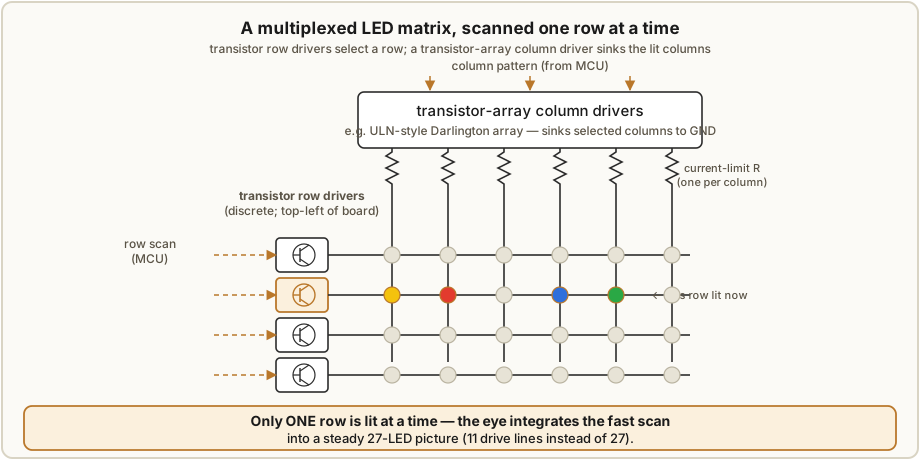
The cure is the matrix. Wire the LEDs into a grid: every LED sits at the intersection of one row line and one column line, with (say) all anodes in a row tied together and all cathodes in a column tied together. To light the LED at row r, column c, you drive row r and enable column c; only that intersection has both ends energised, so only it lights. A 4 × 7 grid (28 nodes) holds all 27 LEDs with eleven drive lines instead of twenty-seven — and you light it not all at once but one row at a time, in turn, cycling fast.
4.2 The multiplexing math — duty, peak vs average, refresh, flicker
Scanning trades pins for time. If the matrix has N rows and you light one row at a time, each row — and therefore each LED in it — is on for only 1/N of the cycle. That fraction is the duty cycle:
duty = (time one LED is on) / (full scan period) = 1 / N (one-row-at-a-time scan)For a 4-row scan, duty = 1/4 = 25 %; for a 9-row scan, duty = 1/9 ≈ 11 %. The eye responds to average brightness, and average is proportional to average current, so a multiplexed LED at duty 1/N looks only 1/N as bright as the same LED run at the same current continuously — unless you push more current while it is on. Because
I_average = I_peak × duty ⇒ I_peak = I_average / duty = N × I_averagean N-row scan needs roughly N times the peak current of static drive to match the same apparent brightness. A 9-row matrix wanting the visual equivalent of 8 mA DC must pulse each LED at about 8 mA × 9 = 72 mA during its 1/9 slice. LEDs tolerate this happily — most 5 mm parts allow tens of mA of pulsed current well above their DC rating, provided the duty is low — but the driver must pass that peak, and that is exactly where the resistor values and the choice of driver chip get interesting (§4.5, §4.6).
The other half of the trade is speed. The whole matrix must be re-scanned — all N rows, once each — fast enough that the on/off flicker fuses into steady light. Human flicker fusion sits around 50–60 Hz for the whole frame in peripheral vision and a little higher for sharp foveal detail; the safe target is a frame rate above ~100 Hz. With N rows in a frame, each row’s slot — the time it gets to be lit before the scan moves on — is
row dwell = 1 / (N × frame_rate)so a 9-row matrix refreshed at 120 Hz gives each row 1 / (9 × 120) ≈ 0.93 ms. The firmware’s
scan loop (Vol 5) must service a row inside that window — load the column pattern, pulse the
row — or the display flickers, smears as you move your eyes past it, or photographs with dark
bands. Faster is better up to the point the MCU runs out of cycles; slower than ~100 Hz frame
rate and the flicker becomes visible, first in peripheral vision and to a phone camera, then to
everyone.
4.3 Architecture A — the discrete-transistor multiplexed matrix (gweeds)
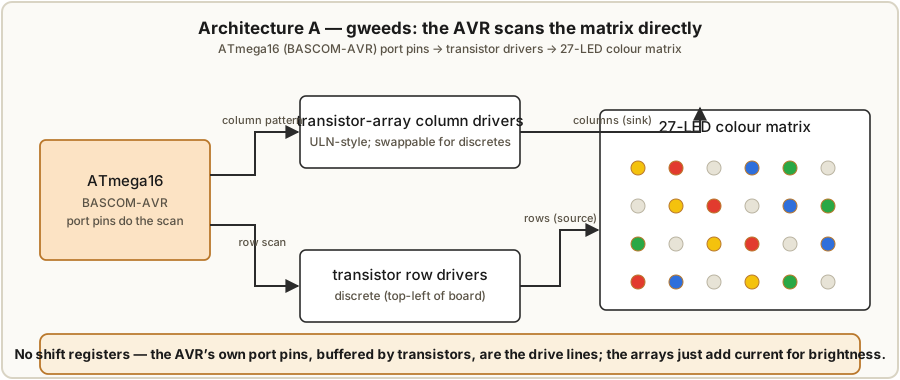
The gweeds DIY TiX Clock (Guido Seevens, Instructables 2011) is an ATmega16 programmed in BASCOM-AVR, scanning the LED matrix with discrete transistors and transistor-array ICs — no shift registers at all. The MCU’s port pins do double duty: some drive the rows through transistor row drivers (described in the source as sitting at the top-left of the board), and others select columns through transistor-array column drivers. The firmware walks the rows; for each active row it presents that row’s column pattern; the transistors do the muscle work the MCU pins cannot.
Why transistors at all? An MCU pin can source or sink only milliamps before its output voltage sags and the LEDs dim. In a multiplexed display the row line carries the summed current of every lit LED in that row at once — up to nine LEDs in a 9-cell field — and the column line carries the peak pulse current of its LED. The source is explicit about the purpose: the transistor-array ICs are there “to get a bit more current to the LEDs to make them brighter.” They are current amplifiers: a small base current from the MCU switches a much larger collector current through the LEDs, so the row can supply nine LEDs’ worth of current and the columns can sink the high multiplex peaks without loading the MCU.
Why an array, and the swap the source allows. A transistor array (a ULN-style package — several Darlington pairs in one DIP, each with its base resistor built in) is just a tidy way to put one transistor per column in a single chip, saving board space and parts over a row of discretes with matching base resistors. The gweeds source notes the arrays “can be replaced with transistors if you like” — because functionally that is all they are, a bank of switching transistors. The trade is convenience versus parts: the array is fewer components and a cleaner single-sided board; discrete transistors are cheaper, let you pick the exact rating, and come from the junk box, at the cost of more soldering and area. Either way the topology is the same — transistor row drivers, transistor (or array) column drivers, scanned by the AVR.
4.4 Architecture B — the 74HC595 shift-register-expanded matrix (uTix)
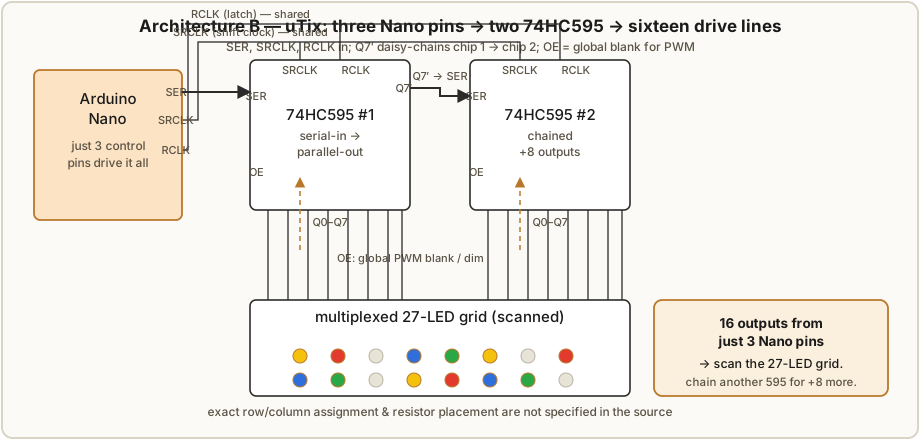
The ujjaldey uTixClock reaches the same multiplexed grid by a different road. Instead of spending many MCU pins on rows and columns, it drives the whole matrix through two 74HC595 shift registers fed by just three Arduino Nano control lines. The author prototyped the idea first on a breadboard — a small 4 × 3 matrix scanned by a single 74HC595 — before committing to the full 27-LED display with a second register chained on.
How a 74HC595 turns three pins into sixteen. The 74HC595 is an 8-bit serial-in, parallel-out shift register with an output latch. You feed it three signals:
- SER (serial data) — one bit at a time, the pattern you want to display;
- SRCLK (shift clock) — each rising edge shifts the SER bit into the register and pushes the others along one place;
- RCLK (latch / register clock) — one rising edge after eight bits copies the shift register into the output latch, so all eight outputs (Q0–Q7) change together.
(Two more pins matter in practice: OE, output-enable, active-low, which blanks all outputs when high — a free global brightness/blank control for PWM dimming — and SRCLR, the asynchronous clear.) The magic for pin-starved designs is daisy-chaining: each chip has a Q7′ “serial-out” pin that is the bit falling off the end of its eight stages. Wire Q7′ of the first chip into SER of the second, share SRCLK and RCLK across both, and you have a single 16-bit shift register: clock in sixteen bits, latch once, and sixteen outputs update together — all still from the same three Nano pins. That is how the uTix gets sixteen drive lines from three pins.
Sixteen outputs, twenty-seven LEDs — so it is still scanned. This is the key inference the source supports but does not spell out: sixteen outputs cannot statically own twenty-seven LEDs (that would need 27 lines). Sixteen lines arranged as a matrix — for example rows × columns whose product covers 27 — light the grid one slice at a time, exactly as in Architecture A. The 595s are simply the drive lines of a multiplexed matrix; the Nano clocks a fresh row-pattern into the registers, latches it, pulses the row, and moves on, hundreds of times a second (§4.2). Same scan, different pin-expander.
Why the 595 forces low resistors and multiplexing. A 74HC595 output is no power driver: the recommended per-output source/sink is about 6 mA, with a ~70 mA total per package ceiling and an absolute-max per pin well under what a bright LED wants in pulsed multiplex. Two consequences follow, and they are visible in the uTix BOM:
- The resistors are low — 33 Ω × 3 (plus one 10 K for the LDR divider, §4.7). A low series resistor is what lets a meaningful peak current flow during each LED’s short on-slice (§4.5); a “normal” 220 Ω would, at 11 % duty, leave the display dim.
- The grid must be multiplexed, not static — because the package simply cannot pass twenty-seven LEDs’ worth of continuous current at once. Scanning spreads the load over time.
There is a real tension here (§4.5): low resistors and a tall scan both raise the peak current, but the 595’s per-pin limit caps what it can deliver — so a 595-driven matrix lives in a narrower brightness envelope than the transistor-buffered gweeds design, and a careful build keeps the scan depth modest, buffers the high-current common lines with transistors, or trims brightness with OE/PWM rather than brute current.
Not documented in the source — flagged. The uTixClock write-up does not fully specify the matrix wiring: which 595 carries rows and which carries columns, exactly where the three 33 Ω resistors sit (on the row commons, the column commons, or per-colour), or the scan depth, duty, and refresh rate the firmware actually uses. The 27-from-16 multiplexing, the low-resistor/low-duty logic, and the 595 current ceilings above are sound general engineering, but the precise pinout is not asserted here — do not treat any specific row/column assignment as the author’s. Vol 5 covers the firmware side; Vol 6 the build.
4.5 Sizing the current-limiting resistor — and why one value cannot fit four colours
Every LED needs a series resistor to set its current; without it the LED is a near-short above its forward voltage and burns out. The value comes from Ohm’s law across the resistor, which sees whatever supply voltage is left after the LED’s forward drop and the driver’s own drop:
R = (V_supply − V_f − V_drive) / I_LEDwhere V_f is the LED forward voltage (Vol 3: red/yellow ≈ 2.0 V, green/blue ≈ 3.0–3.2 V), V_drive is the saturation/output drop of the transistor or 595 in the path (~0.2–0.7 V), and I_LED is the current you want. Take 5 V supply, a ~0.3 V driver drop, and aim for 15 mA static (we will redo it for multiplex below):
- Red / yellow (V_f ≈ 2.0 V):
R = (5 − 2.0 − 0.3) / 0.015 = 2.7 / 0.015 = 180 Ω. - Green / blue (V_f ≈ 3.1 V):
R = (5 − 3.1 − 0.3) / 0.015 = 1.6 / 0.015 ≈ 107 Ω→ 110 Ω.
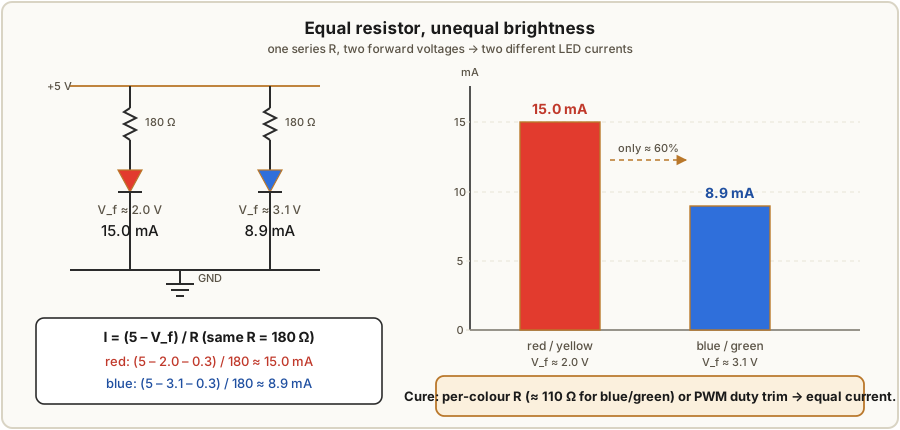
Now the gotcha. Use one resistor value for all four fields — say the red-derived 180 Ω — and the currents come out unequal because the colours have different V_f:
- Red through 180 Ω:
(5 − 2.0 − 0.3) / 180 = 2.7 / 180 = 15.0 mA. - Blue through 180 Ω:
(5 − 3.1 − 0.3) / 180 = 1.6 / 180 = 8.9 mA.
The blue/green fields get barely 60 % of the red field’s current — and since brightness tracks current, the blue and green digits read visibly dimmer than the red and yellow ones. This is a real, classic TIX (and any multi-colour LED panel) gotcha, made worse because the eye is already less sensitive at the blue end. The cures:
- Per-colour resistors — give each field its own value (≈ 180 Ω red/yellow, ≈ 110 Ω blue/green from the numbers above) so all four draw the same current. Cheapest, no firmware.
- PWM trimming — drive all fields at one resistor but give the dimmer colours a longer on-time (higher duty) in the scan, balancing brightness in software (Vol 5). Costs nothing in parts but spends MCU time and shifts the per-colour peak currents.
Multiplex changes the numbers, not the method. In a scanned matrix you size the resistor for the peak current, not the average. To get the visual equivalent of ~8 mA average at a 1/9 duty you need ~72 mA peak (§4.2), so for red:
R = (5 − 2.0 − V_drive) / I_peak = (5 − 2.0 − 0.5) / 0.072 = 2.5 / 0.072 ≈ 35 Ω → 33 Ωwhich lands right on the uTix’s 33 Ω — a low value precisely because it must pass a high multiplex peak at low duty. But note the tension from §4.4: a 72 mA pulse is well above a single 74HC595 output’s safe per-pin current, so a 595-direct build must either run a shallower scan (higher duty, lower peak), accept a dimmer display, or buffer the high-current common line with a transistor. And the peak must still respect the LED’s pulsed maximum (tens of mA at low duty for typical 5 mm parts) — comfortably met here, but worth checking against the LED’s datasheet rather than assumed.
4.6 Discrete transistors vs shift registers — a short comparison
Both architectures reach the same multiplexed grid; they differ in how the drive lines are generated and buffered.
Table 1 — 4.6 Discrete transistors vs shift registers — a short comparison
| Aspect | A — discrete transistors / arrays (gweeds) | B — 74HC595 shift registers (uTix) |
|---|---|---|
| MCU pins used | many (rows + columns straight off ports) | three (SER, SRCLK, RCLK), expandable |
| Parts count | more discretes (or array DIPs) + base resistors | two 595 DIPs + sockets, few resistors |
| Current / brightness headroom | high — transistors buffer big row & peak currents | limited — ~6 mA/pin, ~70 mA/package; may need buffering |
| Board complexity | wider; fine on a single-sided PCB | compact; three signals route anywhere |
| Extensibility | add pins/transistors per new line | chain another 595 (+8 outputs) for zero extra MCU pins |
| Where the brightness comes from | transistor current gain | low resistors + low duty + OE/PWM |
The headline trade: transistors give you current (brightness headroom, the ability to push high multiplex peaks) at the cost of pins and parts; shift registers give you pins (three lines, endlessly chainable) at the cost of current, which you claw back with low resistors, modest scan depth, and PWM. The gweeds AVR build, doing its own scanning with transistor muscle, is the brighter, more pin-hungry design; the uTix Nano build trades a little brightness headroom for three-wire simplicity and easy expansion — a fair picture of the same display solved two ways (Vol 9).
4.7 Brightness control and LDR auto-dimming
Once the matrix scans, global brightness is just duty cycle. Two levers set it:
- PWM on the whole display — blink the entire scan on and off faster than the eye can see (the 74HC595’s OE pin is purpose-built for this: hold it high and every output blanks). At 50 % PWM the panel is half as bright; at 10 % it is a dim night-glow. This rides on top of the row-scan duty and is the cleanest brightness knob.
- Trimming the per-row dwell — lengthening or shortening each row’s on-slice in the scan loop, which also lets you balance the per-colour brightness of §4.5 in software.
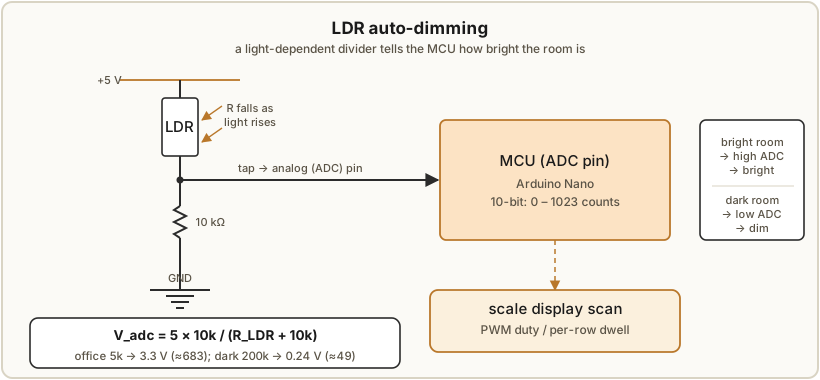
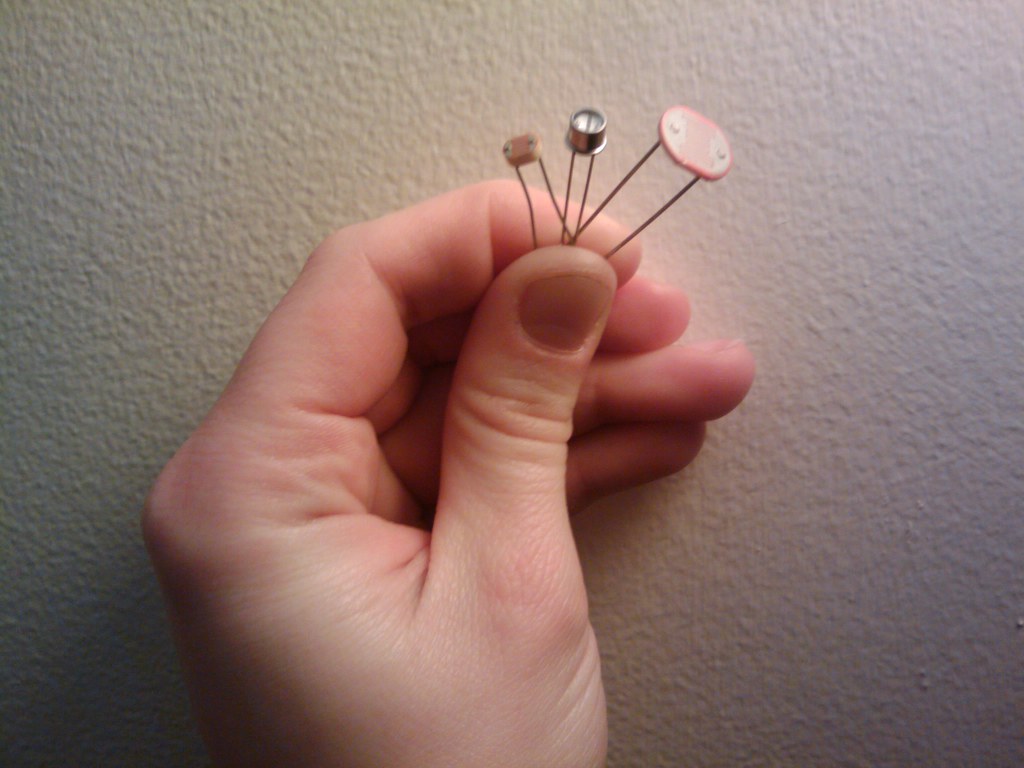
The uTix automates this with an LDR (light-dependent resistor) so the clock dims itself in a dark room and brightens in daylight — no buttons. The LDR sits in a voltage divider with the build’s 10 K resistor, feeding an analog input:
        +5V
         │
        [ LDR ]        (resistance falls as light rises)
         │
         ├────────── to MCU analog pin (ADC)
         │
        [ 10 KΩ ]      (the build's 10K — the divider's fixed leg / pull-down)
         │
        GND

V_adc = 5V × 10K / (R_LDR + 10K)
In bright light the LDR’s resistance is low (a few kΩ), so V_adc rises toward 5 V; in darkness
it climbs into the hundreds of kΩ, so V_adc collapses toward 0 V. The firmware reads the ADC
(0–1023 on the Nano’s 10-bit converter) and maps it to a PWM duty or per-row dwell —
high reading → bright, low reading → dim — so the display tracks the room. Worked feel: with
R_LDR ≈ 5 K in office light, V_adc = 5 × 10 / (5 + 10) = 3.3 V (≈ 683 counts → near full
brightness); with R_LDR ≈ 200 K in the dark, V_adc = 5 × 10 / (200 + 10) = 0.24 V (≈ 49
counts → heavily dimmed). The exact mapping curve lives in the firmware (Vol 5); the 10 K
in the uTix BOM is precisely this divider’s fixed leg (the other three resistors are the 33 Ω
LED limiters of §4.5).
4.8 What the firmware then has to do (hand-off to Vol 5)
Everything above is the hardware of driving the LEDs; it is inert until firmware runs the scan loop on top of it. Every frame the controller must compute the four field counts from the time, let the randomiser pick which cells to light to reach those counts (Vol 5 — the logic unique to TIX), then walk the matrix row by row — for each row presenting its column pattern (port pins in gweeds, or clock-and-latch the two 595s in uTix), pulsing the row, and moving on inside the ~1 ms dwell budget of §4.2 — all while sampling the LDR and folding its reading into the display’s duty. Keep the scan above ~100 Hz with the duty matched to the LDR and the panel is steady, even, and self-dimming; that timing, the randomiser, and the BASCOM-vs-Arduino code are Vol 5. The LEDs and fields this volume lit are Vol 3.
4.9 References (Vol 4)
The two collected builds and their drive architectures:
- DIY TiX Clock by gweeds (Guido Seevens), Instructables, 2011 — ATmega16 in BASCOM-AVR scanning a multiplexed LED matrix with discrete transistor row drivers (top-left of the board) and transistor-array column drivers added “to get a bit more current to the LEDs to make them brighter,” the arrays explicitly noted as replaceable with discrete transistors; single-sided Eagle PCB. Source: http://www.instructables.com/id/DIY-TiX-Clock/.1
- uTixClock by ujjaldey, Instructables — Arduino Nano driving 27 LEDs through two 74HC595 shift registers (three control lines → sixteen outputs, daisy-chained Q7′ → SER), with 33 Ω × 3 LED limiters and a 10 K LDR-divider resistor, LDR auto-dim, USB 5 V; matrix prototyped first as a 4 × 3 grid on one 74HC595. The exact row/column wiring, resistor placement, and scan duty are not specified in the source and are not asserted here. Source: https://www.instructables.com/id/UTixClock/.2
Footnotes
-
gweeds (Guido Seevens), DIY TiX Clock, Instructables, 2011 — http://www.instructables.com/id/DIY-TiX-Clock/. Quoted phrases on the transistor arrays (“to get a bit more current… brighter”; “can be replaced with transistors if you like”) and the top-left placement of the row-driver transistors are from this source. Transistor-array part numbers (e.g. ULN2803) are named here as the standard class of Darlington-array driver, not as an exact BOM claim. ↩
-
ujjaldey, uTixClock, Instructables — https://www.instructables.com/id/UTixClock/. The two 74HC595s, three Nano control lines, 33 Ω × 3 and 10 K resistors, LDR auto-dim, USB power, and the single-595 4 × 3 breadboard prototype are from this source. 74HC595 electrical limits (~6 mA/output, ~70 mA/package), the SER/SRCLK/RCLK/OE/SRCLR pin functions, Q7′ daisy-chaining, the multiplexing/duty/refresh arithmetic, the resistor-sizing formula, and the worked currents are standard engineering applied to the build, not source claims; the precise uTix matrix pinout, duty, and refresh rate are not documented in the source. ↩
Comments (0)