TIX · Volume 1
Overview & Decision Tree
What a TIX clock is, how you read it, and which build path fits your bench
A TIX clock tells the time without showing a single numeral. Its face is a panel of small, coloured LED fields, and at any moment some of the LEDs in each field are lit and the rest are dark — in a pattern that looks random and, every minute, rearranges itself into a new random pattern. The trick is that you do not read the positions of the lit LEDs; you count them. Each field stands for one digit of the time, and the number of lit LEDs in that field is that digit. Count the lit cells in the four fields, left to right, and you have read the hour and the minute. A TIX clock is, in effect, a clock you decode — an everyday object that asks you to do one second of arithmetic, and rewards you with an abstract, ever-shifting light pattern that no two minutes ever repeat.
The name is a small joke on its opposite. A NIXie clock spells the time out in glowing numerals; a TIX clock hides it inside a count. There is nothing exotic in the hardware — no high voltage, no vacuum tube, no vector deflection — just plain 5 V LEDs, a handful of driver chips, and a microcontroller keeping time. The whole interest of the technology is in the encoding (how a digit becomes a count of lit cells, and how the firmware re-rolls a fresh random arrangement each minute) and in the small craft of diffusing a grid of bare LEDs into clean, evenly-glowing squares behind a smoked window. It is the gentlest build in this hub: a beginner-friendly soldering project that runs from a USB cable and cannot hurt you, yet still produces an object that visitors pick up and puzzle over.
Note — this is the TIX technology overview. Specific TIX clocks Jeff owns or builds — their design, construction, and operation — are documented as their own deep dives in this technology’s
clocks/folder, one folder per clock, each avol*.mdseries with a Design → Building → Running spine. This volume series covers the technology in general; the per-clock dives go deep on individual units.
This ten-volume reference covers the TIX clock at depth: the count-the-cells encoding and how to read it fluently; the LED display and how to diffuse it; the two ways to drive the LEDs (transistor multiplexing versus static shift-register drive); the timebase, the randomisation algorithm, and the firmware; two complete worked builds held in this hub; the buy-a-kit and finished-clock options; the enclosure and the all-important diffuser stack; and a laminate-ready cheatsheet. It is written for a maker with a soldering iron and a little microcontroller experience; the electronics are friendly and the whole clock lives at a safe 5 V.
1.1 What a TIX clock actually is
Strip away the shifting lights and a TIX clock is the same four subsystems every clock in this hub has — only the display is a grid of LEDs read by counting, and the logic carries one extra job no other clock here needs: a random-pattern generator.
- The LED fields (the display). The face is divided into four fields, one per digit
of a 24-hour
HH:MMtime. Each field is a small cluster of LEDs of a single colour, and the fields are sized to hold the largest digit they must ever show: the conventional TIX layout is 3 / 9 / 6 / 9 cells. The collected builds use yellow for the tens-of-hours field (it only ever shows 0, 1 or 2, so three cells suffice), red for the units-of-hours (0–9, nine cells), blue for the tens-of-minutes (0–5, six cells), and green for the units-of-minutes (0–9, nine cells). Colour is what keeps the four counts from blurring into one another (Vol 3). - The LED drivers. Something must turn each field’s target count into the right LEDs actually lit. Two architectures appear in the wild and both are in this hub: a multiplexed matrix scanned by discrete transistor row/column drivers (the gweeds DIY TiX), or the same kind of matrix scanned through a daisy-chain of 74HC595 shift registers that expand the microcontroller’s pins (the ujjaldey uTixClock — two 595s drive 27 LEDs from three Nano pins). Vol 4 builds up both, with the current-limiting and the optional LDR auto-dimming.
- A timebase, plus the randomiser. A microcontroller keeps the time and, every minute, recomputes the four digit counts and then randomly chooses which cells in each field to light to reach that count. The timebase is either the MCU’s own crystal (the gweeds AVR build) or a dedicated DS1302 real-time-clock chip with a backup cell so the time survives a power-off (the ujjaldey build). The randomiser — the one piece of logic unique to this technology — is Vol 5.
- The structure that ties them together. A 5 V supply (almost always USB), a few time-set buttons or an RTC, an optional light-dependent resistor for ambient dimming, and — most important to how the finished clock looks — the diffuser stack and enclosure that turn bare LEDs into soft, square cells behind a dark window (Vol 8).
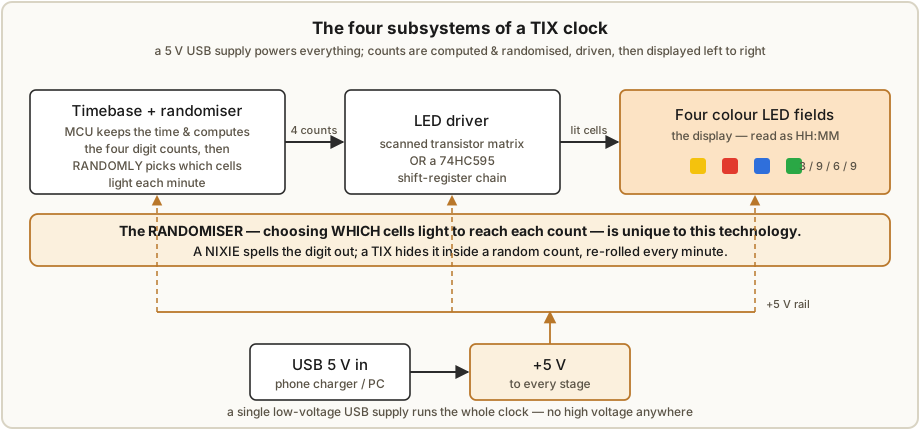
What makes a TIX clock a project rather than a novelty purchase is not difficulty in any one subsystem — none is hard — but the finish: a grid of raw 5 mm LEDs looks like a science fair until you build the diffuser sandwich that turns each LED into a clean, evenly-lit square with no hot-spot and no bleed into its neighbour. The electronics are a weekend; the diffusion and the enclosure are where the hours go, and they are the difference between a breadboard and a thing on the shelf people ask about.
1.2 How you read it — in one figure
The reading rule is the whole idea, so here it is once, up front (Vol 2 is the full treatment). The four fields, left to right, are tens-of-hours, units-of-hours, tens-of-minutes, units-of-minutes. Count the lit cells in each; write the four digits side by side; that is the 24-hour time.
Table 1 — 1.2 How you read it — in one figure
| Field (colour) | Cells | Shows the digit | Range |
|---|---|---|---|
| 1 — yellow | 3 | tens of hours | 0–2 |
| 2 — red | 9 | units of hours | 0–9 |
| 3 — blue | 6 | tens of minutes | 0–5 |
| 4 — green | 9 | units of minutes | 0–9 |
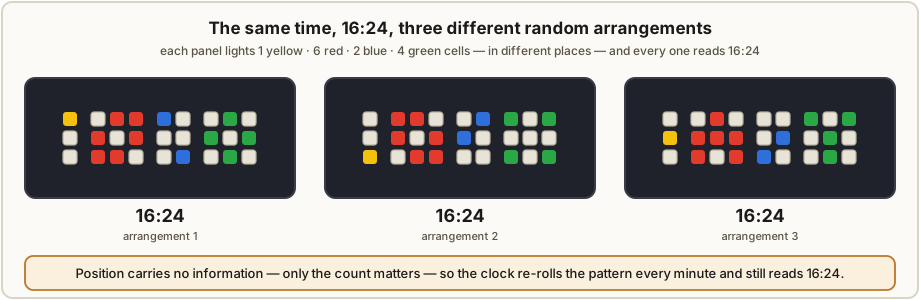
So 1 yellow, 6 red, 2 blue, 4 green lit cells reads 1 6 : 2 4 → 16:24. The lit cells can be anywhere in their field and the answer is the same — only the count matters, which is why the clock can scramble the arrangement every minute without ever changing what it says.
1.3 A one-paragraph history
The TIX clock is a modern invention — it has no vacuum-tube ancestry. The commercial “Tix” clock appeared in the early 2000s as a desk novelty, and the count-the-cells idea spread through the maker community as something fun to clone: the encoding is clever, the parts are a few dollars, and the result is unmistakably your own. The two builds collected in this hub are both community clones — Guido Seevens (“gweeds”), who also sold finished TIX clocks commercially, published an AVR-based DIY TiX on Instructables in 2011, and ujjaldey published an Arduino-based uTixClock clone (after seeing a TIX clock featured on the SmarterEveryDay YouTube channel) that leans on Seevens’s design.1 Unlike the nixie or the oscilloscope clock — obsolete technologies lovingly revived — the TIX clock was born a hobbyist curiosity and has stayed one. There is no industry to mourn here, only a neat idea that makers keep rebuilding.
1.4 The ways to get a TIX clock
The spectrum runs from buying a finished novelty to designing your own driver and randomiser, and because the parts are so cheap the centre of gravity is firmly build it yourself. This hub recognises four first-class paths, and the series is organised so that whichever you choose, a volume goes deep on it.
Table 2 — 1.4 The ways to get a TIX clock
| # | Path | Effort | Cost | Covered in |
|---|---|---|---|---|
| 1 | Buy a finished TIX / “binary-style” clock (desk novelty) | none | $$ | Vol 7 |
| 2 | Buy/clone a documented design and solder it (Seevens DIY TiX, or the uTixClock) | medium | $ | Vols 6, 7 |
| 3 | Build a collected design end to end — gweeds DIY TiX or ujjaldey uTixClock | high | $ | Vol 6 |
| 4 | Design from scratch — your own field layout, driver, and randomiser firmware | high | $ | Vols 3–5 |
Paths 3 and 4 are the worked examples throughout the engineering volumes. This hub holds two complete, contrasting builds — a transistor-multiplexed AVR clock with a milled-wood case (Seevens) and a shift-register Arduino clock with a 3D-printed case and an RTC (ujjaldey) — and the series deliberately threads both so you can see each design decision made two ways (Vol 9).
1.5 Decision tree — which path is right for this build
Work top-down; stop at the first “yes.”
- Do you just want a finished count-the-lights clock on the shelf, no soldering? → Path 1. Vol 7 covers the genre and what to look for (and why genuine “TIX”-branded units come and go).
- Do you want to solder a known-good design with files in hand? → Path 3, a collected build. Choose by what’s on your bench: no 3D printer and you like wood → the gweeds DIY TiX (AVR, Eagle PCB, milled case). A 3D printer and you prefer Arduino → the ujjaldey uTixClock (Nano, shift registers, printed case, RTC). Vol 6 walks both.
- Do you want the time to survive a power cut? → pick (or add) an RTC, as the uTixClock does with its DS1302; the bare-AVR gweeds build keeps time only while powered (Vol 5).
- Do you want to design your own — a different field layout, a 12-hour face, a different randomiser, WS2812 “smart” LEDs instead of a driven matrix? → Path 4. Vols 3–5 are the display, driver, and firmware engineering you will live in.
Whatever the path, Vol 8’s diffuser stack is what makes or breaks the look — the electronics will work the first time, but a TIX clock with undiffused LEDs looks unfinished no matter how clever the firmware.
1.6 The display — a first orientation
You cannot choose a build without choosing how the LEDs are arranged and lit, so here is the orientation the rest of the series builds on (Vol 3 is the full treatment).
- Four fields, sized to their largest digit. The classic layout is 3 / 9 / 6 / 9 cells for tens-hours / units-hours / tens-minutes / units-minutes. Twenty-seven LEDs total in the collected builds. (A 12-hour variant needs only 1 / 9 / 6 / 9, since the tens-of-hours is only ever 0 or 1.)
- Colour separates the fields. With four counts to read at a glance, the fields are given distinct colours — yellow / red / blue / green in both collected builds — so the eye groups them without lines or gaps doing the work.
- The cells are square, not round. The signature TIX look is a grid of evenly-lit squares, which is a diffuser effect, not an LED shape: bare 5 mm round LEDs sit behind a square-celled reflector grid (or a 3D-printed cell wall), a paper diffuser, and a dark window, so each LED fills its square (Vol 8). Get the diffuser right and round LEDs read as crisp squares; get it wrong and you see nine bright dots.
1.7 TIX vs the other count/encode clocks (the one clarification)
There is one boundary worth stating up front, because TIX is easily lumped in with the binary clock, and they are not the same. A binary clock encodes each digit in base 2 and you read it by the positions of the lit LEDs (weights 8-4-2-1). A TIX clock encodes each digit as a plain count — base 1, if you like — and you read it by how many LEDs are lit, never by which. That difference is the whole personality of the clock: because position is meaningless, the TIX firmware is free to scatter the lit cells at random and re-roll them every minute, which a binary clock can never do (move a binary LED and you’ve changed the number). When a clock asks you to count lit cells, it is a TIX clock and belongs here; when it asks you to weight their positions, it is a binary clock. The Numitron, nixie, and scope clocks all show actual numerals and are a different family again.
1.8 What the owner already has collected
Two complete, contrasting published builds anchor the series:
- “DIY TiX Clock” by gweeds (Guido Seevens), Instructables, 2011. An AVR
microcontroller (an ATmega-class part, programmed in BASCOM-AVR BASIC) scanning a
multiplexed LED matrix: transistor row drivers and transistor-array column
drivers push enough current to keep the LEDs bright while the matrix is scanned. Built first
on Veroboard, then as a single-sided Eagle PCB that combines controller and display on
one board. The display is the classic sandwich — an office-light square reflector grid, a
draughtsman’s tracing-paper diffuser, and a smoked-perspex window — in a milled
Rimu (New Zealand timber) case with lathe-turned buttons. Source code, schematic and PCB
ship as
tixclock.zip. This is one of the two worked builds of Vol 6, walked through in Vol 9. - “uTixClock” by ujjaldey, Instructables. An Arduino Nano with a DS1302 RTC module (battery-backed, so the time survives power-off), driving 27 LEDs (yellow ×3, red ×9, blue ×6, green ×9) through two 74HC595 shift registers that expand the Nano’s pins to scan the LED grid (the registers replace the gweeds build’s discrete transistor driver arrays; the exact matrix wiring is not fully detailed in the source — Vol 4). An LDR auto-dims the display to ambient light; the clock runs from USB and shows 24-hour time. Built on dotted/striped Veroboard; firmware in C++ (PlatformIO / Arduino, using an RtcDS1302 library); enclosure 3D-printed in PLA+ (designed in Fusion 360), held together with neodymium magnets, with a transparent-paper diffuser and a black acrylic window. This is the second worked build of Vol 6, walked through in Vol 9.
Note on a misfiled reference: a third PDF in this subproject’s inputs,
Lantern-Clock.pdf, is not a TIX clock — it is a steampunk nixie “lantern” clock (a petes_kits nixie board and IN-style tubes in brass-and-walnut lantern fixtures, running from 9 VAC). It is excluded from this deep dive and should be relocated to the Steampunk (or Nixie) subproject. The collected TIX material is the two builds above.
1.9 How this series is organised
The series moves from principle to practice to project to polish:
- Principle (Vols 2–5) — how you read the count encoding, the LED display and its diffusion, the two ways to drive the LEDs, and the timebase + randomiser + firmware. Read these to understand any TIX clock.
- Project (Vols 6, 9) — the two worked builds start to finish, and a full walk-through of both collected designs side by side.
- Buy & polish (Vols 7, 8, 10) — the buy-a-finished-clock options; the diffuser stack and enclosure; and the laminate-ready cheatsheet and glossary.
1.9.1 Volume-by-volume index
Table 3 — 1.9.1 Volume-by-volume index
| Vol | Title | Read it for |
|---|---|---|
| 1 | Overview & Decision Tree | (this volume) — the map, the reading rule, the path choice |
| 2 | Reading a TIX Clock — the Encoding | count-not-position, the four fields, field sizing, 24 h vs 12 h, worked examples, why it can randomise |
| 3 | The LED Display | LEDs, fields, the 3/9/6/9 grid, colour choice, square cells, viewing angle, how many LEDs |
| 4 | Driving the LEDs | multiplexed transistor matrix vs static 74HC595 drive; current-limiting; brightness; LDR auto-dim |
| 5 | Timebase, Randomisation & Firmware | MCU crystal vs DS1302 RTC; the random-pattern algorithm; BASCOM vs Arduino/C++; midnight & set logic |
| 6 | Build It Yourself | both collected builds: schematic → BOM → Veroboard/PCB → flashing → first light |
| 7 | Buy a Kit or Finished Clock | the TIX genre, finished-clock and kit options, sourcing, price, skill/time, trade-offs |
| 8 | Enclosure, Diffusion & Finishing | the diffuser sandwich, square-cell grids, wood vs 3D-printed cases, windows; the Steampunk cross-link |
| 9 | The Collected Projects | a full walk-through of gweeds DIY TiX and ujjaldey uTixClock, decision by decision |
| 10 | Cheatsheet & Glossary | the reading table, field-size reference, BOM quick-ref, pinouts, source URLs, A–Z terms |
1.10 What this series is — and is not
It is a build-and-understand reference for clocks that show the time as a count of lit LED cells in colour-coded fields, grounded in two complete published builds held in this hub and in the small body of logic — the field encoding and the per-minute randomiser — that makes the technology distinctive.
It is not a binary-clock guide (§1.7 — that reads LED positions, not counts), nor a numeral-display reference (the nixie, Numitron, and scope deep dives cover those), nor the steampunk nixie “lantern” clock that is misfiled in this subproject’s inputs (§1.8). Where the enclosure or aesthetic overlaps another hub deep dive — most of all Steampunk — this series cross-links to it.
1.11 Safety, stated once up front
This is the safest build in the hub, and it is worth saying plainly: a TIX clock runs from a
5 V USB supply, every LED sits behind a current-limiting resistor, and there is no high
voltage anywhere — nothing here can shock you, unlike the nixie (~170 V) or scope/CRT (kV)
clocks elsewhere in this hub. The only real cautions are the ordinary ones of any small
electronics project: don’t exceed an LED’s current (size the series resistors — Vol 4); handle
the CMOS driver chips (74HC595) with a little ESD care; and use the usual sense around a
soldering iron and around the enclosure work (a wood mill and lathe in the gweeds build, a
3D printer and acrylic in the ujjaldey build). There are no high-voltage warnings in this deep
dive because there is no high voltage. (The one exception you might add — a steampunk shell
wrapping a nixie display instead of LEDs — would inherit the nixie hub’s HV rules; see
../../_shared/safety.md.)
1.12 Photo policy
Photographs in this series are credited in every caption, from three sources: any of the owner’s own build photos; license-clean images from Wikimedia Commons / Openverse fetched through the project’s Photo Helper (with the full attribution line reproduced verbatim); and, for diagrams, hand-authored SVG in the paper-background house style. Figures that have not yet been sourced are simply absent. No images are scraped from arbitrary copyrighted web pages; the two collected builds’ own photographs belong to their Instructables authors and are referenced, not reproduced.
1.13 References (Vol 1)
- DIY TiX Clock by gweeds (Guido Seevens), Instructables, 2011 — AVR (ATmega-class) in BASCOM-AVR, transistor-multiplexed LED matrix, single-sided Eagle PCB combining controller + display, reflector-grid/tracing-paper/smoked-perspex diffuser sandwich, milled Rimu case. Source/schematic/PCB in
tixclock.zip. Held in02-inputs/DIY-TiX-Clock.pdf. Source: http://www.instructables.com/id/DIY-TiX-Clock/. - uTixClock by ujjaldey, Instructables — Arduino Nano + DS1302 RTC + two 74HC595 shift registers, 27 LEDs (Y3/R9/B6/G9), LDR auto-dim, USB power, 24-hour, 3D-printed PLA+ enclosure with magnets + black-acrylic window. Held in
02-inputs/UTixClock.pdf. Source: https://www.instructables.com/id/UTixClock/. _shared/comparison.md(cross-technology decision matrix) and_shared/deep_dive_protocol.md.
Footnotes
-
The two collected builds: DIY TiX Clock by gweeds (Guido Seevens), Instructables, 2011 — http://www.instructables.com/id/DIY-TiX-Clock/ — whose PCB silkscreen reads “Designed by Guido Seevens 2008” and whose author also sold finished TIX clocks; and uTixClock by ujjaldey — https://www.instructables.com/id/UTixClock/ (author site https://ujjaldey.in/) — which credits Guido Seevens’s design and was prompted by a TIX clock shown on the SmarterEveryDay YouTube channel. Precise dates and the commercial “Tix” brand history beyond these sources are not asserted here; treat §1.3 as orientation, not citation. ↩
Comments (0)