Numitron · Volume 8
The Collected Project
A guided tour of Bill van Dijk's six-digit IV-9 Numitron clock — provenance, what's on disk, the two-button UI, the eight LED patterns, and the firmware behind them
Every other volume in this series treats the Numitron clock as a category — the physics of the tube (Vol 2), how you drive one without multiplexing it into a dim smear (Vol 3), how a PIC keeps the seconds and animates a ring of LEDs (Vol 4), how you solder it all together (Vol 5). This volume is different. It is a walk-through of one real, fully documented clock — the single project collected in this hub, with every design file, both manuals, the build article, the schematic, and the firmware sitting on disk. If Vol 5 is the how-to-build and Vols 3–4 are the how-it-works, Vol 8 is the what-it-is: the features, the user experience, the LED choreography, and the firmware behavior of the finished article, as its designer documented it.
This is, deliberately, not a re-derivation of the engineering. Where the driver architecture or the timebase matters to the story this volume names it and points back to the volume that goes deep — it does not repeat the CD4511 truth table or the crystal-loading math. Read this one to know the clock: to pick it up, set it to the second, choose a pattern, and understand what the box is doing while it glows.
8.1 Provenance — one designer, one article, one firmware revision
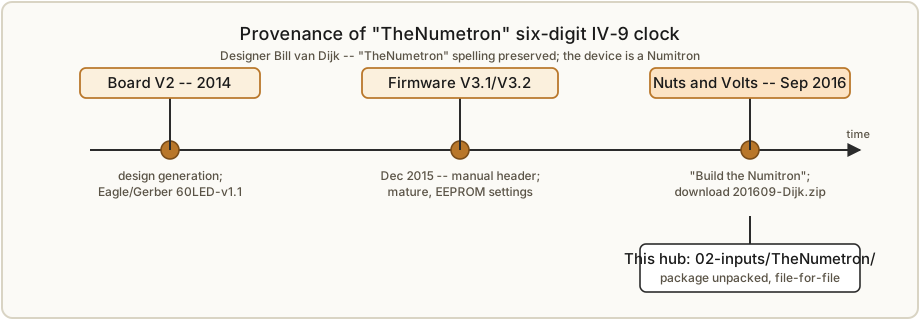
The collected project is “TheNumetron” — the author’s own spelling, preserved as the
folder name in this hub — a 60-LED six-digit Numitron clock designed by Bill van
Dijk. It was published in Nuts & Volts, September 2016, under the title “Build
the Numitron — A Six-Digit Clock.”1 The article is the public face of the project;
the downloadable package that accompanies it (the Nuts & Volts download 201609-Dijk.zip)
is the complete design, and it is that package, unpacked, that this hub holds.
A note on the name. The device is a Numitron — the RCA-coined name for an
incandescent seven-segment indicator tube (the history is Vol 2). The designer titled his
project “TheNumetron,” with an e, and that spelling survives in this hub’s folder name
(02-inputs/TheNumetron/) so the collected material matches the author’s originals. The
correct device name, and the name of this whole subproject, is Numitron. Wherever this
series says “the Numetron clock” it means Bill van Dijk’s specific build; wherever it says
“a Numitron” it means the tube.
The collected documents carry their own internal dating, and it is worth pinning down because the clock exists in revisions:
- Firmware version V3.1, dated December 2015 — the version string in the user manual’s header.2
- Board version V2, dated 2014 — also from the manual header. (The Eagle and
Gerber files in the hub are labelled
60LED-v1.1, a board-file revision; the “V2” in the manual is the design generation.) - The production firmware image on disk is named
NumitronV3.X.production.hex— the ready-to-flash build of the V3-series assembly source.
So the clock you would build from this hub is a 2014/2015-vintage design, published and finalized in 2016, with mature firmware that had already been through at least three major revisions by the time it was documented. The designer invites contact directly: the user manual closes with [email protected] for questions or suggestions.2
8.2 What’s in the hub — the package, file by file
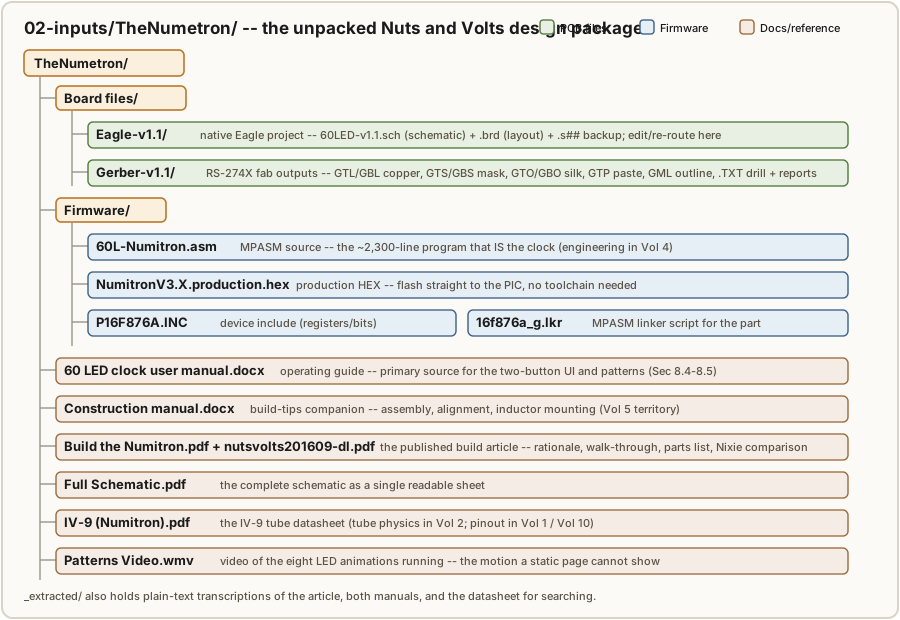
The value of this project is that it is complete: not a teaser with “files available on
request,” but the whole design, enough to fabricate a board, populate it, flash it, and
read both manuals. Here is what is actually on disk in 02-inputs/TheNumetron/, grouped
the way the Nuts & Volts “What’s in the zip?” list groups it.1
PCB files — the board design in two formats, under Board files/:
Eagle-v1.1/— the native CadSoft/Autodesk Eagle project: the schematic (60LED-v1.1.sch), the board layout (60LED-v1.1.brd), and an Eagle backup (60LED-v1.1.s##). Open these to edit the design or re-route the board.Gerber-v1.1/— the Gerber RS-274X fabrication outputs for board houses that do not accept native Eagle: the copper layers (.GTLtop,.GBLbottom), soldermask (.GTS/.GBS), silkscreen (.GTO/.GBO), solder-paste top (.GTP), mill/outline (.GML), plus the Excellon drill file (.TXT) and the fab/drill report files (.dri,.gpi). This is the set you upload to a fab unchanged.
Firmware — under Firmware/, the complete PIC toolchain inputs and output:
60L-Numitron.asm— the MPASM assembly source, the ~2,300-line program that is the clock (Section 8.6, and the engineering in Vol 4).NumitronV3.X.production.hex— the production HEX, ready to flash straight to the PIC with no toolchain if you do not want to assemble the source yourself.P16F876A.INC— the Microchip device include file (register and bit definitions for the PIC16F876A) the source assembles against.16f876a_g.lkr— the MPASM linker script for the part.
Documentation and reference — at the top level of the folder:
60 LED clock user manual.docx— the user manual (the operating guide; the primary source for Sections 8.4–8.5 of this volume).Construction manual.docx— the construction manual, the build-tips companion to the article (assembly, alignment, the inductor mounting tip; this is Vol 5’s territory).Build the Numitron — A Six-Digit Clock.pdfandnutsvolts201609-dl.pdf— the published build article (design rationale, the subsystem walk-through, the parts list, the “Numitron vs. Nixie” close).Full Schematic.pdf— the complete schematic as a single readable sheet.IV-9 (Numitron).pdf— the IV-9 tube datasheet (the tube physics is Vol 2; the pinout is reproduced in Vol 1 and the Vol 10 cheatsheet).Patterns Video.wmv— a video of the clock’s LED patterns running, which is the one thing a static document cannot convey: the motion of the eight animations.
A convenience folder _extracted/ holds plain-text transcriptions of the article, both
manuals, the schematic notes, and the IV-9 datasheet, so the prose is searchable without
opening Word or a PDF reader. The bulky binaries (the .docx, the PDFs, the .wmv, the
fab archives) live on disk untracked, per this hub’s git policy.
8.3 The concept — a deliberate hybrid
Bill van Dijk is explicit about what he was trying to make, and it is not merely “a clock that uses old tubes.” His stated goal was to showcase the Numitron — a beautiful, rapidly-vanishing cold-war component still available cheaply as Russian surplus — and to do it by deliberately marrying it to modern technology: “a hybrid as it were.”1 The result is a clock that puts roughly forty-five years of electronics history on one six-inch board at the same time:
- The old: six IV-9 Numitron tubes, 1970s Soviet manufacture, each a vacuum envelope of seven tungsten filaments — “WW2 era technology … a slow technology that does not allow multiplexing,” as the manual’s Geek Info section puts it.2
- The new: a Microchip PIC microcontroller, a swarm of surface-mount support chips, and a ring of 60 ultra-bright LEDs that the PIC animates by high-speed multiplexing — the very technique the tubes refuse.
The six tubes read HH:MM:SS — hours, minutes, and seconds, a six-digit display rather than the more common four. The LED ring around them is the showpiece: sixty points of light that the firmware drives in eight selectable patterns, most of them keyed to the passing minute, so the circle is in constant motion while the digits glow steady. The designer’s own word for the result is “psychedelic,” and his pitch is unabashedly aesthetic — it is “a great conversation piece,” a clock “while surrounded by high tech LEDs.”12 That the two display technologies on the board demand opposite drive strategies — the LEDs heavily multiplexed, the tubes never multiplexed — is not an accident of the design; it is the point of it, and it is what makes the build instructive (Vol 1’s “one gotcha,” explored in Vol 3).
8.4 The user experience — two buttons, many functions
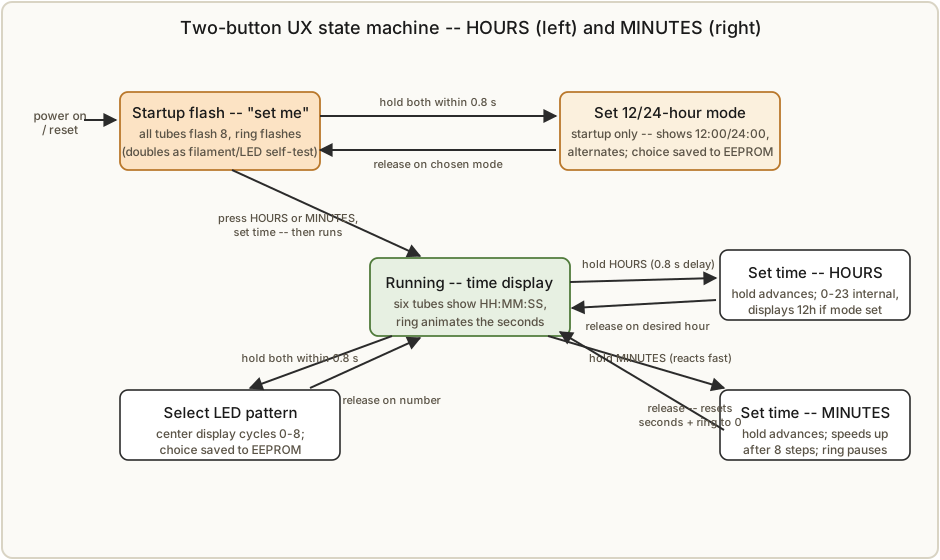
The entire clock is operated from two buttons on the top (plus an optional reset), and the designer’s user manual is mostly an account of how two buttons cover 12/24-hour mode, pattern selection, and setting the time. The ergonomics are worth getting right because the multiplexing of functions onto two buttons relies on timing — short presses, long holds, and a critical 0.8-second window.
Orientation. Facing the front of the clock (so you can read the display), reach over the top for the buttons. The HOURS button is on the left; the MINUTES button is on the right — “makes sense, right?” as the manual notes. There may also be a reset button; the designer points out the reset is electrically optional, since unplugging and replugging the power does the same thing and avoids accidental resets in normal use (an engineering note expanded in Vol 5).12
Startup — the “set me” signal that doubles as a self-test. When the clock is first powered on (or after a reset), the circle of 60 LEDs flashes and the center digits flash a series of 8s. This is the clock telling you it needs to be set — an unset clock flashes rather than displays a time. It is also, cleverly, a complete display test: flashing all six tubes as figure-eights lights every one of the seven filaments in every tube, and flashing the ring lights every LED, so a single glance at the startup flash confirms that nothing is burned out. (The “8” test exploits the CD4511’s lamp-test input — Vol 3.) Pressing either the HOURS or MINUTES button stops the flashing and begins setting.2
8.4.1 Setting 12- or 24-hour mode (startup only)
The 12/24-hour choice can be changed only at startup or just after a reset, while the display is flashing — not while the clock is running. To change it on a running clock, briefly unplug the power (or press reset) to force the flashing state first.2
The gesture is a two-button hold with a timing window:
- Press and hold HOURS.
- Within 0.8 seconds, also press and hold MINUTES.
- The clock is now in mode-set: it shows the current mode — 12:00 or 24:00 — on the center display.
- If you do not want to change it, release both buttons now.
- Otherwise keep holding. After a two-second delay the clock swaps the mode and shows the new one for about a second, then swaps again, alternating.
- Release both buttons while the mode you want is displayed to lock it in.
The chosen mode is saved in the PIC’s internal EEPROM, so it survives a power failure or an extended unplugging — “not lost even when power has been off for an extended period of time.”2
8.4.2 Setting the time — and setting it to the second
Setting the time uses the same two buttons individually:
- Hold HOURS to advance the hours. Note the deliberate 0.8-second delay before the hours start incrementing — that window exists because the same initial gesture (HOURS-then-MINUTES within 0.8 s) is how you enter pattern/mode selection, so the firmware waits to see whether a second button is coming. The hour count runs the full 0–23 internally but displays correctly for 12-hour mode if that mode is set. Release on the desired hour.2
- Hold MINUTES to advance the minutes. The MINUTES button reacts quickly (no 0.8 s delay) and, while held, the LED-circle animation pauses. The update rate speeds up after eight steps; releasing and re-pressing restores the slow rate for another eight — so you can creep to the exact minute, then dash across a big gap, then creep again.2
The clever part is set-to-the-second synchronization. When you release the MINUTES button, the firmware resets the seconds count and the LED ring to zero. That makes it possible to sync the clock to a reference to the exact second. The manual’s tip: watch a reference clock; release the MINUTES button before the target minute arrives; then, the instant your reference rolls over to the new minute, give MINUTES a short quick push — the minute increments by one and the seconds reset to zero simultaneously, leaving the clock running in lockstep with the reference. With a properly matched 32 kHz timebase crystal (the accuracy story is Vol 4), a clock set this way drifts only about a second a day.2
8.5 The eight LED patterns
Once the clock is running, the LED ring is user-programmable: hold HOURS then MINUTES (within 0.8 s) and keep holding, and the clock enters pattern-select, cycling the center display through the pattern numbers 0 to 8. Release on the number you want; the clock briefly confirms it and returns to telling time. The chosen pattern is saved in EEPROM. Changing the pattern does not disturb the time if done correctly, though for some patterns the ring may take up to a full minute to “catch up” to the current second.2
The nine settings (one auto-cycle plus eight named animations) are:
Table 1 — The nine settings (one auto-cycle plus eight named animations) are
| # | Pattern | Behavior |
|---|---|---|
| 0 | Cycle (default) | Randomly selects one of patterns 1–7, changing every hour |
| 1 | Running LED, clockwise, filling | A single LED runs CW; the ring fills as the minute progresses |
| 2 | Running LED, counter-clockwise, filling | As pattern 1, but CCW |
| 3 | Single running LED, clockwise | One LED runs CW around the circle (no fill) |
| 4 | Running LED, counter-clockwise, filling | A CCW running LED, filling as the minute progresses |
| 5 | Pattern 4 reversed | As pattern 4, but reversed |
| 6 | Pendulum | A swinging back-and-forth motion |
| 7 | Newton | A “Newton’s cradle” style animation |
| 8 | Rain | A falling-drops effect |
The “filling” patterns (1, 2, 4, 5) are the ones that make the ring a second progress
bar: a dot flies around the circle, and each completed lap leaves the circle a little
more filled, so at the 60-second mark the whole ring is lit and resets at the new minute.
That behavior is exactly why releasing the MINUTES button resets the ring along with the
seconds (Section 8.4.2) — the ring is the seconds display in animated form. Pattern 0,
the factory default, keeps things fresh by re-rolling a random pattern (1–7) every hour.
The three “named” animations — Pendulum, Newton, Rain — are pure showpieces, and they are
the ones the bundled Patterns Video.wmv exists to show, since their charm is entirely in
the motion.2
8.6 Firmware behavior, from the outside in
The full firmware engineering — the timer/interrupt architecture, the EEPROM map, the
LED-ring multiplex math, the crystal timebase — is Vol 4’s subject, and the assembly
source (60L-Numitron.asm) is on disk for anyone who wants to read every line. This
section stays at the level of observable behavior: what the roughly 2,300 lines of
MPASM2 are actually doing while the clock runs, so the user-facing behavior above
makes sense.
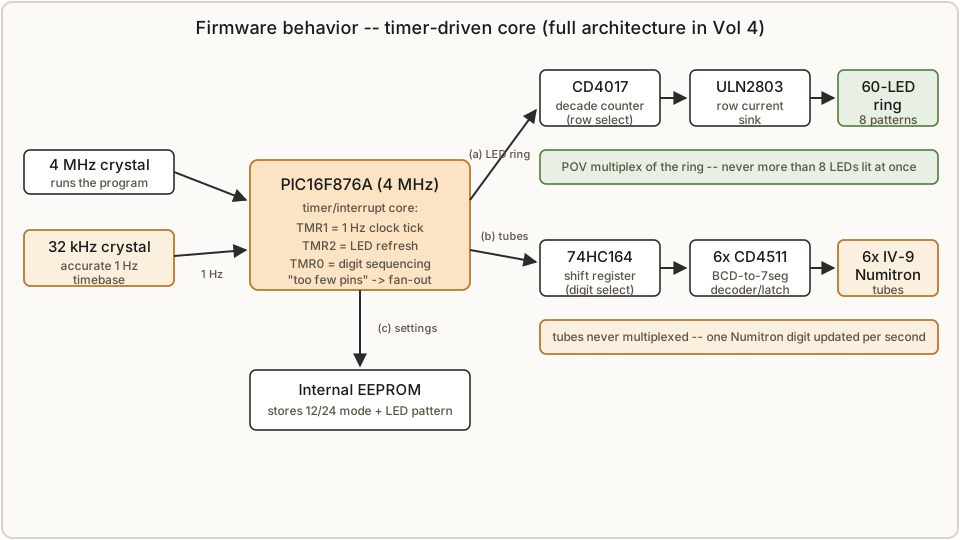
- One small chip, far too few pins. The PIC is an 8-bit Microchip part running at 4 MHz; the designer is candid that it “does not nearly have enough outputs (pins) to connect to each of the LEDs and Numitron tube displays.”2 Everything else in the design exists to fan those few pins out to 60 LEDs and 6 tubes.
- The LED ring is multiplexed via persistence of vision. The firmware lights the ring in rows so fast that the eye fuses them into a steady circle — “there are never more than eight LEDs lit at any given time,” yet you perceive a full ring of sixty. This is the “POV” trick the Geek Info section explains at length, and the row-by-row hardware (a CD4017 decade counter selecting rows, a ULN2803 sinking the row current) is Vol 3/4.12
- The tubes are not multiplexed — one digit updates per tick. Because a Numitron is a thermal device that dims if multiplexed, each tube has its own decoder/latch (the CD4511 behind each tube) that holds its digit steady. Since the time only changes once a second, the firmware updates just one Numitron digit each time it refreshes the LED ring — which the designer notes “made the software easier, and it is still much faster than actually required.”12
- Two crystals, three timers. The clock is timed by two crystals — the oval 4 MHz system crystal that runs the program, and the small cylindrical 32 kHz watch crystal that is the accurate timebase. Inside, the PIC’s timers each generate an interrupt on overflow: one overflows every second to advance the clock, one schedules the display updates, and one drives the LEDs.12
- The animations come from lookup tables. In the filling patterns a dot must make 60 steps in the first second, then one fewer step each subsequent second, so the timing of each step changes every second. The firmware handles this by reprogramming a timer’s period register on the fly, with the step-timing values and the dot positions both stored in lookup tables.1
- Settings persist in EEPROM. The 12/24-hour mode and the chosen LED pattern are written to the PIC’s internal EEPROM, which is why they survive a power failure or a long unplugging. The user manual’s source even closes with a short EEPROM-read routine as its code “snippet.”2
That is the whole behavioral picture: a busy little 4 MHz PIC, ticking off seconds from a 32 kHz crystal, painting a sixty-LED ring by persistence of vision, nudging one steady-lit Numitron digit per second through its own latch, and remembering your preferences across power cycles.
8.7 The designer’s case — “Numitron vs. Nixie?”
The build article closes with a short argument that is worth reproducing because it is the
clearest statement of why a maker might choose this clock over the more famous nixie.
These are the designer’s claims, presented as he frames them — the cross-technology
comparison this hub maintains is in _shared/comparison.md, and the tube physics behind
the claims is Vol 2.1
Bill van Dijk grants that nixies are “very cool and retro,” but argues the Numitron offers “the same feel” with four distinct advantages:
- Low voltage, no shock hazard. Numitrons are low-voltage devices, so — unlike nixies, which need ~170 V — “you do not need to insure carefully insulated enclosures to keep users from getting a nasty high voltage ‘bite.’” (This whole clock lives at 5 V; Vol 1’s safety note and Vol 9’s care chapter build on this.)
- No sputtering. Numitrons “do not suffer from failure states such as ‘sputtering,’” the nixie failure mode where electrode metal slowly collects on the inside of the glass and dims or obscures the display.
- No cathode poisoning, so no anti-poisoning routine. Numitrons “don’t encounter cathode poisoning that requires a potentially distracting anti-cathode poisoning software routine” — a real chunk of firmware that nixie clocks often must run to keep seldom-used digits healthy. A filament has no cathode to poison.
- Long rated life. Numitrons “will outlast Nixie tubes as they are typically rated for over 100,000 hours (~11.5 years)” against some nixies rated for as little as 5,000 hours (~200 days).
His conclusion is the spirit of the whole project: Numitrons are “a fun and interesting item, and having them used in a clock while surrounded by high tech LEDs makes for a great conversation piece.” He recommends building one “even if you already have a nifty Nixie clock.”1
8.8 How to actually build it
This volume is the tour, not the build. If it has made you want one, the rest of the series is the road map:
- Vol 5 — Build It Yourself is the worked build of exactly this clock: schematic → BOM → ordering the PCB from the Gerbers → SMD assembly → power → flashing the PIC → calibration, written against the construction manual and parts list on disk here.
- Vols 3 and 4 — Driving Numitrons and Timebase & Logic are the engineering behind it: why each tube gets one CD4511, how the 74HC164 selects which tube to update, how the CD4017/ULN2803 row-multiplex lights the ring, and how the PIC and 32 kHz crystal keep time.
- Vol 2 — How a Numitron Works is the tube itself, the foundation for handling the fragile, irreplaceable IV-9s.
- Vol 9 — Care, Reliability & Low-Voltage Safety is worth a read before first power-up: not because 5 V is dangerous, but because a stressed fly lead or a doubled segment current kills a tube you cannot easily replace.
And the canonical documents — the construction manual, the user manual, the build article,
the full schematic, the IV-9 datasheet, the Eagle/Gerber files, and the MPASM source plus
production HEX — are all in 02-inputs/TheNumetron/. Build with the originals open; this
series points you at them and reproduces the load-bearing data, but it does not replace the
designer’s own documentation. And if you do build one, the designer would like to hear about
it — [email protected].2
8.9 References (Vol 8)
- Design package (the unpacked Nuts & Volts
201609-Dijk.zip), held in02-inputs/TheNumetron/: PCB files (Board files/Eagle-v1.1/—.sch/.brd;Board files/Gerber-v1.1/— RS-274X copper/mask/silk/paste + Excellon drill + reports); firmware (Firmware/60L-Numitron.asm,NumitronV3.X.production.hex,P16F876A.INC,16f876a_g.lkr);60 LED clock user manual.docx;Construction manual.docx;Full Schematic.pdf;IV-9 (Numitron).pdf; andPatterns Video.wmv. - Cross-references within this series: Vol 1 (overview and the “no multiplexing” gotcha), Vol 2 (tube physics), Vol 3 (CD4511 drive, shift-register fan-out, LED-ring multiplex), Vol 4 (PIC timebase, timers/interrupts, EEPROM, ring math), Vol 5 (the worked build), Vol 9 (care and low-voltage safety). Hub comparison matrix:
_shared/comparison.md.
Footnotes
-
Bill van Dijk, “Build the Numitron — A Six-Digit Clock,” Nuts & Volts, September 2016. Design rationale (the deliberate old-tube/modern-tech “hybrid”), the subsystem walk-through (PIC at 4 MHz; LED ring multiplexed in rows via CD4017 + ULN2803; tubes driven one-per CD4511 decoder/latch selected by a 74HC164 shift register; LM2575 buck supply behind a bridge rectifier), the lookup-table animation timing, the EEPROM-stored settings, the parts list, the “What’s in the zip?” package contents, and the closing “Numitron vs. Nixie?” argument. Held as
Build the Numitron — A Six-Digit Clock.pdf/nutsvolts201609-dl.pdf(and_extracted/build_article.txt) in02-inputs/TheNumetron/. ↩ ↩2 ↩3 ↩4 ↩5 ↩6 ↩7 ↩8 ↩9 ↩10 ↩11 -
Bill van Dijk, “60 LED Numitron Clock Manual” (user manual), Firmware V3.1, December 2015; Board V2, 2014. Header version/date strings; two-button HOURS/MINUTES UI and orientation; startup flash as set-me prompt and filament/LED self-test; 12/24-hour mode set (startup-only, HOURS-then-MINUTES within 0.8 s, EEPROM-saved); time setting (0.8 s hold delay, MINUTES speed-up after 8 steps, release-resets-seconds for set-to-the-second sync); the eight LED patterns (0 = cycle default, 1–8); the “Geek Info” section (~2,300 lines MPASM, 4 MHz PIC, POV multiplexing of the 60-LED ring, non-multiplexed tubes via per-tube decoder/latch, two crystals, EEPROM persistence); and designer contact [email protected]. Held as
60 LED clock user manual.docx(and_extracted/user_manual.txt) in02-inputs/TheNumetron/. ↩ ↩2 ↩3 ↩4 ↩5 ↩6 ↩7 ↩8 ↩9 ↩10 ↩11 ↩12 ↩13 ↩14 ↩15 ↩16 ↩17 ↩18 ↩19 ↩20
Comments (0)