Numitron · Volume 7
Enclosure & Finishing
The floating acrylic sandwich, edge-polishing, LED alignment, and the steampunk option
A Numitron clock earns its keep on a shelf, not on a bench, and the difference between those two places is the enclosure. The worked build of this series — Bill van Dijk’s six-digit IV-9 clock from Nuts & Volts (the design walked through in Vol 5 and Vol 8) — makes a deliberate choice here that is worth understanding before you reach for it or reject it: it has no case at all in the conventional sense. The board is simply suspended in mid-air between two clear panels, so the electronics are the decoration. That works because a Numitron clock has nothing to hide and nothing dangerous to contain. There is no 170 V anode rail to insulate (the entire reason a nixie clock needs a sealed, inaccessible enclosure — see the Nixie deep dive in this hub), no charged filter capacitor waiting behind the panel; the whole clock lives at the safe 5 V established in Vol 1. The enclosure is therefore free to be purely aesthetic, and the design leans all the way into that freedom.
This volume covers the documented “floating sandwich” approach in detail, the material and edge-finishing decisions behind it, the LED- and tube-alignment craft that makes or breaks the look, the upgrade paths available to a maker with a full shop, and a cross-link to the hub’s Steampunk technology — for which the Numitron’s warm incandescent glow is an unusually good fit.
7.1 The floating board sandwich
The documented enclosure is described in a single compact paragraph at the end of the construction manual, and it is elegant in its economy. The roughly 6-inch-square PCB (it carries four mounting holes, one near each corner) is held vertically between two clear panels measuring 7 in × 7 in, standing the finished clock upright on the shelf with about a half-inch of panel proud of the board on every side.1 The panels do not enclose the board so much as float it — there are no side walls, no top, no bottom, just two sheets of plastic and the glowing electronics between them, fully visible from front and back.
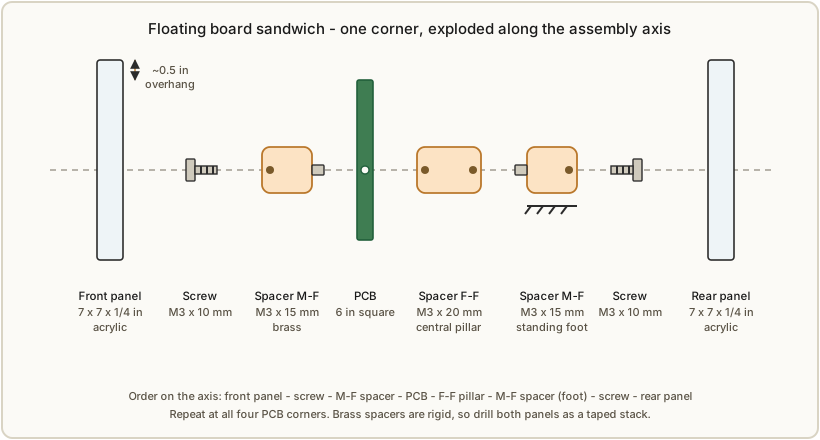
The standoff stack-up is specified in the parts list and is worth reproducing because the geometry only works if you follow it. For each of the four corners:
- 1 × M3 × 20 mm female-female brass spacer — the central pillar that sets the gap between the two panels and through which the board is suspended.
- 1 × M3 × 15 mm male-female brass spacer — extends the stack outward to one panel and, on the male end, provides a foot the clock can stand on.
- 2 × M3 × 10 mm screws — one per side, capturing a panel against the spacer stack.2
Brass is the right material here for both mechanical and visual reasons: it is rigid enough to keep a 7-inch panel from flexing, it will not crack the way a nylon standoff can if a screw is overtightened against acrylic, and — as Section 7.6 develops — its warm yellow metal is exactly the palette the Numitron’s amber glow wants around it.
7.1.1 The one clearance trap: panel height vs. tall parts
The sandwich has exactly one geometry pitfall, and the designer engineered around it rather than leaving it to chance. The spacer height sets how far the front panel sits off the board, and the tallest component on the board must clear that panel. The component that nearly violates this is the 1000 µF / 35 V tank capacitor (C1) in the power supply — a part that in its ordinary radial form would be a tall cylinder. The design deliberately specifies a low-profile unit (the parts list calls out a 16 mm × 15 mm Nichicon, and the build article states plainly that “the 1,000 µF tank capacitor is a low-profile unit so it does not interfere with the front panel”).3 The warning attached to that sentence is the one to carry into your own build: if you substitute a taller capacitor, you must lengthen the front-panel spacers to match, or the panel will not seat. The same caution applies to any through-hole part you stand tall — the electrolytics, the LM2575 regulator on its tab, the power jack. Measure your tallest part, add a margin, and choose the spacer length from that, not the other way around.
7.2 Material choice: acrylic vs. polycarbonate
The construction manual offers a direct either/or for the panels: “Use two Plexiglas (or Lexan Polycarbonate which is more durable) panels.”1 Those two trade names point at the two clear thermoplastics you will actually choose between, and the choice has real consequences for both fabrication and finish.
Plexiglas — acrylic (PMMA). Acrylic is the default and the material the parts list specifies (it lists the panels as 1/4-inch (~6 mm) acrylic).2 It is the clearer of the two — acrylic transmits a hair more light and has a glassier surface — and, critically for this build, it is the one you can flame-polish to an optically clear edge (Section 7.3). Its drawback is brittleness: acrylic is comparatively hard and will chip or crack under a sharp blow or an overtightened screw. Drill it with a slow, sharp bit and back it with a sacrificial board to avoid blow-out on exit.
Lexan — polycarbonate (PC). Polycarbonate is far more impact-resistant — effectively unbreakable at this thickness, which is why it is the material of safety glazing and machine guards. If the clock will live somewhere it might get knocked, or travel, polycarbonate is the tougher choice and the manual flags it as “more durable.” The trade-offs are that it is slightly less clear (a faint warmth to the edge), scratches more easily on the face, and — the deciding factor for a hand finish — does not flame-polish well; heat tends to bubble and yellow it rather than clarify it. Polycarbonate’s edges are best brought up by progressive sanding and buffing, or simply left cleanly machined.
For a shelf clock that will sit undisturbed, acrylic is the better pick — clearer, and it takes the beautiful flame-polished edge that is half the point of an exposed sandwich. Reserve polycarbonate for a clock that needs to survive handling.
7.3 Cutting, drilling, and edge finishing
The exposed sandwich puts the panel edges on permanent display, so finishing them is not optional polish — it is the visible craft. The construction manual’s procedure is short and exact, and it is the right sequence.
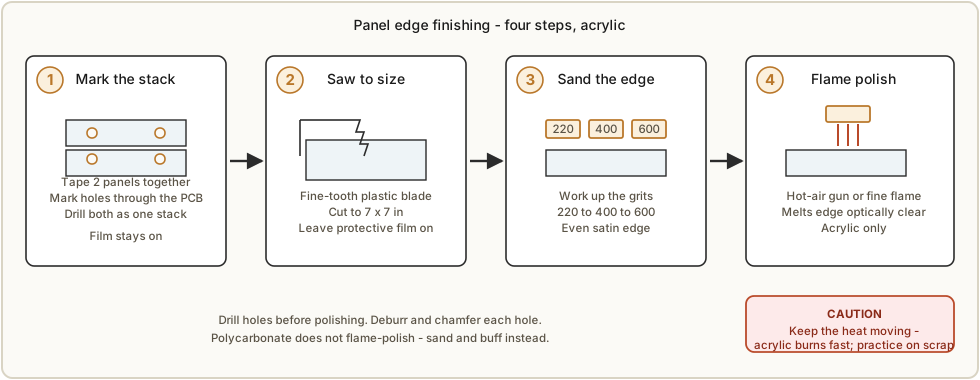
- Tape and mark together. Tape the two panels into a stack and mark the four mounting holes through them at once, transferring directly from the PCB’s mounting holes so the drilled holes line up with the board.1 Drilling both panels as a stack guarantees the two patterns match, which matters because the brass spacers are rigid and will not take up any misalignment.
- Cut to 7 in × 7 in. A fine-tooth blade (a plastic-cutting or fine plywood blade on a table saw, or a scoring tool for thinner stock) gives the cleanest start. Leave the protective film on through cutting and drilling to protect the faces.
- Sand the edges. Sand the cut edges with fine paper to remove the sharp, ragged areas left by the saw.4 Work up through grits (e.g. 220 → 400 → 600) for a uniformly smooth, satin edge — which on its own is a perfectly respectable finish.
- Flame- or hot-air-polish (acrylic only). For the glass-clear edge, pass a hot-air gun or a fine flame along the sanded acrylic edge. Done correctly it melts the surface just enough to flow it optically clear — “a beautiful edge.” The manual’s emphatic warning is the one to heed: the material burns very quickly, so move steadily, keep the heat moving, and never dwell. A scorched or bubbled edge cannot be undone; practice on a scrap offcut first.4
Drill the holes before you flame-polish, and deburr the hole edges as well — a clean chamfer where the screw head meets the panel reads as care.
7.4 Display aesthetics: the look is only as good as the alignment
In a clock with no case, every component is on show, and two of them dominate the view: the ring of 60 LEDs and the six Numitron tubes themselves. How straight and even they sit is the single biggest determinant of whether the finished clock looks crafted or thrown together — and both are addressed at length in the construction manual because they are the parts that “only look as good as you align them.”
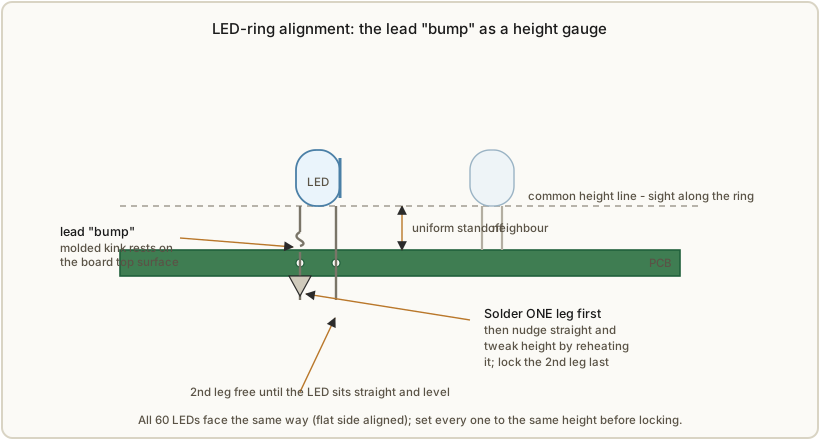
The LED ring. All 60 LEDs face the same way (their flat sides toward the right of the board), and the manual stresses that they must be installed very straight and at uniform height for a clean result.5 Because most ultra-bright LEDs are water-clear, any LED that leans or sits proud of its neighbors catches the eye instantly. The technique: use the small “bump” molded into the LED leads as a height gauge — insert each LED until the bumps just touch the board, which sets every LED to the same height without measuring. Then solder only one leg first across all 60, leaving each LED free to be nudged straight and to have its height tweaked (by reheating that single leg) before the second leg locks it down. Sighting along the ring from the top and the side alternately, and adjusting, is what produces the even circle. (The electrical side of this ring — the CD4017 / ULN2803 multiplex that drives it — is Vol 4’s subject; here it is purely a finishing concern.)
The Numitron tubes. The IV-9s are the centerpiece, and their warm filament glow is the whole reason for the build. Aesthetically the goals are that each tube’s view side (the face with the filaments) sits level with the board and the tube stands square, and that each tube tucks down close to its CD4511 decoder so the row reads as a clean line.6 As with the LEDs, the method is solder-one-lead-then-adjust: tack a single fly lead, verify the tube is straight and level, then commit the rest. The fly-lead bending that precedes this is a tube-safety matter (any stress reaches the glass seal) and is covered in Vol 5 and Vol 9; the point here is that a tube soldered in crooked spoils the display no matter how clean the rest of the build is.
Viewing angle and contrast. The filament glow is warm and relatively gentle — it is incandescence, not the punchy line of a nixie cathode — so contrast against the background matters. A clear panel shows the glow against whatever is behind the clock; a tinted or smoked acrylic front panel (grey or bronze smoke) absorbs ambient light and deepens the perceived contrast of the lit segments, making the digits read as crisper and the unlit segments disappear. This is the same trick used on nixie and VFD clocks, and it costs nothing but the choice of panel. Consider the dominant viewing angle too: the tubes read best near head-on, so a slight forward lean (set by using a longer front foot than rear, or a small wedge) can improve the everyday view.
7.5 Upgrade paths for a full shop
The hand-cut sandwich is the documented baseline, and it is genuinely good. But this hub belongs to a maker with a full shop, and several upgrades turn the same floating-board idea into a more finished object. None changes the electronics; all are pure enclosure work.
- Laser-cut acrylic panels. A laser cutter produces crisp, square, optically clean edges straight off the bed — no sawing, sanding, or flame-polishing, and dead-accurate hole placement transferred from the PCB’s Eagle/Gerber outline (held in this hub, see Vol 5). The laser can also engrave markings directly into the panel: a maker’s mark, the hour ticks of a 12-position ring aligned to the LEDs, “12 / 3 / 6 / 9” indices, or a back- panel legend of the button functions. Engraved acrylic frosts white and glows softly when edge-lit, which pairs well with the LED ring.
- 3D-printed parts. A printer is the fastest route to the small structural pieces the bare sandwich lacks: feet (a pair of printed cradle feet steadies the clock and sets a viewing rake), tube holders or a front bezel that masks the board edge and frames just the six digits, a light shroud / hood to cut glare and raise contrast, and a snap-on rear cover over the power jack and buttons. Print in a matte dark filament to vanish behind the glow, or in a translucent one to diffuse the LED ring.
- CNC metal or wood frame. For a step beyond the two-panel idea, a CNC mill or router can cut a proper frame — a milled aluminum or brass perimeter, or a hardwood surround — that the acrylic faces drop into. This converts the open sandwich into a framed display while keeping the front and back glass-clear, and it is the natural bridge to the steampunk treatment below.
Offer these as upgrades, not replacements: the value of the documented sandwich is that it needs nothing but two panels and a drill, and the result already looks intentional.
7.6 The steampunk cross-link
A Numitron is a glowing vacuum tube with a warm incandescent filament — which is to say it is already a Victorian-looking object, and an unusually willing candidate for a brass-and-wood steampunk treatment. It earns this even more easily than a nixie does, for one decisive reason established back in Vol 1: there is no high voltage. A steampunk nixie build has to hide and insulate a ~170 V supply behind all that decorative brass; a steampunk Numitron build has nothing to insulate, so exposed metal, rivets, and open framing carry no shock risk. The filament glow also reads as more authentically “incandescent-era” than a nixie’s neon — it is the same physics as an Edison lamp, the very aesthetic steampunk reaches for.
Concretely, the same floating board lends itself to:
- Brass tube collars — short turned or printed-and-plated rings around each IV-9, echoing the ferrules of antique instruments and tying the tubes to the brass spacers already in the design.
- A wood base — a hardwood plinth (walnut, oak) the panel-and-spacer assembly stands on, in place of or in addition to the brass feet, grounding the warm glow in warm material.
- Exposed-rivet panels — brass-strip edging on the acrylic, fastened with decorative dome rivets, to frame the sandwich as a riveted instrument face rather than a bare sheet.
- Aged-brass hardware — swapping the bright M3 screws for slotted, patinated brass heads, and the bright spacers for an aged finish, so the structure itself reads period.
This is exactly the territory of the hub’s Steampunk subproject, which treats the aesthetic shell as a technology in its own right (most often layered over a nixie or scope clock). The Numitron is offered there as the low-voltage steampunk donor — the build that gives you the whole Victorian look without a single safety caveat. See that subproject for the brass-finishing, patina, and woodworking techniques that finish a clock like this.
7.7 Ventilation, heat, and cable management
A nice consequence of the incandescent-but-low-voltage design is that thermal management is nearly a non-issue, but it is worth stating where the heat is so the enclosure does not trap it. The two warm spots are the Numitron filaments themselves and the LM2575 switching regulator. Each lit segment dissipates roughly 5 V × 23 mA ≈ 0.12 W, so a fully lit six-digit display (the worst case, during the start-up lamp-test flash where all 7 × 6 = 42 segments light) dissipates only a few watts total across the six tubes — warm to the touch, not hot, and spread over six glass envelopes that radiate it freely in the open sandwich.7 The LM2575 is a switching buck converter precisely so it runs cool; the designer’s notes record that a linear regulator “became hotter than I was comfortable with,” which is why the switcher was chosen.3
The practical upshot for the enclosure: the open sandwich is its own ventilation — with no walls, nothing traps heat, and no vents need cutting. If you upgrade to a closed framed or steampunk enclosure (Sections 7.5–7.6), keep a few discreet slots or a gap near the LM2575’s tab and above the tubes so warm air can rise out; the heat load is small but a fully sealed box is still poor practice. If the regulator is screwed down with its isolation pad (an option noted in the construction manual), it sheds its modest heat into the board ground plane and needs no further help.
For cable and jack placement, the board carries the barrel power jack (JP1) and the two (or three) set buttons at fixed positions; in the bare sandwich these simply protrude at the board edge. Orient the clock so the jack faces the rear and the buttons stay reachable from the front or side — easy to overlook until you have to set the time and find the buttons facing a wall. A right-angle barrel plug, or a short pigtail to a jack mounted in a printed rear foot, keeps the cord from forcing the clock to stand off the shelf. The wall wart itself (12–15 V, ≥ 1.5 A, AC or DC — the bridge rectifier makes the clock polarity- and AC/DC-agnostic, per Vol 5) lives off-clock, so the only cable to manage at the enclosure is the low-voltage barrel lead.
7.8 References (Vol 7)
- Bill van Dijk, “Build the Numitron — A Six-Digit Clock,” Nuts & Volts, September 2016 — construction manual (“Finish”, LED, and Numitron sections), build article (“The Power Supply”, “The LEDs”, “The Printed Circuit Board”), and parts list. Held in
02-inputs/TheNumetron/. - Cross-references: Vol 1 (low-voltage safety, the four subsystems), Vol 4 (LED-ring multiplex), Vol 5 (worked build, fly-lead bending, power supply), Vol 8 (collected-project walk-through), Vol 9 (tube handling and lifetime); the hub’s Nixie deep dive (high-voltage enclosure contrast) and Steampunk subproject (brass / wood / patina finishing).
Footnotes
-
Numitron Clock Construction Manual, “Finish” section: “Use two Plexiglas (or Lexan Polycarbonate which is more durable) panels measuring 7” x 7”, with the board suspended between them by brass spacers. Tape the two panels nicely together, and mark the holes to line up with the mounting holes in the circuit board.” Held in
02-inputs/TheNumetron/_extracted/construction_manual.txt. ↩ ↩2 ↩3 -
Bill van Dijk, “Build the Numitron — A Six-Digit Clock,” Nuts & Volts, September 2016, Parts List: Spacer 4 × M3 × 20 mm F-F; Spacer 4 × M3 × 15 mm M-F; Screw 8 × M3 × 10 mm; Panel 2 × 8” × 8” × 1/4” acrylic (the construction manual gives the finished panel size as 7” × 7”). Board “about 6” square” with four mounting holes. Held in
02-inputs/TheNumetron/. ↩ ↩2 -
van Dijk, Nuts & Volts build article, “The Power Supply”: “The 1,000 µF tank capacitor is a low profile unit so it does not interfere with the front panel. If you use a taller part, you may have to adjust the front panel spacers.” On the regulator: a linear part “became hotter than I was comfortable with,” so a switch-mode LM2575 was used. Held in
02-inputs/TheNumetron/_extracted/build_article.txt. ↩ ↩2 -
Construction Manual, “Finish”: “The edges should be sanded with a fine paper to remove sharp areas left over from cutting, and can be further smoothed with a hot air gun. Be very careful with the heat; although it will result in a beautiful edge when done correctly, the material very quickly burns.” ↩ ↩2
-
Construction Manual, LED section: “It is important to install them very straight and at the same height for a great looking result. Most ultra bright LEDs are of the clear type… The wires of most LEDs have a little ‘bump’ in them, and we will use that as our height gauge… solder ONLY ONE leg of the LEDs until the entire set of 60 LEDs is installed.” ↩
-
Construction Manual, Numitron section: “look for proper installation, making sure the view side is nice and straight. The tube should touch or at least be very close to its 4511. Check to see that none of the wires touch each other.” ↩
-
Per-segment dissipation from the IV-9’s ~5 V at ~23 mA per segment (Vol 1, Vol 2); peak current figure from the build article: “7x6 segments at about 23 mA = 966 mA total,” the start-up flash worst case. ↩
Comments (0)