Numitron · Volume 5
Build It Yourself
The Nuts & Volts six-digit IV-9 Numitron clock, start to finish — schematic, BOM, board, SMD assembly, tube installation, power-up, flashing, and calibration
This volume is the worked build — the one a maker actually solders. Everything before it
explained how a Numitron works (Vol 2), how you drive its filaments (Vol 3), and how
the timebase and logic keep time and animate the LED ring (Vol 4). Here those subsystems
stop being theory and become a populated circuit board. The build in question is Bill van
Dijk’s six-digit IV-9 Numitron clock, published in Nuts & Volts, September 2016, whose
complete design package — construction article, construction manual, full schematic, native
Eagle and Gerber (RS274x) board files, the IV-9 datasheet, and the PIC firmware in MPASM
source plus a ready-to-flash HEX — is held in this hub under
02-inputs/TheNumetron/.1 This volume walks that design from schematic to first
power-up; it does not replace the original documents, and you should build with the
construction manual open on the bench beside you.
5.1 Overview and skill level
This is an advanced build, and the designer says so plainly: “Building this project is probably at an advanced skill level, mostly due to the number of surface-mount parts.”1 The difficulty is not in any single subsystem — none of them is conceptually hard — but in the craft: ten 0805 surface-mount capacitors (three of them on the back of the board), six SMD CD4511 decoder chips, an SMD power inductor, an SO-28 PIC, sixty LEDs that must all sit straight and at the same height, and finally six irreplaceable glass vacuum tubes whose fly leads transmit any bending stress straight to the seal. As the article puts it, “None of the SMDs used here are ridiculously difficult to solder by hand, but it does require a steady hand, good light, a magnifying glass, and a good soldering iron.”1
What you are building:
- Six IV-9 Numitron tubes in a row — the HH:MM:SS display, each digit driven continuously by its own decoder (Numitrons cannot be multiplexed; see Vol 3).
- A ring of 60 ultra-bright LEDs around the tubes, heavily multiplexed in seven rows of eight plus one short row of four, animating the passing minute in eight selectable patterns (the firmware architecture is Vol 4’s subject).
- A PIC16F876A brain with a 4 MHz system crystal and a separate 32 kHz watch crystal as the accurate timebase.
- A switch-mode 5 V supply behind a bridge rectifier, so the clock runs from an AC or DC wall wart of either polarity.
- A two-button user interface with hardware-debounced inputs.
The board is about 6 inches square, two-layer, and is meant to stand vertically sandwiched between two acrylic panels on brass standoffs (Vol 7 covers the enclosure). If you have soldered SMD before and you take the tube installation slowly, it is an achievable weekend-or-two project; if you have not, practice 0805 placement on a scrap board first.
5.2 Schematic walkthrough by section
The full schematic is in the hub (02-inputs/TheNumetron/, native Eagle and a flat PDF).
It divides cleanly into five functional blocks. The engineering derivations behind each
block live in Vols 3 and 4 — this section reads the schematic as a builder, pointing back
rather than re-deriving.
5.2.1 Power supply
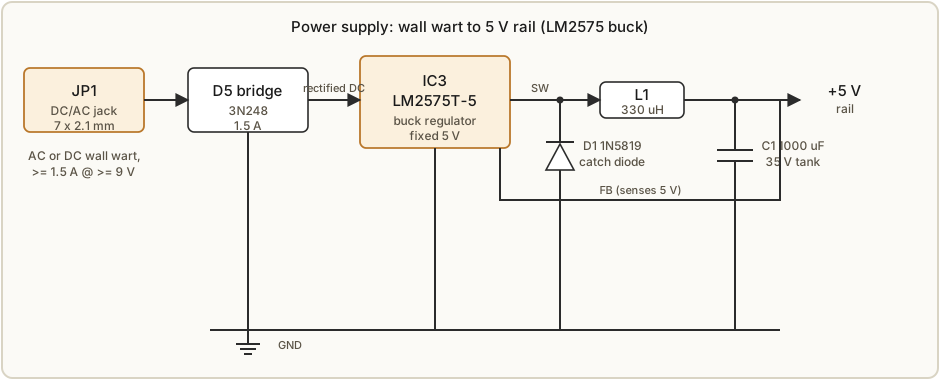
Power enters at the DC/AC jack JP1 (a 7 × 2.1 mm barrel jack — “perfect parts to be salvaged from old discarded equipment”) and meets a bridge rectifier, D5 (3N248, 1.5 A). The bridge is the clever first move: because it rectifies whatever it is given, the clock accepts an AC wall wart, or a DC wall wart of either polarity — there is no wrong way to plug it in.1 If you know your supply is DC and you know its polarity, you may leave the bridge out and jumper the appropriate points on the board instead; the bridge exists for convenience, not necessity.
After the bridge comes the regulator. The designer “considered a linear regulator,” but in testing it “became hotter than I was comfortable with,” so the design uses a switch-mode buck converter: the LM2575T-5 (a fixed 5 V “simple switcher” in a TO-220-5 package).1 A buck converter throws away far less power as heat than a linear regulator dropping the same voltage, and it also widens the range of wall warts you can use. Around it sit the three parts every buck converter of this family needs:
- L1 — 330 µH SMD power inductor, the energy-storage element. (It is surface-mount purely “for space reasons,” and it gets a special mounting trick — see Section 5.6.)
- D1 — 1N5819 Schottky diode, the catch (freewheel) diode that carries the inductor current during the switch’s off phase. A Schottky’s low forward drop and fast recovery matter here.
- C1 — 1000 µF / 35 V tank capacitor, the output smoothing reservoir. It is specified as a low-profile unit “so it does not interfere with the front panel”; a taller substitute means adjusting the front-panel spacers.
Why the supply must be beefy. The peak current is not during normal timekeeping — it is during the start-up flash, when the CD4511 lamp-test lights every segment of all six tubes at once to verify them. That is 7 segments × 6 tubes × ~23 mA ≈ 966 mA, brushing right up against one amp.1 That single number drives the whole supply specification: the designer’s instruction is to “be sure the wall wart can supply at least 1.5 amps of current at minimum nine volts.” The 1.5 A headroom covers the ~966 mA flash plus the LED ring, the logic, and converter losses, with margin; the ≥ 9 V floor keeps the buck converter above dropout under load.
5.2.2 MCU and timebase
The brain is the PIC16F876A (IC1, SO-28 wide package) — “a very busy fellow in this project; it’s in control of everything happening on the board.”1 It carries two independent time references:
- X1 — 4 MHz crystal, the main system clock, low-profile, with its own load caps (C18 + C19, 20 pF 0805).
- X2 — 32 kHz watch crystal, the accurate timebase, with matched 12 pF load capacitors (C16 + C17, 0805). This is the part the designer flags hardest: “This is a critical part for clock accuracy! Please resist using an unknown or salvaged part here.” The two 12 pF caps “determine its frequency accuracy, and must be matched with the part.” Get this right and “accuracy of one second per day or less is possible.”1 Calibration is Section 5.10.
Every chip on the board gets a 0.1 µF ceramic decoupling capacitor placed close to it (“there is a lot of heavy duty switching happening on this board”) — six through-hole 0.1 µF (C4–C9) and six 0805 SMD 0.1 µF (C10–C15) distribute that job.1
The reset button (S-reset) is optional. It is “not debounced (not needed), and for all intents and purposes may be left off the board all together. Simply disconnecting and reconnecting the power will do the same” — and leaving it off “prevent[s] non-intentional reset when in use.” If you fit only two of the three tactile buttons, this is the one to skip.
5.2.3 Numitron drivers
Numitrons “do not lend themselves at all to multiplexing” — a filament has thermal mass, so strobing it at low duty cycle just dims it; “a 1×6 (or even a 2×3) multiplexing arrangement would leave them very dim” (Vol 3 derives why). So each tube gets its own continuous driver.
That driver is the CD4511 BCD-to-seven-segment decoder/latch (IC5–IC10, six of them, SMD). It is an ordinary part designed for seven-segment LED displays, and it works here because the IV-9 is electrically just a seven-segment device at ~5 V drawing ~23 mA per segment — comfortably under the CD4511’s 25 mA per-output rating. Two of its features seal the choice: it has a built-in data latch, and it has a lamp-test input that lights all segments at once (used for the start-up flash and the reset/test flash).1 The SMD version was chosen because the chips “neatly tuck behind the Numitron tube, making for a nice clean appearance” — the tube sits directly atop its decoder.
With six decoders to feed and the PIC “rapidly running out of ports,” the design needs an efficient addressing scheme. Enter the SN74HC164 (IC4), an 8-bit shift register. The BCD data is “presented to all the CD4511s at the same time via the data bus, but decoded and latched only by the CD4511 selected by the SN74HC164 shift register.” The PIC clocks a single “select” bit along the shift register to choose which decoder latches the data on the bus; “synchronization of data and latch selection is controlled in software.”1 Because the time changes only once a second, the firmware updates just one digit per display cycle — plenty fast.
Optional dimming — D2 + JP2. A diode (D2, 1N4001) and a two-pin jumper (JP2) sit in the Numitron supply path as “a rudimentary option for lowering the brightness of the Numitrons and lower the current requirement slightly. It simply relied on the forward voltage drop of the diode, with a jumper to short it.”1 Fit the jumper cap and the diode is bypassed (full brightness); remove the cap and the segments run through the diode’s ~0.7 V drop (slightly dimmer, slightly less current). It “is not really required and may be left off the board, in which case a simple jumper wire may be inserted in place of the diode.”
5.2.4 LED ring driver
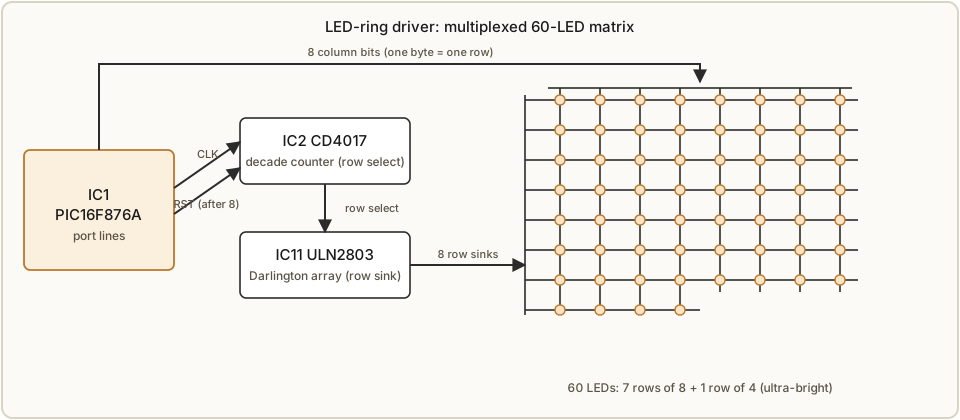
The 60-LED circle is the opposite of the tubes — LEDs “lend themselves very well to multiplexing, and that is used extensively.” They are wired as a matrix of seven rows of eight plus one short row of four = 60, and “the PIC drives one row at a time, and at a couple of mA each, the current draw is well within the specifications for the PIC.”1 At any instant at most eight LEDs are lit (one byte = one row), but “a fast multiplex rate and … persistence of vision” make the circle look continuously lit.
Two helper chips offload the work:
- CD4017 decade counter (IC2, DIL-16) does row selection. It “counts the pulses sent from the PIC and activates the appropriate” row; after eight pulses the PIC resets it.1
- ULN2803 Darlington array (IC11, DIL-18) does the current sinking. A single PIC pin can light one LED, but “the combined current of the full row may need to be sunk in order to light all eight in that row since this exceeds the current output capacity of the CD4017. The ULN2803 acts as the driver there.”1
So the PIC presents the eight column bits, the CD4017 selects the row, and the ULN2803 sinks that row’s current — any of the 60 LEDs can be addressed while respecting every chip’s current limit. Use ultra-bright (“high output”) LEDs — “regular LEDs will appear too dim.” Color is free choice (the small forward-voltage differences “is insignificant in this project”). Because most ultra-bright LEDs are water-clear, placement matters a great deal for a pleasing result — hence the careful LED-installation routine in Section 5.6.
5.2.5 Buttons and hardware debounce
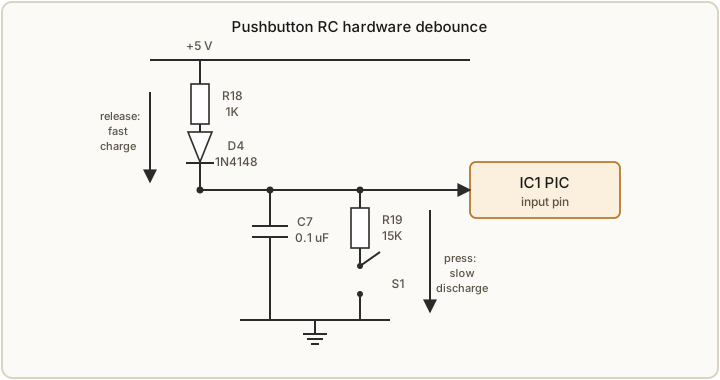
The clock is set with just two buttons (S1–S3 in the BOM, but recall the reset button S-reset is optional), each carrying multiple functions: 12/24-hour selection, LED-pattern selection, and time-setting. Mechanical switches “bounce like a dropped ball,” so each input is debounced in hardware with an RC network rather than in software:1
- On press: the capacitor C7 is discharged through R19, “allowing the bounce to settle before the voltage on the PIC input pin falls below the logic level 0.”
- On release: “the capacitor is charged quickly through R18 and D4.”
The asymmetry (discharge through one resistor, charge through another path that includes a diode) shapes the edge so the PIC “is treated like an ideal button without bounce” and “no further precautions are required in the software.”1 (The designer credits a debouncing write-up listed in Resources; see References.)
5.3 Bill of materials
The complete parts list from the source article is reproduced below verbatim. Items marked with an asterisk (*) are specifically discussed in the article text — read those sections before ordering. The IV-9 tubes (NU1–6) are sourced from eBay (old Russian cold-war stock; see Vol 6 for sourcing and fakes). Mouser part numbers are the designer’s suggestions; “there are many other excellent vendors,” and for the small SMD parts the designer recommends buying kits so you have spares.1
Table 1 — 5.3 Bill of materials
| Part | Qty | Value | Device | Mouser # |
|---|---|---|---|---|
| C1 | 1 | 1000 µF / 35 V | Capacitor, polarized, 16 × 15 mm | 647-URS1V102MHD |
| C2 | 1 | 220 µF / 50 V | Capacitor, polarized, 10 × 16 mm | 667-EEU-FM1H221 |
| C3 | 1 | 10 µF tantalum / 16 V | Capacitor, polarized, tantalum | 581-TAP106K016SCS |
| C4–C9 | 6 | 0.1 µF | Capacitor, ceramic, through-hole | 75-1C10Z5U104M050B |
| C10–C15 | 6 | 0.1 µF | Capacitor, ceramic, 0805 SMD | 581-08055C104K |
| C16 + C17 | 2 | 12 pF | Capacitor, ceramic, 0805 SMD | 581-08055A120J * |
| C18 + C19 | 2 | 20 pF | Capacitor, ceramic, 0805 SMD | 80-C0805C200J5G |
| D1 | 1 | 1N5819 | Schottky diode, high speed | 512-1N5819 |
| D2 | 1 | 1N4001 | Diode, rectifier | 512-1N4001 * |
| D3 + D4 | 2 | 1N4148 | Diode, switching | 512-1N4148 |
| D5 | 1 | 3N248 | Diode bridge, 1.5 A | 625-3N248-E4 * |
| F1 | 1 | 1 A | Fuse, 10 × 3.8 mm | 576-07771.25MRET1P * |
| IC1 | 1 | PIC16F876A-I/SO | 8-bit Microchip PIC (SO-28W) | 579-PIC16F876A-I/SO * |
| IC2 | 1 | CD4017BE | Decade counter (DIL-16) | 595-CD4017BE |
| IC3 | 1 | LM2575T-5 | Switch-mode regulator, 5 V (TO-220-5) | 863-LM2575T-5G |
| IC4 | 1 | SN74HC164N | 8-bit shift register (DIL-14) | 595-SN74HC164N |
| IC5–IC10 | 6 | CD4511BNSR | BCD-to-7-seg decoder/latch (SMD) | 595-CD4511BNSR * |
| IC11 | 1 | ULN2803A | Darlington transistor array (DIL-18) | 595-CD4511BPW * |
| JP1 | 1 | POWER_JACK | Power jack, 7 × 2.1 mm | Your favorite / various * |
| JP2 | 1 | Two-pin | Straight 0.1” header with jumper block | Your favorite / various * |
| JP3 | 1 | Five-pin | Angled 0.1” header (ICSP) | Your favorite / various |
| L1 | 1 | 330 µH | SMD power inductor | 851-CDRH127NP-331MC |
| LED1–60 | 60 | UltraBrite LED | LED, 5 mm | Your favorite / various * |
| NU1–6 | 6 | IV-9 | IV-9 Numitron | eBay * |
| R1–R8 | 8 | 1k6 | Carbon resistor, 1/4 W, axial, 5% | Your favorite / various |
| R9–R13 | 5 | 10K | Carbon resistor, 1/4 W, axial, 5% | Your favorite / various |
| R14 + R15 | 2 | 0R | Use jumper wire | Your favorite / various |
| R16–R18 | 3 | 1K | Carbon resistor, 1/4 W, axial, 5% | Your favorite / various |
| R19 + R20 | 2 | 15K | Carbon resistor, 1/4 W, axial, 5% | Your favorite / various |
| R21–R28 | 8 | 100 Ω | Carbon resistor, 1/4 W, axial, 5% | Your favorite / various |
| S1–S3 | 3 | Switch | Long tactile button, 90° | 506-FSMRA4JH04 |
| X1 | 1 | 4 MHz | Crystal, low profile | 520-040-20-4X-DU |
| X2 | 1 | 32 kHz | Watch crystal | 732-C002RX32.76K-APB * |
| Circuit board | 1 | N/A | — | Favorite board house |
| Wall wart | 1 | 12 V or 15 V, 1.5 A, AC or DC | Connector to fit JP1 | Your favorite / various |
| Spacer | 4 | M3 × 20 mm F-F | — | Your favorite / various |
| Spacer | 4 | M3 × 15 mm M-F | — | Your favorite / various |
| Screw | 8 | M3 × 10 mm | — | Your favorite / various |
| Panel | 2 | 8” × 8” × 1/4” acrylic | — | Local plastics shop * |
Two cautions on the printed list. First, the IC11 row reproduces the source list’s Mouser number exactly — “595-CD4511BPW” is plainly a copy-paste slip (it is a CD4511 part number, not a ULN2803); order a genuine ULN2803A Darlington array by its own part number. Second, the construction manual notes that “some of the component numbers do not correspond with the parts list in the article” because the manual’s photos came from an earlier prototype board — trust the schematic and the article BOM for designators, and use the manual for technique.1
A few BOM notes worth carrying to the order page: R14 and R15 are 0 Ω “resistors” — just fit jumper wire. The tantalum C3 is the polarity trap (Section 5.6). The fuse F1 is a 1 A 10 × 3.8 mm cartridge. The wall wart is the one external purchase that gates the whole supply spec: 12 V or 15 V, at least 1.5 A, AC or DC (Section 5.2.1).
5.4 The printed circuit board
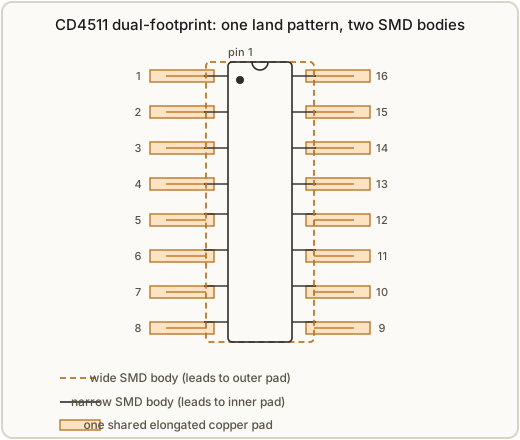
The board is “a standard two-layer version, and has no complicated manufacturing issues for most board houses.” Both native Eagle files and Gerber (RS274x) files are in the hub for houses that do not accept Eagle directly.1 It is about 6 inches square with four mounting holes for the standoffs that hold the acrylic panels (Vol 7).
Two design touches are worth knowing before you fabricate:
- The dual-footprint CD4511. The decoder “come[s] in wide and narrow packages, and in the past I have received either or both mixed in my orders.” Rather than gamble on package width, the designer “created an Eagle footprint that would accept both wide and narrow formats.” Functionally either chip is fine; the clever land pattern means whatever the vendor ships will solder down. This is documented in detail in the download package.1
- The LED circle by vector math. The ring of 60 LEDs “was created by specifying a set of vector coordinates in Eagle by specifying the center, radius, and angle for each LED.” That is why the circle is geometrically perfect — it was placed by trigonometry, not by eye.1
If you are fabricating your own boards, send the Gerbers as-is; if you want to modify the design (different tube spacing, a bigger ring), the native Eagle source is the place to start, and a free version of Eagle CAD is linked in the source article’s Resources.
5.5 SMD soldering technique
The surface-mount work is what earns this build its “advanced” rating, so the designer devotes real space to method. The tooling first: “Small components are best soldered with small tools” — a very fine, almost needle-sharp soldering tip, fine-point tweezers, and very thin (0.020”) 60/40 rosin-core solder.1 A temperature-controlled (ideally anti-static) station, a brass-wool tip cleaner, and a magnifying glass round out the kit. Solder wick and a solder sucker are insurance for mistakes.
The core 0805 technique (caps and resistors):
- Put a small drop of solder on ONE pad only.
- With tweezers, place the part on that pad while you reflow the drop with the fine tip — the solder flows onto the part’s end and tacks it.
- If it sat down crooked, reheat that one side and nudge it into place. (If you hear a small “plink,” the part has launched — look on the iron tip first, then go get a spare.)
- Only when satisfied, solder the other end.
The IC technique (CD4511s and the PIC) is the same idea scaled up, with one ironclad rule:
- Tack one corner pad with solder, set the chip in place watching pin-1 orientation, and reflow that corner.
- Under magnification, verify every other pin lines up on its pad. If not, “reheat the first pin until it is loose and reposition.”
- “DO NOT BEND THE PINS!” — “The legs will break easily, and the stress will add to future failure chances.” Never push a leg, even slightly.1
- Solder the opposite corner to immobilize the chip (“your last chance for easy correction of misalignment”), then solder the remaining pins. A solder bridge between adjacent pins is removed with solder wick.
A few specifics that bite people: there are ten 0805 capacitors total, and three of them are on the BACKSIDE of the board — do not forget to flip it over.1 Static protection is essential — “especially in the winter when houses become dry, and static discharges (even so small that you can’t feel them) are guaranteed to destroy or damage many of the parts.” The designer keeps a grounded wrist strap clipped to a bare copper wire along the bench edge; a damaged-but-alive part is the nightmare (“relatively easy” to find a dead part, very hard to chase an intermittently bad pin).1 And: order spare 0805 caps — the lost-part tax is real.
5.6 Assembly order
The governing principle is smallest first — “you need the most space (for hands and tools) when placing the smallest items, so that is where we start.” Work in this order:1
- The ten 0805 SMD capacitors (C10–C19) — using the Section 5.5 technique. Remember three are on the backside.
- The inductor L1, with its special mounting trick. Bend two small pieces of wire (trimmed component legs are perfect), solder them upright on the inductor’s pads, then sit the inductor on those wire standoffs and solder it to the board. The point of the standoffs is clearance: “do not twist the inductor so its pads short across the two wire supports! Each pad must rest on one wire only!” The standoffs lift the body so its metal pads cannot short to the board.1
- The six CD4511s (IC5–IC10) — the IC technique, watching pin 1 on every one. Verify them now: they will be covered by the Numitron tubes later and become virtually impossible to reach, so this is your only realistic chance to fix orientation or a solder bridge.
- The PIC (IC1) — again, pin 1 orientation (“just so important and easy to goof up”). This finishes the SMD work; switch to the chisel tip and the heavier (0.032”) solder.
- The through-hole parts — diodes, the remaining ICs (CD4017, 74HC164, ULN2803), the regulator, resistors, the small crystals, headers, buttons. Mind every polarity. The designer singles out the tantalum C3: “on the electrolytic capacitors, the negative wire is usually marked, while on the tantalums, it is often the positive wire. Please double-check!” Diodes and ICs are of course polarized too. R14 and R15 are 0 Ω jumpers — fit wire. The regulator IC3 may be bolted down with a screw and isolation pad (not required); if you do, fit the pad and screw before soldering its leads. Do not yet install the big electrolytic caps, the LEDs, the Numitrons, or the power jack.1
- Review. Sit back and inspect — orientation, bridges, missed joints — especially the CD4511s before the tubes hide them.
- The 60 LEDs. All oriented the same way: flats face the right-hand side of the board. Insert each “to the lead bump” (most LED leads have a small bump used as a height gauge) so they all stand at equal height — the designer’s aesthetic choice over pushing them flush. Lightly squeeze each LED’s legs together so it grips the holes and will not fall out when you flip the board; do ~10 at a time. Solder ONLY ONE leg of all 60 first. With one leg soldered each LED “can be bent in all directions” and its height “easily adjusted by heating the one wire” — so straighten and align the whole ring, then clip only the soldered leg, then go back and solder and clip the rest. “Time, patience, and accuracy will greatly improve the final result.”1
- The Numitrons — last (Section 5.7), then the two big electrolytics (watch polarity) and the power jack.
5.7 Installing the Numitrons
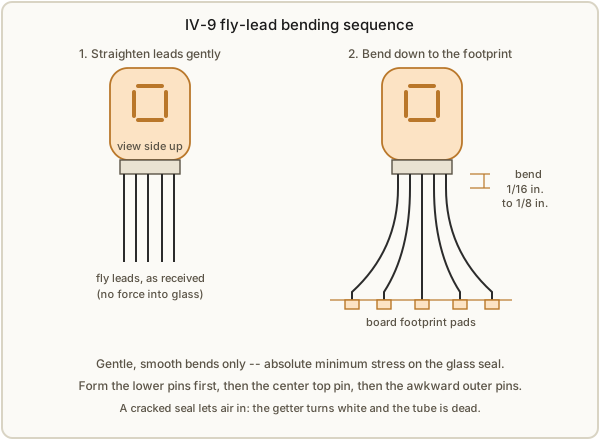
This is, in the designer’s words, “the most difficult part (I think) of the job,” and it is the one step that risks an irreplaceable part. The IV-9’s fly leads pass through a sealed hole in the glass envelope, and any stress transferred to that seal can crack it. A cracked seal lets air in, the getter turns from silvery to white, and the tube is dead and unbuyable (Vols 2 and 9).1
The procedure:
- Straighten the fly leads first. They arrive bent. Use a tweezer with large flat jaws to grip each wire and gently straighten it. Be very gentle — “make sure not to put any force into the glass body of the tube.”
- Identify the pins from the IV-9 pin map (reproduced below; same standard segment lettering as a seven-segment LED).
- Bend the leads to fit the footprint, working 1/16” to 1/8” from the glass and bending downward, perpendicular to the view (filament) side. Hold the tube with the filament side up while you look at the base. The common (pin 1) sits at the center of the lower pad row; bend the lower five (d, e, common, dp, b) into place first, then the middle of the top five straight down to its pad, then pins 2 and 9 either side of common (keep clearance so wires don’t touch), then the two awkward outer wires (3 and 8) “up and slightly sideways, and then with a nice smooth bend down again.” Absolute minimum stress on the glass throughout.1
- Dry-fit and level. Seat the tube in its holes and confirm the view side is level with the board and the tube body is level before committing. Each tube should “touch or at least be very close to its 4511.”
- Solder one wire, verify, then finish. Insert one tube at a time, solder only one wire, check that the view side is straight and that no wires touch each other, then solder a second wire, do a final check, and solder and clip the rest. Repeat for all six.
IV-9 pin map (from the construction manual; segment lettering is the standard seven-segment convention):1
Table 2 — 5.7 Installing the Numitrons
| Pin | Function |
|---|---|
| 1 | Common |
| 2 | Right-hand decimal point |
| 3 | Segment b |
| 4 | Segment c |
| 5 | Segment a |
| 6 | Segment f |
| 7 | Segment g |
| 8 | Segment d |
| 9 | Segment e |
5.8 Power-up and smoke test
With the tubes, the two big electrolytics (polarity!), and the power jack in, it is time for first power. Connect the specified wall wart (12–15 V, ≥ 1.5 A) and watch:
- If the PIC was pre-programmed, “the LED circle and the Numitrons will flash alternately” — the start-up self-test, which lights every tube segment (the ~966 mA flash) via the CD4511 lamp-test and runs the LED ring.1
- If the chip is not yet programmed, “little (if anything) will be visible until programming is completed” — that is expected; go to Section 5.9.
If nothing happens at all with a programmed PIC, kill power and recheck the supply path (jack polarity into the bridge, the 5 V rail out of the LM2575, electrolytic polarity) and look once more for the SMD bridges and pin-1 errors you verified in Section 5.6. Because the whole clock lives at 5 V, there is no high-voltage hazard during this test — the cautions are all about the tubes (Vol 9).
5.9 Firmware flashing
The PIC is programmed in-circuit through the on-board ICSP header (JP3, the five-pin angled connector) — no need to pull the SO-28 chip. The designer uses a Microchip PICkit 3 driven by MPLAB IPE (the Integrated Programming Environment that ships with MPLAB X); “other options are available for programming, although programming SMD devices off-board often requires a special adapter” — which is exactly why in-circuit ICSP is the sane route here.1
The firmware is MPASM absolute (assembly) code, “heavily commented,” with the source and
a production HEX both in the hub (02-inputs/TheNumetron/, the file 60L-Numitron.asm plus
HEX). For most builders, flashing the supplied HEX is all that is required — connect the
PICkit 3 to JP3, select the PIC16F876A in MPLAB IPE, program the HEX, and the start-up flash
of Section 5.8 should appear on the next power cycle. The firmware architecture — the two
8-bit timers and one 16-bit timer driving the clock, the display scheduler, and the LED
patterns, plus preferences (12/24 mode and pattern) stored in the PIC’s internal EEPROM so
they survive power loss — is the subject of Vol 4 and the project walk-through in Vol 8.1
5.10 Calibration
There is little to “calibrate” in the trim-pot sense — the clock’s accuracy is a property of the 32 kHz watch crystal and its two matched 12 pF load capacitors, and it is decided at the BOM stage, not by adjustment. “The two 12 pF load capacitors determine its frequency accuracy, and must be matched with the part. Accuracy of one second per day or less is possible if the crystal and load capacitors are properly matched.”1
The practical rules:
- Do not substitute an unknown or salvaged 32 kHz crystal. This is the one part the designer flatly warns against scrimping on; a junk-box crystal of unknown load capacitance will drift.
- If you must substitute a crystal, change the load caps to its specification. “If you use a different crystal than listed, be sure to change the load capacitor values to the specification of your part.” A crystal is specified for a particular load capacitance, and the two series caps (with board and pin parasitics) set the actual load it sees; mismatch it and the oscillation frequency shifts off 32.768 kHz, and the clock gains or loses time.
- Verify by running. With the right crystal and matched caps, let the clock run a few days against a known-good reference and confirm it holds within ~1 s/day. If it drifts consistently, the load capacitance is off.
The full timebase theory — why 32.768 kHz, how the load caps pull the crystal, and how the firmware divides it down to seconds — is Vol 4.
5.11 The minimal supply: skipping the regulator
A useful escape hatch closes the build. The entire switch-mode front end exists only to make a clean 5 V from a cheap, possibly-AC, possibly-wrong-polarity wall wart. If you already have a good, regulated 5 V supply, you can omit most of it. In the designer’s words: “if you were to use a good quality regulated 5 V / 1.5 A minimum power supply, you could even leave the regulator, inductor, catch diode, etc., out as well.”1 Likewise, “you may also leave the bridge rectifier out if you use a DC wall wart with known polarity” — and jumper the board to your polarity.
Two things do not change if you go this route: the supply must still deliver at least 1.5 A (the ~966 mA start-up flash plus everything else), and it must be clean and regulated at 5 V — the IV-9 filaments and the CMOS logic both want a steady rail. This is the simplest possible bring-up for a bench builder who already owns a good 5 V brick, and it removes the only parts of the BOM that get warm.
5.12 References (Vol 5)
- Engineering derivations referenced but not repeated here: Vol 3 (why Numitrons cannot be multiplexed; the CD4511 as a direct filament driver; the 74HC164 fan-out; dimming), Vol 4 (the PIC16F876A timebase, the 4 MHz and 32 kHz crystals, the timer/interrupt architecture, EEPROM preference storage, and the LED-ring multiplex), and Vol 8 (a full walk-through of the collected design and firmware). The enclosure (acrylic-panel sandwich on brass standoffs) is Vol 7; tube care, lifetime, ESD, and what kills a tube are Vol 9.
Footnotes
-
Bill van Dijk, “Build the Numitron — A Six-Digit Clock,” Nuts & Volts, September 2016, together with its companion Numitron Clock Construction Manual, full schematic, native Eagle and Gerber (RS274x) board files, IV-9 datasheet, and MPASM firmware (
60L-Numitron.asm) plus a production HEX. All held in this hub under02-inputs/TheNumetron/(extracted text in02-inputs/TheNumetron/_extracted/:build_article.txt,construction_manual.txt,full_schematic.txt). All component values, currents, part numbers, the BOM, the IV-9 pin map, and every quoted instruction in this volume are drawn from these source documents. The article’s own Resources list cites: a debouncing discussion (www.eng.utah.edu/~cs5780/debouncing.pdf), the free Eagle CAD (cadsoft.io), the MPLAB / PICkit 3 environment (Microchip), and Numitron-lifespan data (RCA DR2010 reference, rfcafe.com). ↩ ↩2 ↩3 ↩4 ↩5 ↩6 ↩7 ↩8 ↩9 ↩10 ↩11 ↩12 ↩13 ↩14 ↩15 ↩16 ↩17 ↩18 ↩19 ↩20 ↩21 ↩22 ↩23 ↩24 ↩25 ↩26 ↩27 ↩28 ↩29 ↩30 ↩31 ↩32 ↩33 ↩34 ↩35 ↩36 ↩37 ↩38
Comments (0)