Meter Movement · Volume 6
Build It Yourself
The collected Multimeter Clock as an ordered procedure — controller, meters, faces, case, and the calibration that makes the needles tell the truth
This is the worked build: the collected Multimeter Clock by abbtech (Alan Parekh, Hacked Gadgets, 2010), taken from a pile of parts to three needles telling the time, in the order you actually do it. Everything in the engineering volumes points here, and this volume points back: the d’Arsonval physics is Vol 2, choosing and sourcing meters is Vol 3, the PWM-through-a-resistor drive is Vol 4, the PIC timebase and counting logic is Vol 5, and the craft of the dial faces is Vol 8. Vol 6 does not re-derive any of that — it assembles it. The result is a three-meter HOURS / MINUTES / SECONDS clock on a PIC16F628A, living entirely at a safe 9–12 V, whose only genuinely fiddly step is the calibration at the end.
The build has five stages, and they go in this order because each one depends on the last being trustworthy: build and flash the controller, wire the meters to it, re-face the meters with time dials, build the enclosure, and calibrate. You can re-face the meters (stage 3) in parallel with building the case (stage 4) — they share no parts — but you cannot calibrate until the controller drives real meters through real resistors, and you should not trust a single reading until you have.
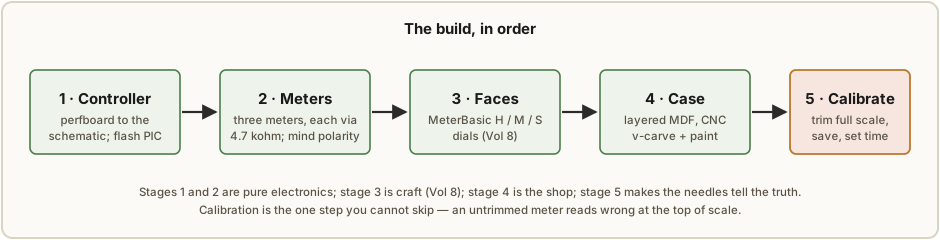
6.1 At a glance
6.1.1 Skill, time, and cost
This is Path 3 from Vol 1 — the best-documented meter clock there is, built on perfboard from a published parts list. It is a high-effort, low-cost project: the electronics are gentle (a regulated 5 V supply, one microcontroller, three resistors, three meters), and the hard parts are the enclosure fabrication (which wants a CNC router) and the calibration (which wants patience, not skill).
Table 1 — 6.1.1 Skill, time, and cost
| Skill | Comfortable soldering on perfboard; able to flash a PIC (or buy it pre-flashed); CNC or laser access for the case |
| Time | An evening for the controller; an evening to wire and re-face the meters; a day for the MDF case; an hour to calibrate |
| Cost | Low — a PIC, a handful of passives, and three analog panel meters (a few dollars each); the priciest line is the meters and the MDF |
| Voltage | 9–12 V DC in, 5 V on the board — no shock hazard (see §6.7) |
6.1.2 Tools
A normal electronics bench plus a small shop:
- Soldering iron, fine solder, flux, side cutters, a third hand.
- A PIC programmer (PICkit or equivalent) — only if you flash the chip yourself (§6.1.4). If you buy the pre-programmed chip you do not need one.
- A multimeter for continuity and for sanity-checking the 5 V rail before you seat the PIC.
- A 9–12 V DC supply (a regulated wall adapter is ideal).
- For the case: a CNC router (the original used a V90), MDF, primer and Krylon black spray, contact paper, and a spray gun or rattle-can for the white detail. A laser cutter or careful hand-tools can substitute for the routing; the v-carved detail is what wants the CNC.
- A PC running MeterBasic (Tonne Software) to draw the dial faces (Vol 8), and a printer.
6.1.3 Choosing your meters
The meters set everything downstream, so choose them before you order anything else. The full treatment is Vol 3; the short version for this build is:
- Prefer meters with a 0.5 mA range. The original uses three analog multimeters set to 0.5 mA DC. At that full-scale current a PIC output pin (good for about 25 mA) drives the meter directly through a single resistor — no transistor, no op-amp. Anything up to a few milliamps is fine; a meter whose lowest range is above 25 mA needs a buffer (Vol 4) and is not this build.
- Three matching meters look best as a panel, but they do not have to be identical — the calibration step trims each one independently, so unit-to-unit spread is forgiven.
- Bare microammeter/milliammeter movements or a multimeter on its mA range both work; a “voltmeter” is just a milliammeter with a series resistor inside (Vol 2–3), so drive it within its range or pull the movement out.
The 4.7 kΩ current-limiting resistor in the BOM is sized for 0.5 mA meters; if you pick a different full-scale current, resize it per Vol 4 before you build.
6.1.4 The chip: pre-programmed or program-it-yourself
The clock’s brain is a PIC16F628A running firmware written in PICBasic Pro. There are two honest ways to get a working chip, and the decision changes your tool list:
- Buy the pre-programmed PIC16F628 (sold for this kit). Drop it in the socket and you are done — no programmer, no compiler. This is the right choice unless you want to modify the firmware.
- Program it yourself. You need a PIC programmer and, if you want to change anything, the PICBasic Pro compiler. The original notes there is still about 20% of the 2K code space free, so there is room to hack — re-map the buttons, change the seconds behavior, add a 24-hour mode. The timebase and counting logic you would be editing is documented in Vol 5.
Either way the circuit is identical; the only difference is whether a programmer ever touches the board.
6.2 The controller on perfboard
Because the controller lives on a 2×3-inch perfboard, layout is up to you — there is no PCB to follow, just the schematic to honor. Build it, flash it (or seat the pre-flashed chip), and confirm the blue LED before you wire a single meter.
6.2.1 The bill of materials
The full controller BOM (the meters and supply are listed separately):
Table 2 — The full controller BOM (the meters and supply are listed separately)
| Qty | Part | Role |
|---|---|---|
| 1 | PIC16F628(A), pre-programmed | timebase + counting + calibration logic (Vol 5) |
| 1 | 18-pin chip socket | so the PIC is removable/re-flashable |
| 1 | 2×3-inch perfboard | the substrate |
| 1 | 2-position terminal block | 9–12 V DC input |
| 5 | 1N4401 diode | reverse-polarity protection + per-meter clamp/protection |
| 1 | 100 µF / 12 V capacitor | input filter (ahead of the regulator) |
| 1 | 47 µF / 5 V capacitor | output filter (5 V rail) |
| 1 | 0.01 µF capacitor | PIC decoupling |
| 2 | 22 pF capacitor | crystal loading caps |
| 1 | LM7805 | 5 V regulator |
| 1 | 20 MHz crystal | oscillator for the PIC |
| 4 | 4.7 kΩ resistor | three meter current-limiters + MCLR pull-up |
| 1 | 1 kΩ resistor | blue-LED series resistor |
| 3 | tactile button | time-set / calibration buttons |
| 2 | 2-position 0.1-inch pin header | scale-adjust + config jumpers |
| 2 | 0.1-inch shorting jumper | for the headers above |
| 1 | blue LED | status indicator |
Separately: 1× 9–12 V DC supply and 3× analog multimeters (prefer the 0.5 mA range).
6.2.2 Building to the schematic
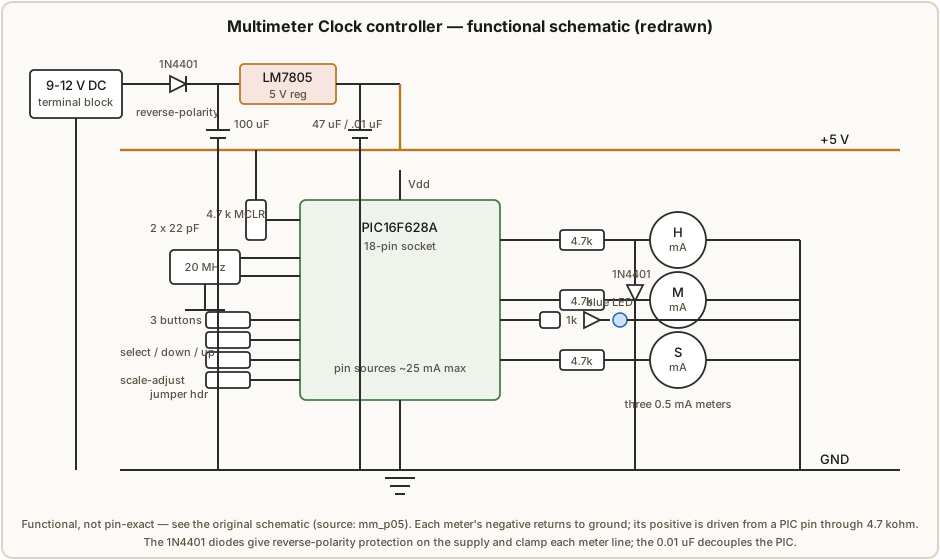
Construct the circuit per the schematic (Figure 6.2). The functional groups, and what each one is for:
- Power in → 5 V. The 9–12 V supply enters the terminal block, passes a 1N4401 for reverse-polarity protection, is smoothed by the 100 µF input cap, and is regulated to 5 V by the LM7805. The 47 µF filters the 5 V output and the 0.01 µF decouples the PIC right at its supply pins. Everything on the board runs from this 5 V rail; the meters are driven from PIC pins, also at 5 V logic levels.
- The PIC and its clock. The PIC16F628A sits in the 18-pin socket. The 20 MHz crystal with its two 22 pF loading caps sets the timebase; a 4.7 kΩ holds MCLR high so the chip runs. The firmware’s tenth-of-a-second interrupt and time-to-deflection mapping are Vol 5’s subject — here you only provide the hardware it expects.
- The three meter channels. Each meter gets its own PIC output pin, and each pin drives the meter’s positive terminal through a 4.7 kΩ current-limiting resistor. The meter’s own slow mechanical response smooths the PIC’s PWM into a steady deflection (Vol 4). The 1N4401 diodes provide reverse/clamp protection on these lines so a mis-wired or back-driven meter cannot hurt the pin.
- The user interface. Three tactile buttons (select / decrease / increase in calibration; hours / minutes / seconds in normal use), a scale-adjust pin header with a shorting jumper that drops the clock into calibration mode, and the blue LED (through its 1 kΩ) for status.
6.2.3 Programming the PIC
If you bought the pre-programmed chip, skip to §6.2.4 — just seat it in the socket (notch to the socket notch) and you are done. If you are flashing it yourself, load the Multimeter Clock firmware onto the PIC16F628A with your PIC programmer before seating it. To modify the firmware you need the PICBasic Pro compiler the original was written in; the counting logic, the interrupt, and the EEPROM trim storage you would be editing are walked through in Vol 5, and the chip has roughly 20% of its 2K free for additions.
6.2.4 Power-up check
Before wiring any meters, apply 9–12 V and watch the blue LED — it is your go/no-go signal:
- On power-up the LED lights steady. This is the start-up phase; it tells you the regulator is making 5 V and the PIC is alive.
- Once the clock is running, the LED flashes — one second on, one second off. A steady 1 Hz blink means the firmware is executing and keeping time.
If the LED never lights, kill power and check the 5 V rail at the PIC supply pins with your multimeter before suspecting the chip. If it lights steady but never starts blinking, suspect the crystal/loading caps or a bad solder joint at the oscillator pins.
6.3 Wire the meters
The wiring is deliberately simple, and polarity is the whole discipline. Set all three meters to their 0.5 mA DC range. For each meter:
- Negative lead → ground. All three meter negatives tie to the board’s ground rail.
- Positive lead → its PIC output, through the 4.7 kΩ resistor. The hours meter to the hours channel, minutes to minutes, seconds to seconds.
That is the entire connection — three positives in through three resistors, three negatives to a common ground. Because a moving-coil meter only deflects the right way when current flows the right way (Vol 2), getting a meter backwards makes its needle slam against the low stop instead of rising. Double-check each meter’s polarity before power-up. The resistor value (4.7 kΩ) is matched to the 0.5 mA range; if your meters have a different full-scale current, Vol 4 has the resistor math — do that before wiring, not after.
6.4 Re-face the meters
The meters arrive lettered in volts or milliamps, so each needs a new dial that reads time. This is summarized here and done in full in Vol 8 (the dial-face craft), but the procedure is:
- Measure the meter face in MeterBasic (Tonne Software). You enter the physical dimensions of the dial, the meter name, and the scale information, and MeterBasic draws a perfectly matched arc for your meter.
- Make three faces: a HOURS dial (0–12, or 0–24 for a 24-hour clock), a MINUTES dial (0–60), and a SECONDS dial (0–60). The original’s downloadable Hour/Minute/Second faces are the reference set.
- Print and fit. Print each face, trim it, and fit it over the existing dial so the needle sweeps the new scale.
Because MeterBasic matches the arc to the meter you measured, full scale on the printed dial lands exactly where the needle reaches full deflection — which is what makes the calibration in §6.6 meaningful. (One charming caveat from the source: cheap meters can carry odd printed markings — the original’s meters read “sunMa” and “sunWa” — so re-facing also tidies the look.)
6.5 The enclosure
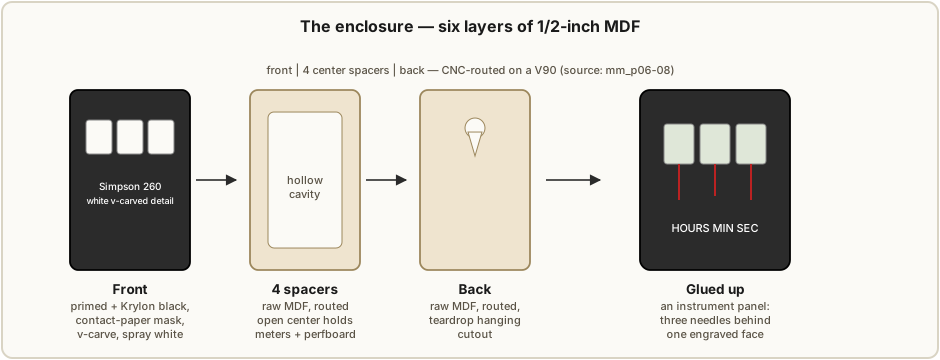
The case is what turns three panel meters into an instrument. The original is a stack of ½-inch MDF layers, CNC-routed, with a front panel v-carved and painted to imitate a Simpson 260 multimeter.
6.5.1 The layered stack
Six layers of ½-inch MDF (Figure 6.3):
- A front piece with the actual Simpson 260 detailing v-carved into it, and windows for the three meters.
- Four center spacer pieces, routed with an open center cavity that holds the meters and the perfboard. The original cut these as solid layers with one large central pocket (wasteful of wood, but jointless) rather than building the walls from offcuts.
- A back piece with a teardrop hanging cutout so the finished clock hangs on a wall.
The front piece was primed and painted with Krylon black before the details were routed; the other five layers were routed from raw MDF. The original was cut on a V90 CNC machine.
6.5.2 The contact-paper mask paint trick
The crisp white-on-black lettering is done with a mask, not a steady hand. After the front was painted black, the black surface was covered with contact paper; the details that were to end up white were then v-carved through the contact paper into the MDF. The contact paper that remains acts as a mask, so when the carved grooves are sprayed white, only the carved detail takes paint — peel the contact paper and you are left with clean white lettering on the black panel. It is the single most repeatable way to get fine instrument-style detail without hand-painting.
6.6 First power-up and calibration
With the controller flashed, the meters wired, and (optionally) the faces fitted, power up the finished clock for the first time. On first power-up the PWM outputs default to about 50% of maximum, so the needles will sit roughly mid-scale and not at the correct time — that is expected. Before the clock means anything, you must trim each meter to true full scale.
6.6.1 The scale-adjust procedure
Calibration uses the scale-adjust jumper and the three buttons:
- Insert the jumper across the scale-adjust pin header. This drops the clock into calibration mode; in this mode only the meter being adjusted is powered.
- Button 1 (the hours button) selects which meter you are adjusting — step it to the hours meter, then the minutes meter, then the seconds meter.
- Button 2 (the minutes button) decreases the powered meter’s full-scale setting.
- Button 3 (the seconds button) increases the powered meter’s full-scale setting.
- Trim each meter so its needle sits at exactly full scale — the very top of the dial. Do all three.
- Remove the jumper to return to normal clock mode. Removing the jumper is what saves the settings to non-volatile memory (EEPROM, Vol 5), so the trims survive a power cycle.
Then set the time (§6.6.3).
6.6.2 Why this step is non-optional
A meter-movement clock maps time onto deflection: noon is full scale on the hours meter, sixty is full scale on minutes and seconds. If a meter’s idea of “full scale” is even slightly off, every reading is wrong — and the error is worst at the top of the dial, exactly where you most want to trust it. An untrimmed meter that reaches “full scale” at 90% of the dial will read 11 o’clock as noon; one that overshoots will peg before noon. The trim per meter is what makes three independent analog movements, with three different full-scale currents and internal resistances, all read true against their printed dials. You cannot calibrate it out in software you do not control, and you cannot eyeball it from mid-scale — this is the step that separates a clock that tells the time from a clock that merely waves three needles around. Skip it and the dial lies.
6.6.3 Setting the time
Once calibrated, set the time with the same three buttons, now in their normal roles:
- Button 1 (hours) increments the current time by one hour.
- Button 2 (minutes) increments the current time by one minute.
- Button 3 (seconds) resets the seconds to zero — press it on a time signal to sync.
From there the PIC keeps time on its own, the blue LED blinks its steady 1 Hz, and the three needles sweep. There is no battery-backed RTC in this design, so the time is re-entered after a power loss (a hack target if you flash your own firmware — Vol 5).
6.7 Safety
This is the consolidated safety section for the meter-movement clock, and it is mandatory
reading before you build — but its tone is deliberately calm, because the electronics are
genuinely benign. The hub-wide safety baseline is _shared/safety.md; this build sits in its
lowest tier.1
6.7.1 Low voltage — there is no shock hazard
The whole clock runs from a 9–12 V DC wall supply into a 5 V regulator. There is no high voltage anywhere — no mains on the board, no charged high-voltage capacitor, nothing that can deliver a shock. Unlike the Nixie (~170 V) and Scope/CRT (kilovolts) builds elsewhere in this hub, you can probe this circuit live with bare hands and an ordinary multimeter. The cautions below are about not damaging parts, not about personal injury.
6.7.2 The meter is the fragile part
The real electrical discipline is protecting the moving-coil movements, which are delicate:
- Never drive a meter past full scale. Over-current slams the needle hard against its mechanical stop and can overheat the fine coil wire; a bent pointer or a cooked coil is hard to fix. This is the reason for the 4.7 kΩ current-limiting resistors and the reason you calibrate before trusting the dial (§6.6) — ramp gently and let the trim set the ceiling.
- Observe meter polarity (§6.3). A backwards meter deflects the wrong way against its stop.
- Mind ordinary bench care — don’t short the 5 V rail, respect the LM7805’s dissipation, and unplug the soldering iron when you walk away.
6.7.3 The enclosure shop hazards
The only conventional hazards in this whole build are in the case work, and they are the ordinary shop ones — take them seriously even though the electronics are harmless:
- CNC router. Moving cutter and clamped stock — follow normal machine-tool practice: secure the workpiece, keep hands and loose clothing clear, wear eye protection, and don’t reach into a running spindle.
- MDF dust. Routing MDF produces very fine dust that contains binder resins; it is an inhalation irritant. Ventilate, run dust extraction, and wear a dust mask/respirator.
- Spray paint and primer fumes. The Krylon black, the primer, and the white detail spray are solvent-based — spray with ventilation and away from ignition sources.
- Sharp tools. Trimming contact paper and dial faces, peeling masks, deburring routed MDF — ordinary cut hazards; mind the blade.
None of these is unique to this clock; they are the standard cautions of a small woodshop, and they are the only hazards here. There is no high-voltage warning in this volume because there is no high voltage.
References
- Multimeter Clock by abbtech (Alan Parekh, Hacked Gadgets), Instructables, August 15, 2010. The worked build of this volume: three analog multimeters on 0.5 mA DC (hours/minutes/seconds), PIC16F628A at 20 MHz, each meter driven from a PIC pin through a 4.7 kΩ resistor, PICBasic Pro firmware with a scale-adjust calibration mode that stores per-meter full-scale trims in non-volatile memory, custom MeterBasic dial faces, and a layered ½-inch MDF CNC enclosure with v-carved Simpson 260 detailing. Construction article, parts list, schematic, faces, and build photos held in
02-inputs/(extracted pagesmm_p01.png … mm_p09.png). Source: http://www.instructables.com/id/Multimeter-Clock/; author blog: http://hackedgadgets.com; personal site: http://alan-parekh.com. - MeterBasic — Tonne Software, the dial-face program used to draw the matched HOURS / MINUTES / SECONDS scales (full treatment in Vol 8). http://www.tonnesoftware.com.
- PICBasic Pro — the compiler the firmware was written in; needed only to modify the firmware (a PIC programmer is needed to flash a non-pre-programmed chip). Counting logic and EEPROM trim storage are documented in Vol 5.
- Cross-references: Vol 2 (moving-coil physics), Vol 3 (meter selection & sourcing — prefer 0.5 mA), Vol 4 (PWM drive + 4.7 kΩ resistor sizing + the 25 mA pin limit + calibration math), Vol 5 (PIC16F628A timebase, the 1/10 s interrupt, EEPROM trims), Vol 7 (buy the kit / a finished clock), Vol 8 (dial faces & the instrument-panel enclosure). The hub-wide safety baseline is
_shared/safety.md.
Footnotes
-
_shared/safety.mdplaces meter-movement, Numitron, LED/discrete-logic, TIX, and 3D-printed mechanical builds in the low-voltage tier (“a few volts to tens of volts; generally safe; normal bench care”). The hazard is component damage — chiefly to the fragile moving-coil meters — not personal injury. The high-voltage rules in that document (discharge before touching, one-hand-behind-the-back, isolation transformers) apply to the Scope/CRT and Nixie builds, not to this one. ↩
Comments (0)