Meter Movement · Volume 5
Timebase & Counting Logic
How a 20 MHz crystal becomes a 1/10-second tick, how tenths roll up into hours, and how each unit of time becomes a needle deflection
A meter-movement clock spends almost all of its silicon not on the meters but on the question what time is it? The three needles of the collected Multimeter Clock (Vol 1, Vol 6) are only ever as right as the number the PIC16F628A is holding in its counters, and that number is only ever as steady as the 20 MHz crystal ticking beside the chip. This volume is the timekeeping core: how the crystal is divided down to a precise tenth-of-a-second interrupt, how that interrupt feeds a chain of counters from tenths up to hours, how the current time is turned back into a PWM duty for each meter (the bridge to Vol 4’s drive electronics), and what the design gives up by keeping time on a bare crystal with no battery-backed real-time clock. The honest headline, stated once and returned to in §5.7: this build keeps excellent rate but has no holdover — pull the plug and it forgets the time, powering back up at a default and waiting to be set.
The whole counting and mapping job is small — it fits in a 2 K PIC with about 20 % of the program space still free1 — but it is the part that makes the difference between a clock and three twitching meters.
5.1 The timebase — a 20 MHz crystal divided to a tenth of a second
5.1.1 From crystal to instruction clock
The PIC16F628A runs from a 20 MHz parallel-resonant crystal across the OSC1/OSC2
pins, with the two 22 pF loading capacitors specified in the parts list (Vol 6) tuning
the oscillator to the crystal’s rated load capacitance. Like every classic PIC, the chip
divides the oscillator by four to produce the instruction clock:
f_instruction = f_osc / 4 = 20 MHz / 4 = 5 MHzSo the processor executes 5 million instruction cycles per second, and one instruction cycle (one “Tcy”) lasts:
T_cy = 1 / 5 MHz = 0.2 µs = 200 nsEvery counting decision below is ultimately measured in these 0.2 µs ticks. The crystal is the only frequency reference in the collected design — there is no second oscillator, no mains-frequency reference, and no RTC — so the accuracy of the entire clock is the accuracy of this one part (§5.6).
5.1.2 Dividing down to a 1/10-second tick
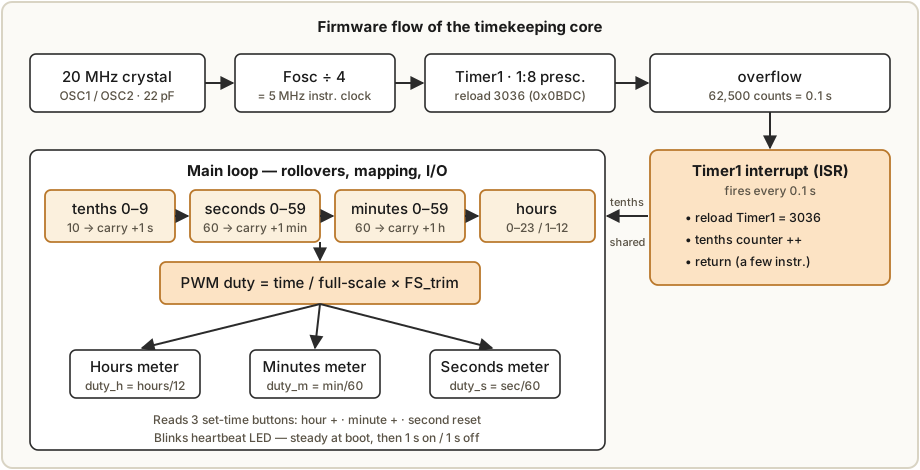
Keeping time directly in 0.2 µs cycles would be hopeless, so a hardware timer divides the instruction clock down to a comfortable interrupt rate. The firmware’s chosen heartbeat is ten interrupts per second — a tick every 0.1 s — because a tenth of a second is fine enough to drive a smooth seconds sweep (§5.5) yet coarse enough that the interrupt service routine (ISR) costs almost no CPU time.
A tenth of a second is a long time in instruction cycles:
cycles per 0.1 s = 0.1 s / 0.2 µs = 100,000 µs / 0.2 µs = 500,000 instruction cycles500,000 overflows an 8-bit timer (max 256) and a 16-bit timer (max 65,536) alike, so the timer’s prescaler is used to stretch its reach. Using the 16-bit Timer1 with a 1:8 prescaler, the timer is clocked at:
f_timer = f_instruction / 8 = 5 MHz / 8 = 625 kHz → 1.6 µs per timer countThe number of timer counts in one tenth-second is then:
counts per 0.1 s = 0.1 s / 1.6 µs = 100,000 µs / 1.6 µs = 62,500 countsThat 62,500 lands cleanly inside the 16-bit range, so the ISR uses the standard reload (preload) trick: instead of letting Timer1 count from 0 to 65,535 (which would take 65,536 counts, the wrong interval), the ISR reloads the timer after each overflow so that it has exactly 62,500 counts left to go before the next overflow:
reload value = 65,536 − 62,500 = 3,036 (0x0BDC)Loaded with 3,036, the timer counts 3,036 → 65,535 (that’s 62,500 counts) and overflows exactly 0.1000 s later, with no remainder — the division is exact, so there is no systematic rounding error in the tick itself. (PICBasic Pro firmware can also reach the same 0.1 s cadence with its higher-level timing primitives; the prescaler-and-reload scheme here is the underlying arithmetic any implementation must satisfy.) The interrupt fires, the ISR reloads 3,036, bumps the tenth-second counter, and returns. Everything else — the rollover chain and the deflection mapping — happens back in the main loop.
5.2 Counting logic — tenths up through hours
5.2.1 The counter chain
Time is held as an ordinary mixed-radix odometer. Each stage counts up until it reaches its modulus, then resets and carries one unit into the next stage:
Table 1 — modulus, then resets and carries one unit into the next stage
| Stage | Counts | Rolls over at | Carries into |
|---|---|---|---|
| Tenths | 0–9 | 10 tenths = 1 s | Seconds |
| Seconds | 0–59 | 60 s = 1 min | Minutes |
| Minutes | 0–59 | 60 min = 1 h | Hours |
| Hours | 0–23 (or 1–12) | 24 h (or 12 h) = 1 day | (wraps) |
The construction article describes exactly this two-part structure: “An interrupt fires every 10th of a second to increment a 10th-second counter. Another routine checks to see if we have at least one full second of time; if we do the current time is incremented by a second.”1 The same carry logic then walks up the chain.
5.2.2 Why the work is split between the ISR and the main loop
The division of labor is deliberate and is the usual embedded pattern:
- The ISR does the minimum. On each Timer1 overflow it reloads 3,036 and increments the tenth-second counter — a few instructions — then returns. Keeping the ISR short means the tick is never delayed by slower work, which protects the clock’s rate.
- The main loop does the rollovers and the mapping. Outside interrupt context, the loop watches the tenth-second counter. When ten tenths have accumulated it subtracts ten, increments seconds, and runs the carry chain (60 s → minute, 60 min → hour, 24 h or 12 h → day). Each time the time changes it recomputes the three PWM duties (§5.4) and refreshes the outputs. The loop also runs the heartbeat LED — steady through boot, then blinking 1 s on / 1 s off once the clock is running (Vol 6) — and polls the buttons.
Because the carry logic and the meter updates live in the main loop, they can take as long as they like without disturbing the timebase: the ISR keeps incrementing tenths underneath them, and the loop simply catches up. This is what lets the same 2 K program comfortably hold the counters, the mapping math, the calibration mode, and still leave ~20 % free.
5.2.3 Setting the time with three buttons
There is no automatic time source, so the user sets the clock with the same three tactile buttons used for calibration (Vol 4, Vol 6). In clock mode their roles are:1
- Button 1 — hour +: increments the current time by one hour.
- Button 2 — minute +: increments the current time by one minute.
- Button 3 — second reset: resets the seconds (and tenths) to zero — the standard way to zero-beat the clock against a time reference on the top of a minute.
Incrementing minutes does not carry into hours in setting mode (so you can dial each field independently), and resetting seconds gives a clean way to start the clock exactly on a known second. The same three buttons take on their scale-adjust meanings when the calibration jumper is fitted (§5.5.3, Vol 4) — a tidy reuse that keeps the parts count down.
5.3 The bridge to deflection — time as a fraction of full scale
The output side of the firmware is where this volume meets Vol 4. Each meter is a moving-coil movement whose needle deflects in proportion to the current through it (Vol 2), and Vol 4’s driver turns a PWM duty into that current: a PIC pin switches between 0 V and 5 V, a 4.7 kΩ series resistor and the meter’s own slow mechanical response average the switching into a steady deflection, and the needle settles at a position proportional to the duty cycle. The firmware’s job is therefore to express each unit of time as a duty between 0 % and 100 % of that meter’s calibrated full scale.
The key word is calibrated. Full scale is not a fixed PWM number — it is the per-meter trim stored in EEPROM during scale-adjust (§5.5.3, Vol 4), because three real meters never reach full deflection at the same duty. So the mapping is always written as a fraction:
duty(meter) = (time value on that meter) / (that meter's full-scale value) × FS_trimwhere FS_trim is the stored full-scale PWM level for that meter. Conceptually, though, the
fractions are simple ratios of the time itself, and that is the clearest way to see them.
5.3.1 The three mappings
- Seconds meter — 0 to 59 seconds maps to 0 % to 100 % of full scale:
duty_s = seconds / 60. (Using 60 rather than 59 as the divisor makes the needle reach full scale just as it rolls to the next minute, which reads more naturally than pinning at full scale for a whole second.) - Minutes meter — 0 to 59 minutes maps the same way:
duty_m = minutes / 60. - Hours meter — 0 to 12 (a 12-hour dial) or 0 to 24 (a 24-hour dial) maps to 0 %–100 %:
duty_h = hours / 12orhours / 24. The collected build re-letters its hours meter for a 12-hour scale; the two-meter “So Analog” parts in this hub include a 0–24 HOURS face for the alternative (Vol 1, Vol 3).
5.3.2 The hours needle must advance smoothly, not jump
A subtle but important detail: the hours needle should not sit on “7” for the whole hour and then jump to “8”. A real clock’s hour hand creeps continuously, and so should this one. To get that, the hours duty uses the fractional hour — hours plus the elapsed minutes (and even seconds) expressed as a fraction of an hour:
fractional_hours = hours + minutes/60 + seconds/3600
duty_h = fractional_hours / 12     (12-hour dial)
So at half past seven the hours needle sits halfway between 7 and 8, exactly where a wall clock’s hour hand would be. This is purely a firmware choice — the same counters, mapped with the fractional term included — and it is one of the things that makes a meter clock read as a clock rather than as three independent gauges.
5.4 Worked example — the deflections at 7:30:15
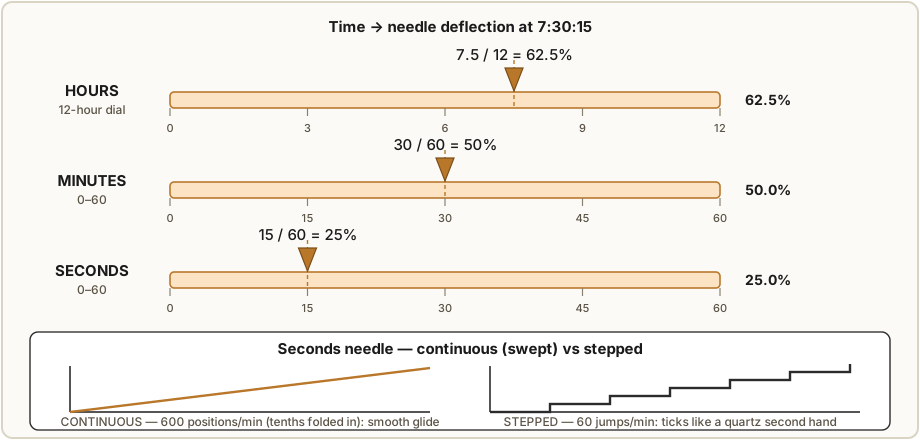
Take the instant 7:30:15 on a clock with a 12-hour hours meter, and compute each meter’s duty as a fraction of its calibrated full scale.
Hours meter (12-hour dial), advancing smoothly:
fractional_hours = 7 + 30/60 + 15/3600
                 = 7 + 0.5 + 0.00417
                 = 7.504 h
duty_h = 7.504 / 12 = 0.6253 → 62.5 % of full scale
The seconds term (15/3600 ≈ 0.004 h) shifts the needle by only ~0.03 % of full scale — far
below what the eye or the movement can resolve — so in practice the hours mapping 7.5 / 12 = 62.5 % from minutes alone is identical to four significant figures. The point of carrying the
fractional hour is the minutes term (the 0.5), which moves the needle a full half-division;
the seconds term is negligible and can be dropped.
Minutes meter:
duty_m = 30 / 60 = 0.500 → 50.0 % of full scale(Carrying the seconds for smoothness gives 30.25/60 = 50.4 %, a 0.4 % nudge — optional, and
discussed for the seconds meter next.)
Seconds meter:
duty_s = 15 / 60 = 0.250 → 25.0 % of full scaleSo at 7:30:15 the three needles sit at roughly 62.5 %, 50 %, and 25 % of their
respective dials. Each duty is then scaled by that meter’s stored FS_trim before being
emitted as PWM — for example, if the seconds meter’s full-scale trim is a duty of 92 % (the
PWM level Vol 4’s calibration found reaches the mechanical full-scale stop), the actual PWM
emitted is 0.25 × 92 % = 23 %. The re-faced dial then reads the needle as “15”.
5.5 Continuous vs stepped seconds — the meter clock’s signature
5.5.1 Why a meter clock can sweep
A digital clock can only jump — its display has no in-between states. A meter-movement clock is different: the seconds needle is a physical pointer that can sit at any angle, and the movement’s own inertia and damping (Vol 2) smooth whatever the driver hands it. This is the meter clock’s signature, and the 1/10-second timebase is what makes it available.
5.5.2 The two driving choices
-
Stepped seconds. Update the seconds duty only on the whole second: 60 discrete needle positions per minute. The needle ticks from one second-mark to the next, mimicking a quartz wall clock’s stepping second hand. Simple, and recognizably “clock-like.”
-
Continuous (swept) seconds. Update the seconds duty on every tenth-second interrupt, including the tenths in the value:
duty_s = (seconds + tenths/10) / 60Now there are 600 needle positions per minute instead of 60, and the pointer glides smoothly around the dial rather than ticking. Each tenth advances the needle by
1/600 = 0.167 %of full scale — a step far smaller than the movement’s mechanical resolution, so what you see is a continuous sweep, not ten little jumps per second. This is the look most builders want from a meter clock, and it costs nothing but using the tenths the ISR is already counting.
5.5.3 The tenths make the sweep possible
The reason the smooth sweep is essentially free is that the ISR already maintains the tenth-second counter for timekeeping; the continuous mapping simply reads it instead of discarding it. The meter movement does the rest of the work: with the needle already a heavily damped, slow-responding mechanical low-pass (Vol 2, Vol 4), even a 10 Hz update is smoothed into a glide. The same trick can sweep the minutes needle continuously (carry the seconds, as in §5.4) so it too creeps rather than ticks; the hours needle already creeps via its fractional-hour mapping (§5.3.2). The result is three pointers all moving like a fine mechanical clock’s hands — the whole reason to build the thing.
A practical caution from Vol 4 carries over here: drive the ramp gently and never past the stored full scale. A moving-coil needle slammed to its end-stop can bend a pointer, and the firmware’s full-scale trim (§5.6) is precisely the guard rail that keeps the swept needle inside the dial.
5.6 EEPROM — the calibration that survives power-off (when the time does not)
5.6.1 What is stored, and why it must be
Three real panel meters never reach full-scale deflection at the same PWM duty — coil resistance, magnet strength, and hairspring tension all vary unit to unit (Vol 2, Vol 3). So the firmware has a scale-adjust mode (Vol 4, Vol 6): fit the calibration jumper, and the three buttons let you select a meter, then decrease or increase its full-scale PWM level until its needle sits exactly on the full-scale mark. On first power-up the PWM outputs default to about 50 %1; calibration walks each meter from there to its true full scale. When the jumper is removed, “the settings will be saved to non-volatile memory.”1
That non-volatile memory is the PIC’s on-chip EEPROM (128 bytes on the 16F628A). It holds
the three FS_trim values — one per meter — and these are read back at every power-up so the
clock comes up already calibrated. EEPROM is the right home for them: it retains its contents
with the power off and survives effectively unlimited reads, and the trims are written only
during the deliberate calibration step, not on every tick (which matters because EEPROM has a
finite write-endurance, on the order of 10^5–10^6 writes per cell).
5.6.2 The asymmetry to be honest about
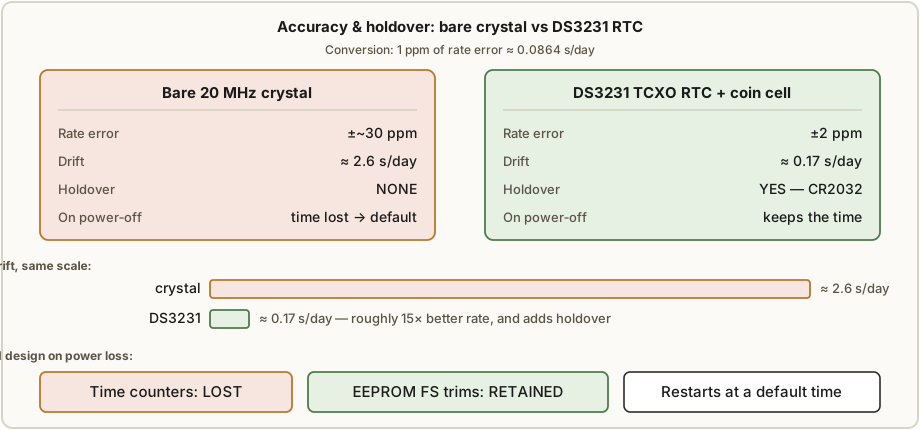
Here is the distinction this volume keeps returning to. The calibration survives power-off; the time does not. The EEPROM trims are non-volatile, so a power cycle never makes you re-calibrate. But the time itself lives only in the PIC’s RAM counters, clocked by the crystal — there is no battery, no real-time clock, and no holdover. Cut the power and the counters are lost; restore it and the firmware comes up at a default time with the heartbeat blinking, waiting for the three buttons to set it again. The meter clock remembers how to point but not where the day is. §5.7 is about closing that gap.
5.7 Improving the timebase — accuracy, holdover, and 12-vs-24
5.7.1 How accurate is a bare crystal?
Quartz crystals are specified in parts per million (ppm) of frequency error. The useful conversion is:
1 ppm of rate error = 1 × 10⁻⁶ × 86,400 s/day = 0.0864 s/dayA typical inexpensive 20 MHz crystal with its 22 pF loading caps is good to perhaps ±20 to ±50 ppm over room temperature once the load is roughly right. Taking a mid value of ±30 ppm:
drift ≈ 30 ppm × 0.0864 s/day/ppm ≈ 2.6 s/day → roughly ±1 minute per few weeksSo a bare-crystal meter clock keeps time to a few seconds a day — perfectly acceptable for a charming desk piece you re-set occasionally, but it will visibly wander over a month, and it has zero holdover: any power blip resets it entirely (§5.6.2). The error is also temperature-dependent — a tuning-fork crystal’s frequency falls off as roughly the square of the temperature offset from its turnover point, so a clock that runs warm in a sealed MDF case (Vol 6) drifts a little more than the bench figure suggests.
5.7.2 Adding a DS3231 / DS1307 for holdover and rate
The single biggest upgrade to the collected design is to stop keeping time on the bare crystal and add a battery-backed real-time clock chip:
-
DS1307 — an I²C RTC with a coin-cell backup input. It keeps seconds/minutes/hours (and the calendar) running across power loss on a CR2032, giving the holdover the bare design lacks. Its accuracy still depends on an external 32.768 kHz crystal, so its rate is similar to a good crystal (tens of ppm) — the win is the battery backup, not better accuracy.
-
DS3231 — an I²C RTC with the 32.768 kHz crystal integrated and temperature-compensated (TCXO). It is specified to about ±2 ppm at room temperature:
drift ≈ 2 ppm × 0.0864 s/day/ppm ≈ 0.17 s/day → well under a minute per yearplus the same coin-cell holdover. This is the upgrade most builders make: roughly 15× better rate than the bare crystal and it remembers the time across a power cut.
Wiring an RTC changes the firmware’s role: instead of being the timebase, the PIC reads hours/minutes/seconds from the RTC over two I²C lines and spends its cycles on the mapping and PWM. The 1/10-second interrupt can stay — driven now by the PIC’s own timer purely to generate the smooth sweep tenths (§5.5) between the RTC’s once-per-second updates — so you keep the glide and gain holdover and accuracy. (The TIX clock catalogued in this hub’s inputs uses a DS1302 RTC for exactly this reason; note the cross-reference but recall from Vol 1 that the TIX itself is a different, non-meter project.)
5.7.3 12-hour vs 24-hour mapping
The choice between a 12-hour and 24-hour hours dial is a one-line firmware change in the hours mapping (§5.3.1): divide the fractional hour by 12 or by 24. A 12-hour dial gives a familiar clock face and twice the angular resolution per hour (each hour spans 1/12 = 8.3 % of the dial instead of 1/24 = 4.2 %), at the cost of AM/PM ambiguity. A 24-hour dial — like the 0–24 HOURS re-faced meter in this hub’s two-meter parts (Vol 1, Vol 3) — removes the ambiguity and has a pleasing “instrument” honesty, but packs the hours into half the swing, so a half-hour’s creep is a smaller, harder-to-read needle move. Either way the counters are identical (hours 0–23 internally); only the divisor in the deflection map and the dial lettering (Vol 8) change.
5.7.4 The trade-off of the minimal collected design
The collected Multimeter Clock deliberately takes the cheap path: a crystal, no RTC, no battery. The payoff is a parts list of a few dollars and a 2 K firmware with room to spare; the price is a few seconds a day of drift and a reset to a default time on every power-up. For a project whose whole point is the look of three sweeping needles, that is a defensible trade — you re-set it after a power cut the same way you wind a mechanical clock you let stop. But anyone who wants a clock to leave running and trust should spend the dollar or two on a DS3231; it is the one change that turns a charming demonstration into a clock you do not have to babysit. The needle drive (Vol 4), the dials (Vol 8), and the case (Vol 6) are all unchanged — only the timebase improves.
5.8 Summary — what the counting core gives you
The timekeeping volume reduces to a short chain of facts:
- A 20 MHz crystal becomes a 5 MHz instruction clock (÷4); a 16-bit timer with a 1:8 prescaler reloaded to 3,036 overflows every 62,500 counts = exactly 0.1 s, firing the interrupt that drives everything.
- The ISR does the minimum (increment tenths); the main loop runs the odometer (tenths → seconds 0–59 → minutes 0–59 → hours 0–23/1–12), recomputes deflections, blinks the heartbeat, and reads the three set-time buttons.
- Each unit of time becomes a PWM duty = time / full-scale-units, scaled by that meter’s EEPROM full-scale trim — seconds and minutes /60, hours /12 or /24, with the hours needle advancing smoothly via the fractional hour (at 7:30:15: ~62.5 %, 50 %, 25 %).
- Folding the tenths into the seconds map turns 60 steps/minute into 600, giving the smooth needle sweep that is the meter clock’s signature — essentially free, because the ISR already counts the tenths and the movement filters the rest (Vol 2, Vol 4).
- The EEPROM trims survive power-off; the time does not — the bare crystal drifts a few s/day and has no holdover. A DS3231 RTC (±2 ppm ≈ 0.17 s/day) plus a coin cell fixes both, and is the one upgrade worth making to the otherwise-minimal collected design.
With the time computed and mapped to a duty, the rest is Vol 4’s drive electronics turning that duty into a coil current, and Vol 6’s build turning all of it into a clock.
References
- Microchip PIC16F628A Data Sheet (DS40044) — Fosc/4 instruction clock, Timer0/Timer1 prescalers and the 16-bit Timer1 with reload, 128 bytes of on-chip data EEPROM and its write-endurance, oscillator modes and crystal loading. Microchip Technology Inc.
- Maxim/Analog Devices DS1307 (I²C RTC with battery backup) and DS3231 (TCXO I²C RTC, ±2 ppm) data sheets — for the holdover/accuracy upgrade of §5.7.
- Cross-references within this series: Vol 1 (overview and the four subsystems), Vol 2 (moving-coil physics, damping, the needle as a mechanical low-pass), Vol 3 (full-scale current and meter selection), Vol 4 (PWM drive, the 4.7 kΩ resistor, filtering, and the scale-adjust calibration that produces the EEPROM trims), Vol 6 (the worked build, parts list, and firmware flashing), and Vol 8 (re-faced 12-hour vs 24-hour dials).
Footnotes
-
Multimeter Clock by abbtech (Alan Parekh, Hacked Gadgets), Instructables, 2010 — “Step 1: How it Works” (the tenth-second interrupt and the routine that increments the time by one second), “Step 2: Building the Clock Circuit” (PICBasic Pro firmware, ~20 % of the 2 K PIC code space free, 20 MHz crystal, the blue-LED steady-then-blinking heartbeat), and “Step 5: How to use the Multimeter Clock” (the three buttons in clock mode — hour +, minute +, second reset; the scale-adjust mode defaulting to ~50 % PWM on power-up and saving trims to non-volatile memory). Source: http://www.instructables.com/id/Multimeter-Clock/; author blog http://hackedgadgets.com. Held in this hub’s
02-inputs/Simpson/. ↩ ↩2 ↩3 ↩4 ↩5
Comments (0)