LED · Volume 9
The Collected Project & Troubleshooting
A decision-by-decision walk-through of the KABtronics design, its longevity, and the use-your-brain method that gets a 2,700-joint board working
This volume does two jobs. First it walks the one collected design, the KABtronics Transistor Wall Clock, decision by decision: not just what the clock does but why each choice was made and how the choices fit together into a single signal chain — because the clock only makes sense as a whole once you can see why a mains timebase wants a noise filter, why a counter is built from toggle flip-flops, and why the decode is split into two ranks of diodes. The building-block volumes (Vols 2–6) prove each circuit in isolation; here we assemble them and read the finished machine end to end.
Second, and at greater length, it is the troubleshooting volume — the practical heart of the whole series. A KABtronics build is roughly 1,256 components and over 2,700 solder joints,1 and a board that large almost never lights up correctly on the first power-up. The manual’s “In Case of Difficulty” section is built around a single sentence that is worth memorising: the most useful tool you have when troubleshooting is your brain.2 There is no automated test, no built-in self-check, no logic analyser hook. What gets the board working is reasoning from a symptom to a cause — and because the logic is fully exposed, that reasoning is unusually tractable. This volume lays out that method in detail.
9.1 The design walk-through: five choices, one chain
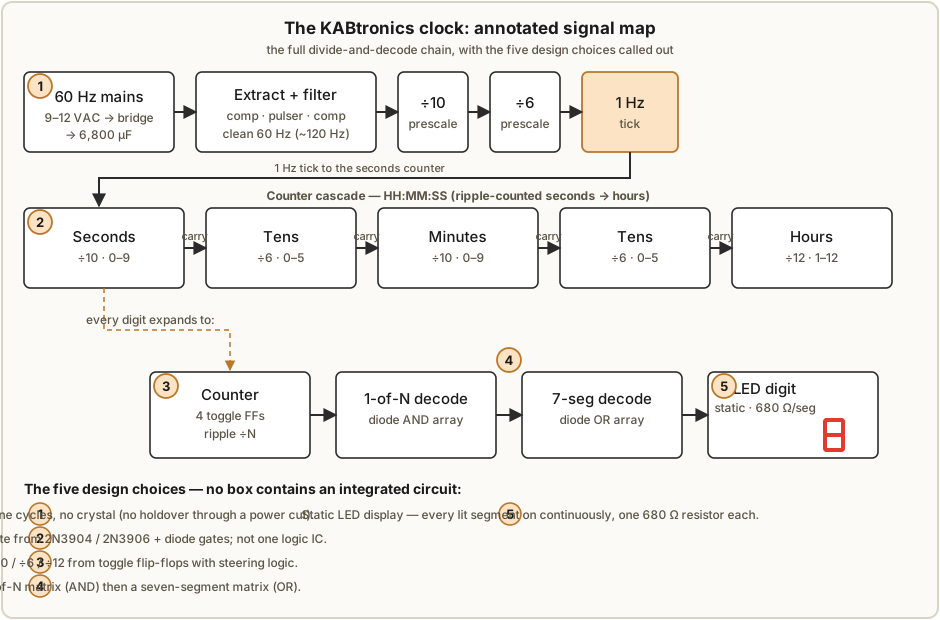
Every design is a stack of decisions, and the KABtronics clock makes five big ones. Read in order they are the signal chain, from the wall plug to the lit segment.
9.1.1 Choice 1 — the timebase is the mains, not a crystal
The clock counts cycles of the 60 Hz power line rather than a quartz crystal (Vol 6). The reasoning is a clean trade. The utility holds the long-term average line frequency extremely accurately — over days and weeks the clock keeps better time than a cheap crystal would, for free, with no trimming. The cost is twofold: there is no holdover (nothing keeps time through a power cut — the clock simply stops and must be reset), and the timebase is only as clean as the line, which is full of switching transients and noise.
The elegant part of the choice is that the same circuit that extracts the 60 Hz also rejects the noise. A comparator squares up the soft rectified sine; a pulser fires a fixed pulse and charges a small ramp capacitor; a second comparator re-squares the result. Because the pulser refuses to retrigger until its ramp has run, the network is dead to anything faster than the line — it behaves as a ~120 Hz brick-wall filter, so a noise spike riding on the mains cannot sneak an extra edge into the counter chain (Vol 6). The timebase decision and the noise-immunity decision are one decision.
9.1.2 Choice 2 — the logic is discrete transistors and diode gates
Every gate and every storage element is built from individual 2N3904 (NPN) and 2N3906 (PNP) transistors, with diode AND / OR / And-Or gates doing the combinational steering (Vol 3). This is the choice that makes the whole project what it is: there is not a single logic IC on the board. A transistor used as a saturating switch is the atom; two of them cross-coupled make a bistable latch; a small 220 pF / 100 kΩ edge-trigger network turns the latch into a toggle flip-flop. The diode gates cost almost nothing and steer the counters and feed the decoders. The penalty — over a thousand parts and 2,700 joints — is the point of the exercise: the logic is visible and probeable, every bit held in a transistor you can put a finger on.
9.1.3 Choice 3 — counting is toggle-flip-flop decade/÷6/÷12 chains
The dividers are ripple counters of toggle flip-flops with steering logic (Vol 4). Four toggle flip-flops in a row naturally divide by sixteen; a few diode gates that detect the unwanted states and force an early reset (or steer the carry) cut that to ÷10 for the units digits, ÷6 for the tens-of-seconds and tens-of-minutes, and ÷12 for the hours. Chained, they realise the spine of the clock:
60 Hz → ÷10 → ÷6 → 1 Hz → [÷10 sec] → [÷6 tens] → [÷10 min] → [÷6 tens] → [÷12 hours]
Toggle flip-flops were chosen over any other counter style because they are the simplest thing that divides — one bit per stage, a carry that ripples to the next stage, and the same cell repeated everywhere so the board is regular and the BOM is short. The cost is the usual ripple-counter caveat (the stages settle in sequence, not all at once), which does not matter at 60 Hz.
9.1.4 Choice 4 — decode is two diode matrices, 1-of-N then seven-segment
A counter’s state is a four-bit binary number; turning it into a lit numeral is done in two ranks of diode logic rather than one (Vol 5). The first matrix is a one-of-N decoder — a diode AND array that lights exactly one line for each binary state (one of ten for a decade, one of six, one of twelve). The second matrix is a seven-segment decoder — a diode OR array that maps each active numeral line onto the set of segments that draw it. The split is deliberate: a one-hot intermediate is far easier to design, lay out, and debug than a single binary-to-seven-segment map, and — as the troubleshooting half of this volume leans on heavily — it cleanly separates “which numeral” from “which segments”, so a fault localises to one rank or the other.
9.1.5 Choice 5 — the display is statically driven LEDs, one resistor per segment
The six seven-segment LED digits (plus single LEDs for the colons) are statically driven: every lit segment is on continuously, each through its own 680 Ω current-limiting resistor (Vol 2). There is no multiplexing and no scan. The choice trades parts count and power for simplicity and brightness: static drive needs a resistor and a drive transistor per segment (many parts), but it needs no scan oscillator, no timing, and no refresh logic, every digit is at full steady brightness, and there is nothing to flicker or tear. Given that the rest of the clock is already a thousand discrete parts, the extra resistors are noise, and the freedom from scan timing is worth a great deal.
9.1.6 How the five fit together
Read the chain once more as a sentence: the mains (1) is squared and noise-filtered into a clean 60 Hz; discrete-transistor logic (2) arranged as toggle-FF counters (3) divides that down to 1 Hz and then counts the six digits; each count is turned into a numeral by two diode matrices (4); and the numeral lights a static LED (5). Each choice hands a clean signal to the next — square wave, then a divided tick, then a binary count, then a one-hot line, then a segment pattern — and that clean hand-off is exactly what makes the troubleshooting method below work: you can put a probe between any two stages and know what the signal there should look like.
9.2 Longevity and maintenance
A discrete clock has no firmware to rot and no proprietary chip to go out of stock — which means that with ordinary care it can run for decades, and every part that does wear is user-replaceable. Three components are worth watching.1
- The 6,800 µF reservoir capacitor. Large aluminium electrolytics dry out; expect this one to need replacing in roughly 10–15 years. Symptoms are supply ripple and erratic behaviour. A like-for-like replacement (same capacitance, equal-or-greater voltage rating, correct polarity) is a five-minute job.
- The LED displays. LEDs do not fail abruptly so much as dim with age, to perhaps ~50 % of original brightness over 10–20 years. Replacement is possible but is the fussiest of the three because each digit is multi-pin.
- The large rectifier (bridge) diodes. These “work hard” — they carry the full supply current every half-cycle — and are the parts most likely to eventually fail outright. They are cheap and easy to swap.
None of this requires special skill beyond the soldering already done to build the clock, and none of it is a high-voltage hazard (Vol 1, §1.11): the whole board runs from a low-voltage wall transformer. The maintenance story is simply the build story in reverse, one part at a time.
9.3 Troubleshooting — use your brain
Now the centrepiece. The KABtronics manual’s troubleshooting philosophy is not a flowchart of part numbers; it is a way of thinking. The board is fully exposed, every signal is accessible, and the signal chain is known — so the job is to reason from what you see to where it must be wrong. The manual states the method in one line and means it literally: the most useful tool you have when troubleshooting is your brain.2
The instruments help — a multimeter to confirm power and continuity, an oscilloscope to watch edges and rates — but they only tell you what is happening; deciding what should be happening, and therefore where to look, is reasoning. The rest of this volume is that reasoning, made into a procedure.
9.3.1 The symptom-triage questions
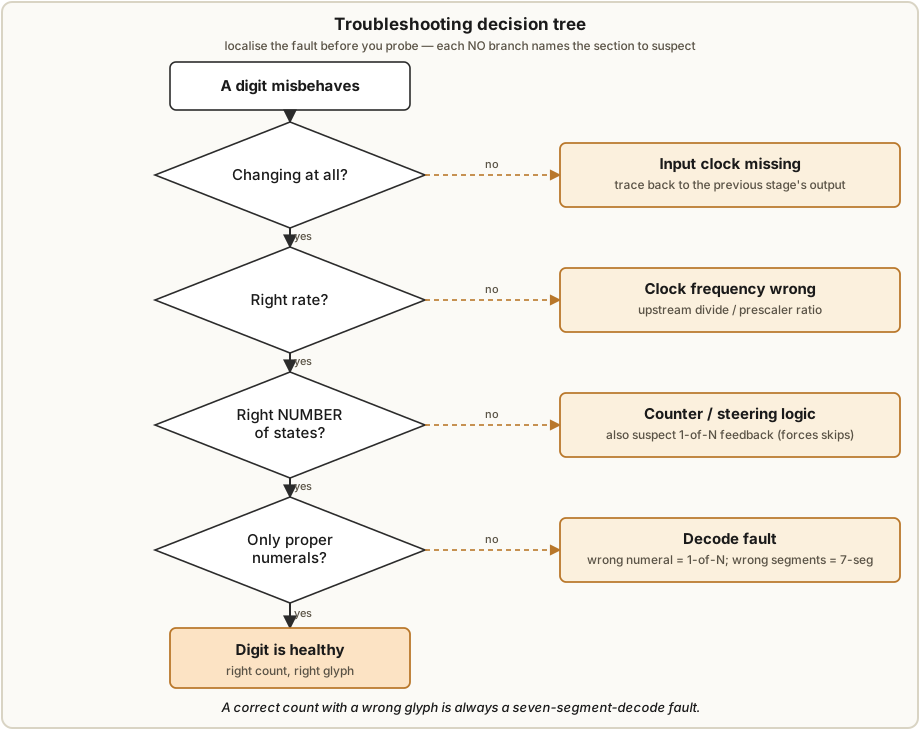
When a digit misbehaves, do not start probing at random. Ask four questions, in order; each one narrows the fault to a smaller part of the chain before you touch a probe.
- Is the digit changing at all? If it is frozen, the most likely issue is that its input clock is not arriving — trace back to the previous stage’s output. A digit that never moves is usually starved of edges, not internally broken.
- Is it changing at the right rate? A seconds digit should tick once a second, its tens once per ten seconds, and so on. A wrong rate points at the clock frequency reaching that stage — too fast or too slow means the divide upstream is wrong, not the digit itself.
- Does it step through the right number of states, even if the glyphs are wrong? Count the transitions before it rolls over. If a decade digit cycles through ten distinct states but shows garbage, the counter is fine and the fault is in decode or display. If it cycles the wrong number of states (say, eight, or twelve), the counter/steering logic is at fault.
- Are the characters proper numerals, or odd characters / blanks? Wrong-but-consistent characters or blanks point at the decode — a one-of-N fault (wrong numeral selected) or a seven-segment fault (wrong segments for the right numeral).
These four questions split the whole clock into “timebase/clock”, “counter”, and “decode/display” before you have unrolled a single scope lead.
9.3.2 Localization — counter vs decode vs seven-segment decode
The single most useful idea in the whole method is that the three failure regions leave different fingerprints, and one of them can masquerade as another. Knowing the patterns lets you place the fault from the display alone.
- A logic-section (counter/steering) fault makes the counter cycle the wrong number of states — it counts to the wrong modulus, or visits states out of order. The count is wrong, not just the glyph.
- A one-of-N decoder fault can feed back and make the counter skip states. This is the trap: the decoder’s reset/steering lines tie back into the counter, so a decode fault can look like a counting fault. If the count is wrong, suspect the decoder that drives that counter as well as the counter itself.
- A seven-segment-decode fault leaves the count perfectly correct and only the glyph wrong — the digit advances through exactly the right number of states at the right rate, but one or more segments are wrong (a “6” missing its top bar, an “8” with a dead segment). The count is fine; only the final segment map is broken.
9.3.3 The most-likely-causes list
Once you have localised the region, the question becomes what kind of fault it is. On a hand-soldered board the causes are not random — they fall in a stable order of probability. Work the list top-down; the cheap, common causes first.2
Table 1 — 9.3.3 The most-likely-causes list
| Rank | Likely cause | Why it is common / how to find it |
|---|---|---|
| 1 | Wrong component loaded | A 1 K where a 10 K belongs, a 2N3906 for a 2N3904. Re-check the part against the silkscreen and BOM at the suspect location. |
| 2 | Component installed backwards | Diodes, electrolytics, transistors all have orientation. Check the band / flat / pin-1 against the silkscreen. |
| 3 | Bad solder joint | An open (cold) joint, or a bridge shorting to an adjacent pad. Re-flow and inspect under light/magnification. |
| 4 | Clipped-off lead stuck to the back | A snipped lead lands on the solder side and shorts the circuit. Turn the board over and look. |
| 5 | Broken trace at the annular ring | A hairline break where a trace meets a pad. Check continuity across the suspect pad. |
| 6 | Board resting on something conductive | The bare solder side bridged by metal underneath. Lift the board and re-test in free air. |
| 7 | A genuinely bad component | Least likely. In order: overheated when soldered > came bad from the factory > ESD-damaged in handling. Only swap parts after 1–6 are ruled out. |
The ordering matters: hobbyists tend to assume a “bad part” first, but on a fresh build that is the rarest cause. The overwhelming majority of first-power-up faults are an assembly mistake (1–6) you can find by looking, not a component you must replace.
9.3.4 Power-supply debug
If nothing works, start at the supply, because everything downstream depends on it. Walk it in order with a meter and then a scope:2
- ~12–13 V at the big cap. Confirm the DC rail on the 6,800 µF reservoir is present and at roughly the right level. No rail → no clock.
- The bridge — four diodes. If the rail is low, missing, or rippling, check the four rectifier diodes (orientation and continuity); these are also the parts that “work hard” and fail with age (§9.2).
- First comparator’s 60 Hz (scope). You should see a clean 60 Hz square wave where the first comparator squares the rectified mains.
- The pulser discharging its cap (scope). Watch the pulser fire and its ramp capacitor charge/discharge — this is the noise-filter timing element.
- The ramp. Confirm the ramp waveform is present and well-formed.
- Second comparator’s clean 60 Hz into the prescaler (scope). The final, re-squared 60 Hz handed to the ÷10/÷6 prescaler. If this edge is clean and at 60 Hz, the timebase is good and the fault is downstream.
That sequence — rail, bridge, square, pulse, ramp, square — is the entire timebase read end to end, and it cross-references the full theory in Vol 6.
9.3.5 Flip-flop debug, and the sensitivity caveat
When the fault is in the counting chain, the technique is bisection: find the last flip-flop in the chain that is working, and the fault is at or just after it.
- Confirm the input is toggling. The 10 kΩ resistor at the lower-left of each flip-flop is the input, and it makes an excellent, well-defined probe point. If a clean clock is arriving there but the flip-flop’s output is not toggling, the fault is in that cell.
- Check the obvious assembly causes at that cell (§9.3.3): right parts, right orientation, good joints.
- Check the decoder it drives. Remember §9.3.2 — a one-of-N decoder feeds back into the counter and can force it to skip. A “counter” fault is sometimes a decoder fault wearing a disguise.
The sensitivity caveat — read this before you panic. The discrete flip-flops are touch-sensitive. A scope probe, or even a finger laid on the board, can inject enough charge to toggle a flip-flop or make a counter miscount while you are touching it. This means you may see false readings or apparent miscounting that vanish the moment you take your hand away — do not chase a fault that only exists while you are probing it. The reassuring half of the caveat: you cannot hurt the circuit by touching it; it is a low-voltage board and the worst you will do is toggle a bit. Probe, then look away from your hand to read the display.
9.3.6 Worked example symptoms
Two miscount patterns from the manual show the method in action; both point at the counter’s steering logic for that digit, because the number of states is wrong.2
- “2, 5, 2, 5, …” — the digit oscillates between two values instead of counting through its full sequence. It is visiting only two states, far short of its modulus, so the steering logic that should advance and reset the counter is mis-wired or mis-loaded. Suspect the diode gates and the flip-flop(s) for that digit.
- “0, 1, 2, blank, 0, 1, 2, blank, …” — the digit counts a few correct states and then shows a blank before restarting. The count is reaching a state for which no numeral is decoded (a blank is “no segments lit”), then resetting early — again a wrong-modulus / steering fault in that counter, possibly with the reset firing one state too soon. Trace the steering diodes and the reset line for that digit.
In both cases the triage (§9.3.1) lands you on question 3 — wrong number of states — which sends you to the counter/steering logic, and the most-likely-causes list (§9.3.3) tells you to check for a wrong or backwards part and a bad joint before suspecting a dead transistor.
9.3.7 The method in one breath
Localise before you probe: which digit, frozen or moving, right rate, right number of states, right glyph. That places the fault in the timebase, a counter, or a decoder. Then work the likely-cause list top-down — wrong part, backwards part, bad joint, stray lead, broken trace, conductive surface, and only last a bad component. Bisect the flip-flop chain at the 10 kΩ inputs, remember the decoder can feed back, and remember your finger can lie to you. That is the whole method, and on a 2,700-joint board it is what turns a dark display into a working clock.
9.4 Where the manual is silent
To keep this walk-through honest, a few things the manual does not specify, and which this volume therefore does not invent: the exact transistor count per section (the clock’s ~1,256 parts are documented as a whole, not broken down by subsystem); any internal test points beyond the ones named here (the comparator outputs, the ramp, the 10 kΩ flip-flop inputs, and the supply rail); and failure rates more precise than the “10–15 year cap, 10–20 year LED dimming, bridge diodes work hard” guidance. The manual’s own photographs and schematics remain KABtronics’ copyright — they are referenced here, not reproduced — and the figure slots below call for owner build photos instead.
References
- KABtronics Transistor Wall Clock Kit — assembly manual (theory of operation, circuit
description, parts identification, troubleshooting, specifications), 15-page schematic, and
board views, in
02-inputs/LED_Transistor_Clock/. Vendor: http://www.transistorclock.com. - Cross-references: the discrete transistor gates and flip-flop (Vol 3), the counters and divide chain (Vol 4), the diode decoders (Vol 5), the mains 60 Hz timebase and its noise filter (Vol 6), and the worked build (Vol 7).
Footnotes
-
Transistor Clock Assembly Manual, KABtronics (transistorclock.com), document version 1.4 for PC board version 4, copyright 2011 — specifications and longevity notes (~1,256 components, “over 2,700 good solder joints”, 10 × 11.3 inch board, ~5.7 W, 9–12 VAC input, ~13 V DC on the 6,800 µF reservoir, 60 Hz line-derived timebase; the cap, LED, and rectifier- diode wear notes). Held in
02-inputs/LED_Transistor_Clock/. ↩ ↩2 -
Transistor Clock Assembly Manual, KABtronics — the “In Case of Difficulty” / troubleshooting section: the “use your brain” method, the symptom-triage reasoning, the most-likely-causes ordering, the power-supply and flip-flop debug walks, the 10 kΩ flip-flop input as a probe point, the touch-sensitivity caveat, and the worked miscount examples (“2,5,2,5” and “0,1,2,blank…”). ↩ ↩2 ↩3 ↩4 ↩5
Comments (0)