LED · Volume 7
Build It Yourself
A practical bench walkthrough of the KABtronics Transistor Wall Clock kit — the parts, soldering 2,700 joints, the section-at-a-time build order, and the power-up test for each section
Vols 2 through 6 take the discrete-logic LED clock apart as theory: the LED display and its static drive (Vol 2), the transistor switch and the gates and flip-flop built from it (Vol 3), the counters and the divide chain (Vol 4), the decoders (Vol 5), and the mains 60 Hz timebase (Vol 6). This volume is the opposite exercise — it is the bench walkthrough of actually building the thing, following the KABtronics Transistor Wall Clock kit’s assembly manual: what you are signing up for, the tools and the parts, soldering at this scale, the section-by-section build order, the power-up test that proves each section before you move on, and the handful of orientation mistakes that can damage the board.1
Nothing here is design work — the design is finished and documented (that is Vols 3–6, and the collected schematic in Vol 9). This is the labor: a long, methodical, low-risk solder that rewards patience and punishes haste on a few heat-sensitive parts. If a section fails its power-up test, Vol 9’s “use your brain” troubleshooting method is what gets it working; this volume’s job is to get you to each test with the best odds of passing it the first time.
7.1 What you are signing up for
The KABtronics kit is the worked Path 2 of this series (Vol 1) — buy the kit, build it. It is not a beginner’s first solder, and the manual is explicit that it is aimed at a “somewhat knowledgeable electronic hobbyist.” The scale is the defining fact:
- ~1,256 components on a single board, and “over 2,700 good solder joints.”1
- A board roughly 10 × 11.3 inches — large, single-sided to your eye, every part on the silkscreen.
- It weighs about 14.5 oz populated, plus about 9 oz for the wall transformer.
- It draws about 5.7 W (0.6 A at 9.5 V AC) and is a room-temperature design — the manual specifies an operating range of about 60–80 °F; this is not a part you run hot or cold.
- Budget 10–15 hours of assembly. That is a real figure for ~2,700 joints: at roughly half a second to a second per joint of iron time it is a small fraction of the total, but placing, orienting, and clipping ~1,256 parts is the bulk of the clock.
The price is about $199 (verify current pricing with the vendor); the manual does not fix a price and it changes over time.1 What you get for the hours is a six-digit HH:MM:SS wall clock whose entire logic is visible — the payoff Vol 1 describes — and a genuine education in digital logic built one transistor at a time.
7.2 Tools
The tool list is short and ordinary — this is a low-voltage build with no exotic requirements:
- A soldering iron (a normal fine-tip iron; nothing temperature-exotic is required, but a controlled tip helps on the heat-sensitive parts).
- A small diagonal cutter for clipping the ~2,700 leads flush after soldering.
- A small flat-blade screwdriver for the two-position screw terminal.
- A VOM / multimeter — used to check for shorts during the build and to verify the supply voltage at power-up. This is the one instrument you genuinely need.
- Optionally, an oscilloscope. The manual treats the scope as a fallback: it is only needed if you hit a problem you cannot resolve by inspection. Most of the build and all of the per-section tests are doable with eyes and a multimeter; the scope earns its place in troubleshooting (Vol 9), not assembly.
De-solder braid is supplied with the kit for lifting a mistaken joint, so you do not need to source your own.
7.3 The parts
Every part is marked on the silkscreen, so placement is “find the outline, match the part.” The kit supplies spares for the small parts — but importantly no spares for the seven-segment LED displays, which is exactly why those get the most careful handling (§7.6). The table below organizes the bill of materials by value and type as the manual identifies it; it is not an exact quantity-per-value BOM (the manual’s full per-value counts are not reproduced here — where this volume is silent on a quantity, treat it as unspecified).
Table 1 — 7.3 The parts
| Class | Value / part | Role on the board | Polarized? |
|---|---|---|---|
| Transistor (NPN) | 2N3904 | the switch in most gates and flip-flops | yes — orient to silkscreen |
| Transistor (PNP) | 2N3906 | complementary switching where needed | yes — orient to silkscreen |
| Diode (small-signal) | small logic diodes | the AND/OR/decode matrices | yes — band to marked end |
| Diode (large) | 4 large diodes | the power-supply bridge rectifier — the only large diodes | yes — orient carefully (§7.6) |
| Resistor | 680 Ω | display segment current-limit | no |
| Resistor | 1 K | general logic | no |
| Resistor | 10 K | general logic — most of the board is 10 K and 100 K | no |
| Resistor | 100 K | general logic / edge-trigger — most of the board is 10 K and 100 K | no |
| Resistor | 1 M | a couple, in the power supply | no |
| Capacitor | 220 pF | edge-trigger timing (toggle flip-flops) | no |
| Capacitor | 0.001 / 0.01 / 0.1 µF | decoupling / timing | no (poly) |
| Capacitor | 6,800 µF electrolytic | the one big power-supply filter cap | yes — critical (§7.6) |
| Display | LSD8161-11 seven-segment LED | the six HH:MM:SS digits | yes — and a real hazard (§7.6) |
| LED | single LEDs | the colons between digit pairs | yes — flat/short lead = cathode |
| Switch | H and M push switches | time-set (hours / minutes) | mechanical orientation |
| Terminal | 2-position screw terminal | transformer input | clip the two nubs (§7.6) |
| Transformer | 9–12 V AC wall transformer | low-voltage input | cut connector, strip + tin leads |
A few rules cover the polarity column at a glance:
- Resistors and the poly (film) capacitors are not polarized — they go in either way.
- The electrolytic capacitor, all the diodes, the transistors, and the LEDs are oriented and must match the silkscreen. The electrolytic and the diodes are the dangerous ones to get wrong (§7.6); the transistors and LEDs simply will not work backwards.
- The transformer arrives with a barrel/connector on its lead — cut the connector off, then strip and tin the two leads before landing them in the screw terminal.
7.4 Soldering at scale
Across 2,700-plus joints, technique matters less for any one joint than for consistency — the clock only works when essentially all of them are good. The manual’s guidance is the classic through-hole discipline:
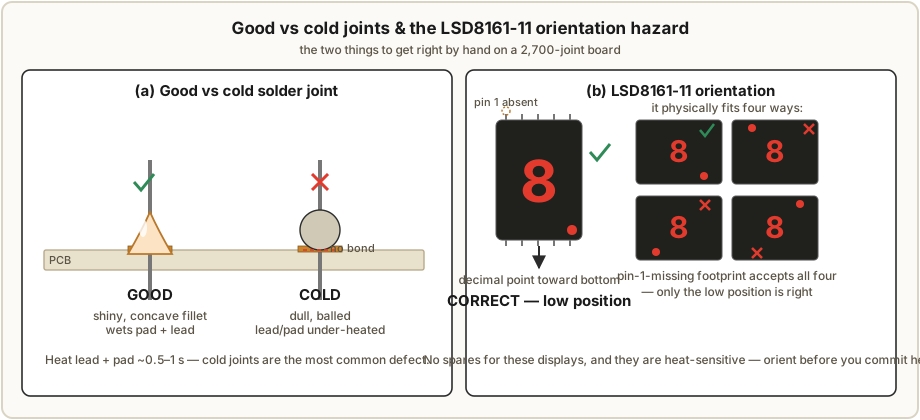
- Heat both the lead and the pad, briefly. Aim for about 0.5 to 1 second per joint with the iron actually heating the joint (not just melting solder onto a cold lead). A good joint is shiny and smoothly filleted from pad to lead; a cold joint is dull, blobby, or ball-shaped, and happens when the lead or the pad was under-heated so the solder never wet both. Cold joints are the single most common build defect at this scale.
- Be quick on the heat-sensitive parts. The diodes, transistors, and especially the LEDs (single LEDs and the seven-segment displays) do not like prolonged heat. Get in, wet the joint, get out. The manual notes that most display failures are caused by soldering heat, not by bad parts — which is the whole reason for the LSD8161 handling in §7.6.
- Clip every lead flush above the joint with the small diagonal cutter once it is soldered. With ~2,700 leads this is a real chunk of the work and worth a rhythm: solder a small cluster, then clip the cluster.
- Fix mistakes with the supplied de-solder braid — lay it on the joint, heat through it, and it wicks the solder away so you can lift or reseat the part.
- Optional rosin clean-up. If you use rosin-core solder and want a clean board, a wipe of isopropyl alcohol lifts the flux residue at the end. Cosmetic, not functional.
The cadence that works is place a handful of one value, solder them, clip them, check them off the silkscreen — which dovetails with the section-at-a-time build order below.
7.5 The section build order — build and test as you go
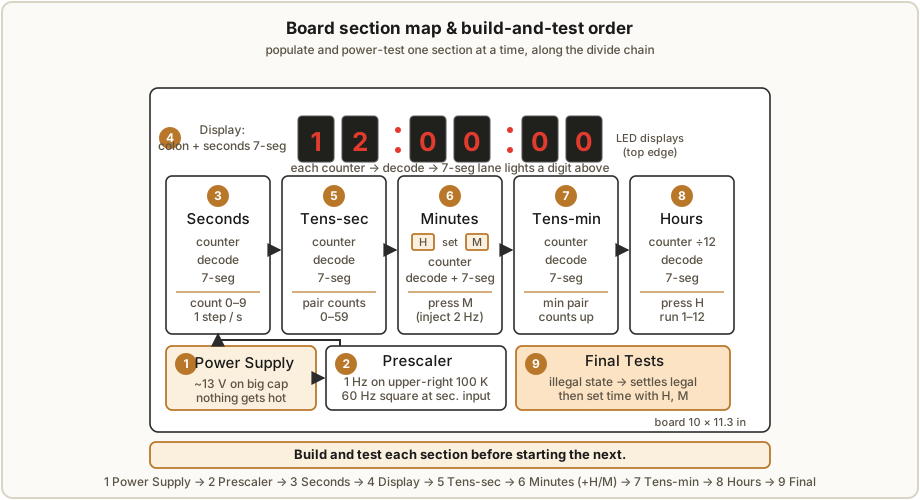
The single most important workflow rule is do not populate the whole board and then power it up. You build along the divide chain (Vol 4), one section at a time, and power up and test each section before starting the next. A fault then localizes to the section you just added — which, on a 2,700-joint board, is the difference between a five-minute fix and a week of misery (Vol 9). The order follows the signal path from the timebase outward:
Table 2 — week of misery (Vol 9). The order follows the signal path from the timebase outward
| Step | Section | Theory ref | Build note | Power-up test |
|---|---|---|---|---|
| 1 | Power Supply | Vol 6 | the 4 large bridge diodes + the 6,800 µF cap — check polarity before power-up (§7.6) | About 13 V on the big cap; nothing gets hot. |
| 2 | Prescaler | Vols 4, 6 | divides the 60 Hz line down toward 1 Hz | Look for 1 Hz signals on the upper-right 100 K resistors; with a scope, a 60 Hz square wave at the seconds-counter input. |
| 3 | Seconds (counter → decode → 7-seg) | Vols 4, 5 | first full digit chain — counter, decode matrices, one display | Watch the seconds digit count 0–9, one step per second. The first few counts may look odd, then it stabilizes. |
| 4 | Display | Vol 2 | mount the colon/single LEDs and the seconds 7-seg display | (part of the seconds test — the digit lights and counts) |
| 5 | Tens-of-Seconds | Vols 4, 5 | the ÷6 stage + its digit | Watch the pair count 0–59. |
| 6 | Minutes | Vols 4, 5 | mount the H and M time-set switches here | Press M to inject a fast 2 Hz clock and watch the minutes count — far better than waiting a real minute. |
| 7 | Tens-of-Minutes | Vols 4, 5 | the ÷6 stage + its digit | minutes pair counts up (drive it with M) |
| 8 | Hours | Vols 4, 5 | the ÷12 stage + the last digits | Press H to run 1–12 quickly. |
| 9 | Final Tests | Vol 9 | whole clock together | See §7.7 — illegal start states that settle, then set the time. |
The H and M switches in step 6 are not just time-set controls in the finished clock; during the build they are your fast-clock injectors — M for the minutes side, H for the hours — so you can verify the upper sections in seconds instead of minutes or hours of real-time waiting. That is the intended use of the buttons during assembly.
7.6 The critical gotchas — check these before first power-up
Most of this build is forgiving. A handful of things are not, and two of them can do real damage, so they get checked before you ever apply power to the power-supply section.
- The 6,800 µF electrolytic capacitor polarity. The + lead goes to the square pad. An electrolytic installed backwards can overheat and vent hot electrolyte — verify the orientation against the silkscreen before power-up. This is the single cap on the board where getting it wrong is dangerous rather than merely non-functional.
- The bridge diode orientation. The four large power-supply diodes must match the silkscreen. Backwards, the bridge can short and overheat — and overheat/damage the transformer — a fire hazard. These four are the only large diodes on the board, so they are easy to find and worth a deliberate double-check before first power-up.
- The LSD8161-11 pin-1-missing orientation. The seven-segment displays use an 18-pin outline with pin 1 missing, which means the part physically fits the footprint four different ways. Only one is correct: the low position on the footprint, with the decimal dots toward the bottom. Because there are no spares for these displays and they are heat-sensitive (most display failures are soldering-heat damage), getting the orientation right before you commit heat is doubly important.
- Single LEDs first, then the seven-segment displays. Mount and solder the single (colon) LEDs first and verify they light — flat/short-lead cathode to the square pad — then tackle the heat-sensitive seven-segment displays. For each LSD8161, solder two opposite corners first, reflow those while pressing to seat the part flush to the board, then solder the remaining pins. This seats the display cleanly without subjecting all pins to repeated heat.
- The terminal connector’s two nubs. The two-position screw terminal has two plastic “nubs” that must be clipped off so it sits correctly. Easy to miss, trivial to fix before it is soldered.
The first two are the ones that can hurt the board or transformer; check both, plus that nothing is bridged, before applying power to the power-supply section in step 1.
7.7 Final tests and setting the time
When all sections are populated and have individually passed, the final power-up has a quirk worth expecting so you do not mistake it for a fault: on power-up some counters start in illegal states — the manual gives examples like a nonsensical “15 o’clock” or “7C minutes.” This is normal. A decade/÷6/÷12 counter built from raw flip-flops can power up in a state outside its legal range, and the steering logic counts it out into a legal value within a few steps. Watch each digit group settle into legal numbers, then use the H and M buttons to set the actual time (H advances hours, M advances minutes). If a section instead stays wrong or never settles, that is a real fault — take it to Vol 9.
7.8 Mounting and finishing
The manual’s optional finishing step is to mount the finished board on a wall plaque using non-conducting standoffs — non-conducting because the board is single-sided with exposed solder side, and you do not want a metal standoff bridging anything. Beyond that, the board is the aesthetic object: the visible logic is the point, so most builders leave it open rather than boxing it.
7.9 Jeff’s-lab note — kit, etch-your-own, or laser-cut bezel
Jeff’s bench is better-equipped than the manual assumes — a full electronics bench with a multimeter and oscilloscope, plus multiple 3D printers, a CNC, and a laser cutter. That opens two paths beyond simply building the kit:
- Build the kit (Path 2). The straight read of this volume — buy the kit, follow the section order, pass each test. The lowest-risk, best-documented route, and the one the per-section tests are written for.
- Etch or CNC your own board (Path 3). Because the hub holds the collected 15-page schematic (Vol 9), Jeff could fabricate his own PCB — CNC-isolation-mill or etch it, then populate it from the same BOM. This is the “very high effort” path of Vol 1’s decision tree: no silkscreen-guided placement, no supplied spares, and you own every layout decision, but it is fully enabled by the collected design. Vol 9 walks that schematic; Vols 3–6 are the per-block design reference.
- Laser-cut a bezel or plaque. Independent of how the board is made, the laser cutter is a natural fit for a display bezel (a slotted front mask over the six digits and colons) or a finished wall plaque to mount the board on with non-conducting standoffs — a cleaner alternative to the manual’s plain-plaque suggestion.
For a first build, Path 2 with a laser-cut plaque is the sweet spot: the kit’s documentation and spares de-risk the 2,700 joints, while the lab adds a finished enclosure the kit does not include.
7.10 References (Vol 7)
- KABtronics Transistor Wall Clock Kit — assembly manual (parts ID, soldering guidance,
section build order, per-section tests, specifications) and the 15-page schematic, in
02-inputs/LED_Transistor_Clock/. Vendor: http://www.transistorclock.com. Kit price about $199 — verify current pricing with the vendor. - Cross-references: Vol 1 (the four paths and the decision tree), Vols 2–6 (the theory of each section you build here — display, transistor blocks, counters, decoders, timebase), and Vol 9 (the collected schematic for Path 3, and the troubleshooting method for any section that fails its power-up test).
Footnotes
-
Transistor Clock Assembly Manual, KABtronics (transistorclock.com) — assembly instructions, parts identification, and specifications. States ~1,256 components, “over 2,700 good solder joints,” a 10 × 11.3 inch board (~14.5 oz, plus ~9 oz transformer), ~5.7 W (0.6 A at 9.5 V AC), a 60–80 °F room-temperature design, 10–15 hours of assembly, and a target audience of a “somewhat knowledgeable electronic hobbyist.” Documents the 2N3904/2N3906 transistors, small-signal logic diodes plus four large bridge diodes, the 680 Ω/1 K/10 K/100 K/ 1 M resistor values, the 220 pF/0.001/0.01/0.1 µF and 6,800 µF capacitors, the LSD8161-11 seven-segment displays (18-pin outline, pin 1 missing), the H/M time-set switches, the section build-and-test order, and the orientation/polarity cautions reproduced above. Full manual and 15-page schematic held in
02-inputs/LED_Transistor_Clock/. ↩ ↩2 ↩3
Comments (0)