LED · Volume 2
The LED Display
Seven-segment red LEDs, the colon dots, and why every lit segment burns continuously — static drive, one current-limiting resistor at a time
This is the layer you actually see. Everything earlier in the clock — the mains tick, the divide chain, the counters, the two ranks of diode decode (Vols 4–6 and Vol 5) — exists only to decide, sixty times a second, which little red bars should be glowing right now. The KABtronics Transistor Wall Clock answers that question with six seven-segment LED digits reading HH:MM:SS, and single LEDs standing in for the two colons. There is no display driver chip here any more than there is a counter chip: the decoder (Vol 5) is a matrix of diodes, and it hands the display nothing more sophisticated than a set of segment lines pulled low. The display’s whole job is to convert those low lines into light.
What makes this volume worth its own treatment is that the display is statically driven — every segment that should be lit is lit continuously, each through its own resistor, with nothing scanned, strobed, or multiplexed. That is the simplest possible way to run a multi-digit LED display and, as it happens, almost nobody does it any more, because it costs a resistor and a continuous milliamp budget per segment instead of sharing one driver across all the digits in time. On a clock that has already spent over a thousand transistors to avoid a single IC, paying that price is entirely in character. This volume covers the seven-segment basics, the specific LSD8161-11 part and the genuinely sneaky ways it can be mounted wrong, the static drive and its order-of-magnitude current budget, the colon LEDs, and the brightness, colour, and longevity you can expect from the finished wall.
2.1 Seven-segment basics: a–g and the ten numerals
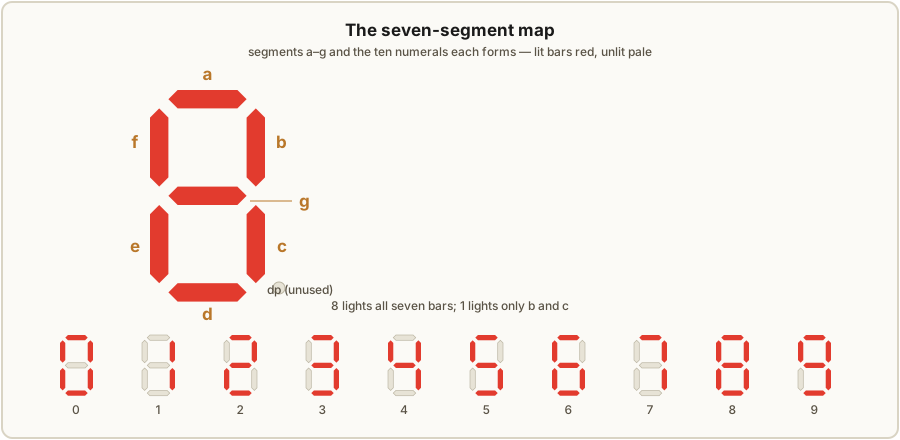
A seven-segment digit is the oldest trick in numeric display: seven elongated light bars arranged as a figure-eight, and any decimal numeral 0–9 made by lighting the right subset of them. The bars are labelled by a universal convention — a across the top, then b and c down the right side (top-right, bottom-right), d across the bottom, e and f up the left side (bottom-left, top-left), and g the centre bar. Read it as “a at twelve o’clock, then clockwise b, c, d, e, f, and g through the middle.” Once you have that map, the ten numerals are just ten on/off patterns:
Table 1 — ten numerals are just ten on/off patterns
| Digit | Segments lit | Count |
|---|---|---|
| 0 | a b c d e f | 6 |
| 1 | b c | 2 |
| 2 | a b g e d | 5 |
| 3 | a b g c d | 5 |
| 4 | f g b c | 4 |
| 5 | a f g c d | 5 |
| 6 | a f g e d c | 6 |
| 7 | a b c | 3 |
| 8 | a b c d e f g | 7 |
| 9 | a b c f g d | 6 |
The figure-eight is no accident: an 8 lights all seven bars, so it is the brightest and hungriest glyph, and a 1 lights only two, the dimmest power draw. That spread matters on a statically driven display because the supply current literally rises and falls with the digits shown — a wall reading 11:11:11 sips current next to one reading 08:08:08. It is a small effect here (the clock’s draw is dominated by the logic, not the LEDs), but it is a real, measurable consequence of not multiplexing, and it is the kind of thing that surprises a builder probing the supply rail.
Each LSD8161-11 also carries a decimal point — a small round dot at the lower-right of the digit, on its own pin. This clock does not use the decimal points. There is nothing to put between hours and minutes that a dot would express (the separators are colons, and those are their own LEDs — §2.5), so the dots stay dark for the life of the clock. They are not wasted, though: as we will see, the unused dot is the single most useful landmark for orienting the part correctly during the build.
2.2 The LSD8161-11 part
The kit’s display devices are LSD8161-11 seven-segment red LED digits.1 Each one is a moulded block carrying the seven segment LEDs plus the decimal-point LED, in an 18-pin outline — but with many of the eighteen positions left empty, because a single digit needs only its segment connections plus a common terminal, nowhere near eighteen leads. The KABtronics manual is explicit that the part is red emission, that it is statically driven, and — the point a builder must internalise — that these LEDs are heat-sensitive, with the manufacturer attributing most display failures to overheating during soldering.1
What the manual does not state, and what this reference therefore will not assert as fact, is the device’s exact electrical designation and pinout: whether the LSD8161-11 is common-anode or common-cathode, the full pin assignment, the LED forward voltage, and the rated segment current are not given in the manual we hold. We can reason about the drive from the surrounding circuit (§2.3–2.4) and quote typical red-LED figures clearly labelled as general knowledge, but the datasheet specifics for this exact marking are not in hand — treat any pinout you find elsewhere as something to verify against the board, not gospel.
2.2.1 The four-way mounting hazard
Here is where the part bites. The 18-pin outline is symmetric enough that the digit physically fits the board four different ways — and only one of them is right. To make matters worse, the LSD8161-11 has no pin 1: the position that would normally carry the keying notch or the “this corner is pin 1” marker is simply absent, so the usual orientation cue is gone. A builder who drops the part in by feel has a one-in-four chance of getting it right and a three-in-four chance of soldering in a digit that is rotated or flipped, will not light correctly, and — given the heat sensitivity — may not survive being desoldered and turned around.
The manual gives two landmarks that resolve it unambiguously, and they are worth committing to muscle memory before you touch the iron:1
- The correct seating is the low position — the digit sits down against the board, not proud of it. If it is riding high, it is in wrong.
- The decimal-point dots go toward the bottom of the board. Even though the dots are never lit in this clock, their physical location is the orientation key: dots down means the digit is the right way up. The LEDs themselves sit along the top edge of the board — the display row is the topmost feature of the populated board, which is exactly what you want for a wall clock you read from across the room.
Put those together — seated low, dots pointing down, the digit row running along the top edge — and there is exactly one orientation that satisfies all three. Check every one of the six digits against that rule before soldering more than a corner pin of each.
2.2.2 Soldering heat-sensitive LEDs
Because the manufacturer pins most display failures on solder heat, the display step is the one place in this otherwise forgiving build where technique matters for survival, not just appearance. The standard discipline applies, a little more strictly than elsewhere: a clean, properly tinned iron tip at a sensible temperature; brief dwell on each joint (heat the pad and lead, flow the solder, get off); and no going back to re-melt the same joint repeatedly while you fuss. If a digit needs reseating, let it cool fully between attempts rather than working a hot part. The cruel asymmetry is that a heat-killed segment usually is not obvious until power-up, by which point the part is soldered into an 18-position footprint that is itself a chore to clear — so the cheap insurance is to not cook it in the first place. (Vol 7 covers the full build sequence and the per-section power-up tests; this is the display-specific caution.)
2.3 Static drive: every lit segment, always on
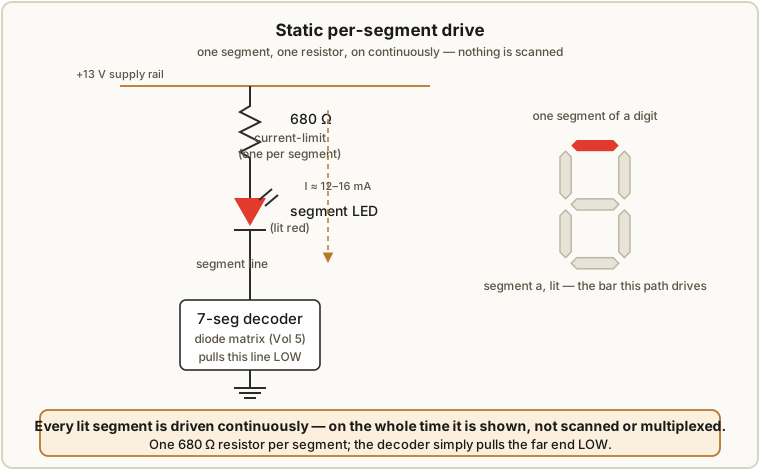
The defining electrical fact of this display is that it is statically driven. Each of the seven segments of each of the six digits has its own continuous drive path: a current-limiting resistor from the supply to one end of the segment LED, and the other end of the segment going to the seven-segment decoder (Vol 5), which lights the segment by pulling its line low. When the decoder pulls a segment’s line down, current flows from the supply, through that segment’s resistor, through the LED, into the decoder, and the bar glows — and it stays glowing, steadily, for as long as that numeral is displayed. There is no strobing and no scan. A segment that should be on this second is on for the whole second.
The current-limiting resistor is 680 Ω, and there are a lot of them: the display assembly step of the build mounts forty-one 680 Ω resistors along with a 0.1 µF capacitor for the display section.1 Six digits × seven segments is forty-two segment lines; the forty-one-resistor count reflects that the display is wired so the resistors land where the build needs them across the six-digit array (and that the colon LEDs and the unused dots are handled separately — §2.5). The headline is the principle: one resistor per segment, not one resistor shared per digit. That is the literal cost of going static, paid in passives.
2.4 Static vs multiplexed — what the choice buys and costs
Almost every modern multi-digit LED display is multiplexed (scanned): all six digits share one set of seven segment drivers, and the digits are lit one at a time in rapid rotation — digit 1’s segments for a moment, then digit 2’s, and so on around the loop fast enough (well above the flicker-fusion rate, typically a few hundred hertz or faster) that the eye integrates it into a steady reading. Multiplexing is popular for an obvious reason: it needs only seven segment drivers and six digit-enable lines instead of forty-two independent segment drives, and you can get away with one resistor per segment line (seven total) because only one digit conducts at a time. It is the natural fit for a microcontroller, which has the spare cycles to run the scan in firmware. The TIX clock elsewhere in this hub multiplexes its LED matrix for exactly this economy; so does essentially any matrix or scanned display.
This clock does none of that, and deliberately. The trade is clean:
- Static wins on simplicity of the logic. There is no scan counter, no digit-strobe timing, no firmware, no risk of getting the multiplex rate wrong. The decoder just statically asserts the segments for each digit and leaves them asserted. On a clock that refuses to use a single IC, not having to build a transistor scan generator is a real saving — it would have been one more block of logic to assemble from discrete parts.
- Static wins on the look. Continuously-lit segments are rock steady — no flicker, no scan shimmer, no banding when you photograph the clock, and full brightness on every segment because each one is on 100 % of the time rather than 1/6 of the time. A multiplexed display has to drive each digit harder during its brief slot just to average to the same brightness, and it can flicker visibly if the scan stalls.
- Static costs components and current. It pays for that steadiness with forty-one resistors instead of seven, and with continuous segment current rather than time-shared — every lit bar draws its few milliamps the whole time, so the display’s worst-case current (an all-eights 88:88:88) is the simultaneous sum of every lit segment, not a one-digit-at-a-time peak. On the wall-transformer-fed ~13 V / ~5.7 W budget (Vol 1) that is comfortably affordable, which is exactly why the simple choice was available.
In short: static drive is the dead-simple, flicker-free, resistor-hungry option, and on a no-IC clock with power to spare it is the right one.
2.4.1 An order-of-magnitude segment-current estimate
The manual does not specify the segment current, nor the LED forward voltage, so the following is a worked estimate from general-knowledge values, not a quoted figure — flagged as such. A red LED typically drops Vf ≈ 1.8–2.1 V when conducting. The segment sees the main supply, about 13 V DC on the big filter cap (Vol 1), through its 680 Ω resistor, with the decoder pulling the far end toward ground. The resistor takes the difference between the supply and the LED drop (plus whatever the decoder’s pull-down transistor and series diodes drop — call those collectively a volt or two, since the decode path is itself diodes and a transistor):
$$ I_{\text{seg}} \approx \frac{V_{\text{supply}} - V_f - V_{\text{decode drops}}}{680\ \Omega} \approx \frac{13\ \text{V} - 2\ \text{V} - (1\text{–}3\ \text{V})}{680\ \Omega} $$
Taking the spread, that puts the segment current somewhere in the region of
$$ I_{\text{seg}} \approx \frac{8\ \text{to}\ 11\ \text{V}}{680\ \Omega} \approx 12\text{–}16\ \text{mA} \quad(\text{order of magnitude: a few to }\sim15\ \text{mA}). $$
That is an entirely sensible, conservative drive level for a small red seven-segment LED — bright enough to read across a room, gentle enough for decades of life — and it is consistent with the 680 Ω choice. But it is an estimate. The exact figure depends on the true LSD8161-11 Vf and on the real drop through the decoder’s pull-down path, neither of which the manual states; if you need the precise number, measure the voltage across one 680 Ω resistor on a powered, working board and divide by 680. As a sanity check on the whole-display draw: an all-eights reading lights 42 segments, so at ~15 mA each that is on the order of 0.6 A of segment current — the same ballpark as the clock’s stated ~0.6 A total input, confirming the logic and display together live within the wall transformer’s budget rather than the LEDs alone dominating it.
2.5 The colons: single LEDs
Between the digit pairs — hours:minutes and minutes:seconds — the clock shows colons, and these are not part of the seven-segment blocks. They are discrete single LEDs, ordinary two-lead indicator LEDs standing on the board in the gaps between digit groups (a colon is two stacked dots; the kit renders the separators with single LEDs in that role). Electrically they are the simplest thing on the display: like the segments they sit behind a current-limiting resistor to the supply, lit continuously in the static spirit of the rest of the display.
The one thing a builder must get right is polarity, because unlike a resistor an LED only works one way round. The kit’s convention is the standard one: the cathode — identified by the flat side of the lens and the shorter lead — goes to the square pad on the silkscreen, while the longer anode lead goes to the round pad.1 “Flat and short to the square” is the mnemonic; get it backwards and the colon simply never lights (it will not be damaged at these voltages, but you will be hunting a dark colon). Check every single LED’s flat against its square pad before soldering, the same discipline as orienting the digits.
2.6 Brightness, colour, and longevity
The finished display is red — the LSD8161-11 is a red-emitting part, and the kit makes no provision for any other colour.1 Red is the classic, and historically the easy, LED colour: the earliest and cheapest LEDs were red, red phosphor-free emitters are efficient and bright at low drive, and a red seven-segment readout is exactly the period-correct look for a clock whose whole aesthetic is “1970s digital logic, made visible.” It reads cleanly across a room at the ~12–16 mA-per-segment level estimated above, with the steady, flicker-free quality that static drive guarantees.
LEDs are not eternal, but on this clock they are effectively a lifetime part. They do not “burn out” like a filament; instead they gradually dim as the semiconductor and its encapsulant age under continuous current. A reasonable expectation for LEDs run gently like these is a fall to perhaps ~50 % of original brightness over 10–20 years of continuous operation — slow enough that you would never notice it day to day, and a span over which the solder joints, electrolytic capacitor, and your patience for a 1,256-part board are all more likely to be the limiting factor than the LEDs. Running them at a conservative current (which the 680 Ω resistors do) is precisely what buys that longevity; a display driven near its maximum rating ages much faster.
2.6.1 Why a builder picks LED over nixie or Numitron
The LED display is one of several numeric technologies this hub covers, and the choice is a genuine trade of character against practicality:
- Low voltage and safe. The whole display runs off the same ~13 V rail as the logic — no ~170 V nixie supply (Nixie deep dive), no high-voltage anything. It is the gentle-voltage tier (Vol 1, §1.11), which is part of why this is one of the safest builds in the hub.
- Cheap, bright, and available. Red seven-segment LEDs are commodity parts: inexpensive, efficient, bright enough to drive directly from a few milliamps, and trivially sourced — unlike nixie tubes (collectible, ageing stock) or Numitron filaments (niche).
- Simple to drive. A red LED wants a resistor and a low-side pull; that is the entire interface, which is what lets this clock drive it statically from a diode decoder with no high-voltage drivers, no boost converter, and no filament inrush to manage.
- The cost is warmth. What LED gives up is the glow. A nixie’s orange cathode haze and a Numitron’s incandescent filament have a soft, three-dimensional warmth that a flat, hard-edged red seven-segment simply does not — the LED reads as crisp and modern where the tube reads as vintage and alive. For this clock that is the right trade: the point of the build is the visible discrete logic, not the romance of the display, so a cheap, safe, dead-reliable red readout that gets out of the way is exactly what the project wants. A builder who wants the warm glow is reading the wrong volume of the wrong hub.
The display, then, is the humble end of an immodest machine: forty-two little red bars and two colon dots, each lit by its own resistor and held steadily on by a wall of diodes, faithfully reporting whatever the thousand transistors behind them have counted up to. Vol 5 is the decoder that decides which bars; this volume is the bars themselves.
2.7 References (Vol 2)
- KABtronics Transistor Wall Clock Kit — assembly manual (theory of operation, circuit
description, parts identification, troubleshooting, specifications) and 15-page schematic, held
in
02-inputs/LED_Transistor_Clock/. Vendor: http://www.transistorclock.com. - Cross-references: the seven-segment decoder that drives these segments low is Vol 5; the clock’s overall architecture, supply rail, and safety tier are Vol 1.
Footnotes
-
Transistor Clock Assembly Manual, KABtronics (transistorclock.com), document version 1.4 for PC board version 4, copyright 2011. Source of the display facts used here: six seven-segment red LED digits (HH:MM:SS) plus single LEDs as the colons; display devices LSD8161-11 in an 18-pin outline with many pins absent and no pin 1; the four-way mounting hazard with the low seating and decimal-point dots toward the bottom / LED row along the top edge as the orientation keys; the LEDs being heat-sensitive with most display failures attributed to soldering overheating; the statically driven display with a 680 Ω current-limiting resistor per segment (the display assembly step mounting 41 × 680 Ω resistors and a 0.1 µF capacitor); single-LED colons with the flat/short-lead cathode to the square pad; and the ~13 V DC supply / ~5.7 W (≈0.6 A) clock budget. The manual does not state the LSD8161-11 common-anode/common-cathode designation, full pinout, LED forward voltage, or rated segment current; the typical red-LED Vf (~1.8–2.1 V) and the resulting few-to-~15 mA segment current in §2.4.1 are general-knowledge estimates, explicitly labelled as such, not figures from the manual. The ~50 %-brightness-in-10–20-years longevity figure is a general LED-ageing expectation, not a manual specification. ↩ ↩2 ↩3 ↩4 ↩5 ↩6
Comments (0)