Mechanical · Volume 9
The Collected Projects
File-by-file walk-throughs of the three designs held in this hub — PlanetaryGear, TuningFork, and Aviation — their architecture, UI, and gotchas
The engineering volumes of this series (Vols 3–5) teach the principles — gear-train
reduction, motor and coil drive, timebases and counting logic — and Vol 6 walks the builds
end to end. This volume does something narrower and more concrete: it opens each of the three
designs actually held in this hub’s 02-inputs/ and walks through what every file is, how
the design is put together, how its user interface behaves, and the gotchas the original
designers flagged. Where Vol 6 is “how you would build one,” Vol 9 is “here is exactly what the
owner collected, and what it tells us.”
Three projects, three threads, three different microcontroller families:
- 9.1 PlanetaryGear — Looman_projects’ 3D-printed epicyclic gear clock (Instructables + full STL/DXF set). Arduino · L293D · DS3231 · printed planetary movement.
- 9.2 TuningFork — NuclearLighthouseStudios’ 440 Hz resonator clock (KiCad project + AVR firmware). ATtiny4313 · BC547 sustaining amplifier · home-etched board.
- 9.3 Aviation — Nobby123’s ESP32 aviator-gauge clock (FreeCAD bodies + firmware zips). ESP32 · 3× TMC2208/TMC2209 · 3× NEMA-17 behind printed instrument dials.
Each section lists the files on disk, walks the architecture, then closes on the documented
gotchas. A cross-project comparison table (9.4) ends the volume. Throughout, file paths are
given relative to the hub root (e.g. 02-inputs/TuningFork/code/clock.c) so you can open the
real thing alongside.
9.1 PlanetaryGear — a printed epicyclic movement
9.1.1 Origin
The design is Looman_projects’ “Planetary Gear Clock” on Instructables. The stated goal, from the build’s Step 1, was one motor driving the whole clock — “similar to a real mechanical clock where one escape mechanism drives the complete clock.” Because the minute hand must turn 12× for every one turn of the hour hand, a 1:12 reduction gearbox is needed to run both hands off a single shaft, and the designer chose to do that with a planetary (epicyclic) gearbox. The author notes the clock “has been ticking away for more than 3 years in my living room without any problems,” so the design is field-proven; the Instructables photos show it partly disassembled only because it was taken apart to document the build.
9.1.2 The files — STL + DXF set
The hub holds the build PDF (02-inputs/PlanetaryGear/Planetary Gear Clock.pdf) and a paired
STL + DXF for every part — the STL for 3D printing, the DXF for laser-cutting the flat plates
from sheet (the designer cut the clock plates from 5 mm acrylic on a laser cutter, and printed
the gears):
Table 1 — the gears)
File (02-inputs/PlanetaryGear/) | What it is | Role |
|---|---|---|
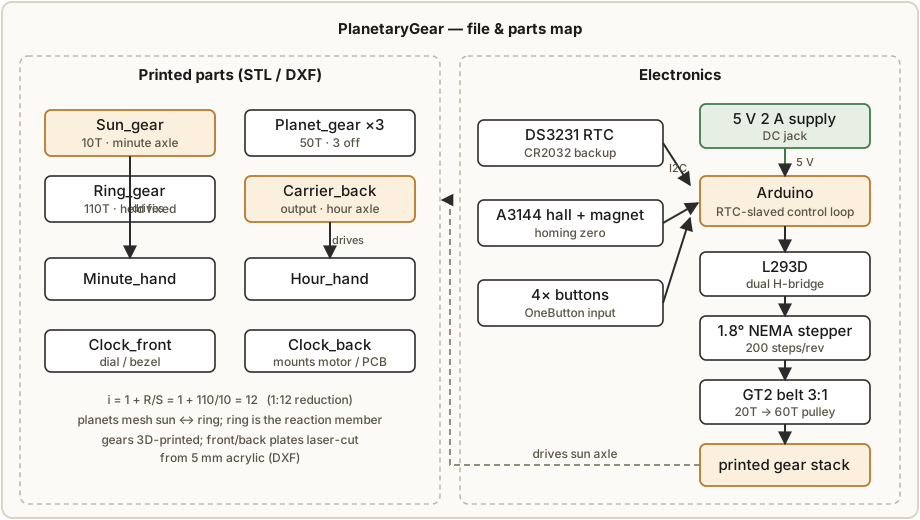
Sun_gear.stl / .dxf | Central sun gear, 10 teeth | Driven member — coupled to the minute hand |
Planet_gear.stl / .dxf | Planet gear, 50 teeth (3 off) | Three planets ride between sun and ring |
Ring_gear.stl / .dxf | Outer ring/annulus, 110 teeth | Held stationary (the reaction member) |
Carrier_back.stl / .dxf | Planet carrier | Output member — coupled to the hour hand |
Hour_hand.stl / .dxf | Hour hand | Reads off the carrier |
Minute_hand.stl / .dxf | Minute hand | Reads off the sun |
Clock_front.stl / .dxf | Front face plate | Dial / bezel |
Clock_back.stl / .dxf | Back plate | Mounts the motor, bearings, electronics |
9.1.3 The gear math, as the designer worked it
Step 1 of the Instructables shows the ratio derivation explicitly, and it is worth reproducing because it is the heart of the design. With S = sun teeth, R = ring teeth, P = planet teeth, driving the sun and taking output from the carrier with the ring fixed gives a reduction
i = 1 + R / Sand the planets must satisfy the geometric meshing constraint
P = (R − S) / 2The designer “puzzled” to find integer tooth counts that hit exactly 1:12: S = 10, R = 110,
P = 50, which gives i = 1 + 110/10 = 12 and checks the constraint P = (110 − 10)/2 = 50.
The sun gear couples to the minute hand, the carrier couples to the hour hand, and the
ring is held stationary — so 12 turns of the minute hand produce exactly one turn of the
hour hand. The full gear-design theory (module, backlash, profile) lives in Vol 3; this is the
applied instance.
9.1.4 The drivetrain
A single 1.8°/step NEMA stepper with a 5 mm shaft drives the train, but not directly. A GT2 timing belt runs from a 20-tooth pulley on the motor to a 60-tooth pulley on the sun/minute axle — a 3:1 belt pre-reduction — using a 400 mm GT2 belt. The flat printed movement rides on bearings: three 5×16×5 mm bearings and two 5×16×5 mm flanged bearings, on an M5×50 threaded rod axle, with M5 countersunk bolts and PCB standoffs holding the plate stack together. The belt pre-reduction means the stepper turns 3× for each minute-hand revolution: at 200 steps/rev that is 600 steps per turn of the minute hand (one hour), giving the firmware fine positional resolution to pace the hands.
9.1.5 The electronics
From the build’s Supplies list, the electronics are deliberately friendly:
- Any Arduino as the brain.
- L293D as the stepper driver (a basic dual H-bridge — see Vol 4 for why this is the simplest possible bipolar-stepper drive).
- DS3231 RTC for the timebase, backed by a CR2032 so it keeps time across power loss.
- A3144 hall-effect sensor plus a 5 mm neodymium magnet for homing the movement.
- Buttons for user input (the designer added four buttons on the PCB, using the Arduino’s internal pull-ups to simplify wiring).
- 10 kΩ resistor and a 100 µF 25 V capacitor, a DC jack, and a 5 V 2 A supply.
The designer breadboarded the circuit first, then laid out a custom PCB in an Uno-shield footprint (so shields could be stacked later) and had it fabricated. The Gerbers are hosted on the designer’s Google Drive (Instructables would not host them); the hub does not hold a copy.
9.1.6 Firmware behaviour and the UI
Step 5 (“Programming the Arduino”) describes an RTC-slaved design built on four libraries:
- AccelStepper — drives the stepping sequence, sets speed and acceleration, and crucially is commanded in relative moves (move N steps in a direction), never absolute positions.
- Wire — I²C transport for the RTC.
- RTClib — gives
rtc.now()to read the DS3231. - OneButton — debounces the buttons and dispatches press callbacks.
The control loop reads the RTC, computes the difference between where the hands are and where the current time says they should be, and commands the stepper to close that gap with a relative move. The single most important firmware gotcha the designer calls out: never command the stepper to an absolute position, because an ever-increasing position counter would eventually overflow on a clock that runs for years. Commanding only relative steps keeps every variable bounded. On first use you uncomment a line that sets the DS3231 from the compile-time clock, flash once, then re-comment and re-flash — otherwise the RTC resets to compile time on every power-up.
9.1.7 Homing and the build gotchas
Homing uses the A3144 hall sensor and the neodymium magnet (Step 3): the magnet is mounted on a rotating member so the movement can find a repeatable zero. The designer’s hard-won notes:
- The A3144 is polarity-sensitive. “The hall effect sensor only works if the magnetic field lines go in the correct direction.” The build recommends gluing the sensor first, then using a test LED circuit to confirm which face of the magnet must point at it before gluing the magnet — get the pole backwards and it will never trip.
- Print clearance for the gear bore. The designer printed a test piece to find the right hole size for the 5 mm bearings, because the correct fit “differs with material and type of machine” — tune it on your own printer, do not trust a number.
- Laser-cutting the ring. The first laser cutter could not hold tolerance and the gears “had a slightly larger diameter,” so the planets fouled; a cleaner cutter fixed it. The ring is large enough that it may need cutting in three parts if the bed is small.
- Belt tension on the GT2 loop matters for clean, skip-free motion — slack belt loses steps and the hands drift.
The tl;dr: a forgiving, well-documented build whose only real precision concern is the printed gear mesh and the hall homing polarity. It “ticks” because the stepper advances in discrete steps, not because anything mechanical escapes.
9.2 TuningFork — a counted 440 Hz resonator
9.2.1 Origin
NuclearLighthouseStudios’ “Tuning Fork Clock” was, per the designer’s article
(02-inputs/TuningFork/The tuning fork clock.docx, transcribed in
volume_sources/_extracted/tuningfork.txt), inspired by another tuning-fork clock seen on
Hackaday, and built to replace “an overly loud mechanical clock” with “something just slightly
less annoying” — it hums instead of ticking. Conceptually it is the electronic descendant of
the Bulova Accutron (Vol 1): a real steel fork is the timebase, kept ringing electromagnetically
and counted rather than ratcheted.
9.2.2 The files
The hub holds a complete KiCad project plus firmware:
Table 2 — The hub holds a complete KiCad project plus firmware
Path (02-inputs/TuningFork/) | What it is |
|---|---|
Tuning Fork Clock.sch / .kicad_pcb / .pro | KiCad schematic, board, project |
Assy/Schematic.pdf, Assy/PCB.pdf | Human-readable schematic and PCB artwork |
gerber/ | Fabrication Gerbers + NPTH/PTH drill files |
BOM/Tuning Fork Clock.csv / .xlsx | Bill of materials |
code/clock.c, chars.h, chars_human.h, Makefile | AVR firmware source + charset tables |
code/clock.hex / .elf | Prebuilt binary |
code/README.md | Serial-protocol documentation |
fork mount/ | FreeCAD + STL/STEP/IGES for the fork-and-coil holder |
Data Sheets/ | EC12E encoder, SC56 display, 74HC595 datasheets |
Pix/ | Build photos |
9.2.3 The bill of materials
Reproduced from README.md / BOM/Tuning Fork Clock.csv — the parts that define the design:
Table 3 — Reproduced from README.md / BOM/Tuning Fork Clock.csv — the parts that define the design
| Ref | Qty | Value | What it does |
|---|---|---|---|
| Q1–Q7 | 7 | BC547B NPN | The sustaining amplifier and digital buffering |
| U1 | 1 | NE555P | Squares the analog pickup into a clean logic pulse |
| U2 | 1 | ATtiny4313-PU | Counts fork pulses, scans display, serial I/O |
| U3 | 1 | 74HC595 | 8-bit shift register feeding the segments |
| U4–U8 | 5 | SC39-11YWA | Five 7-segment displays (the readout) |
| U9 | 1 | L7805 | 5 V linear regulator (power section) |
| U10 | 1 | 440 Hz tuning fork | The timebase itself |
| U10 | 2 | 22 mH inductors (11 mm) | Drive coil + sense coil |
| U10 | 1 | 15×5 mm neodymium rod magnet | Bias field for the “guitar-pickup” sensing |
| SW1 | 1 | Alps EC12E rotary encoder w/ switch | The entire physical UI |
| J3 | 1 | Panel-mount BNC | Scope tap on the raw pickup waveform |
| D2–D4 | 3 | 5 mm LEDs | Status / input-feedback indicators |
Plus the passives: thirteen 1 kΩ, five 10 kΩ (vertical) + three 10 kΩ (horizontal), two 100 kΩ, two 1 MΩ, one 4.7 kΩ; ten 100 nF, two 47 nF, one 100 µF/16 V; one 1N4148.
9.2.4 The three circuit sections
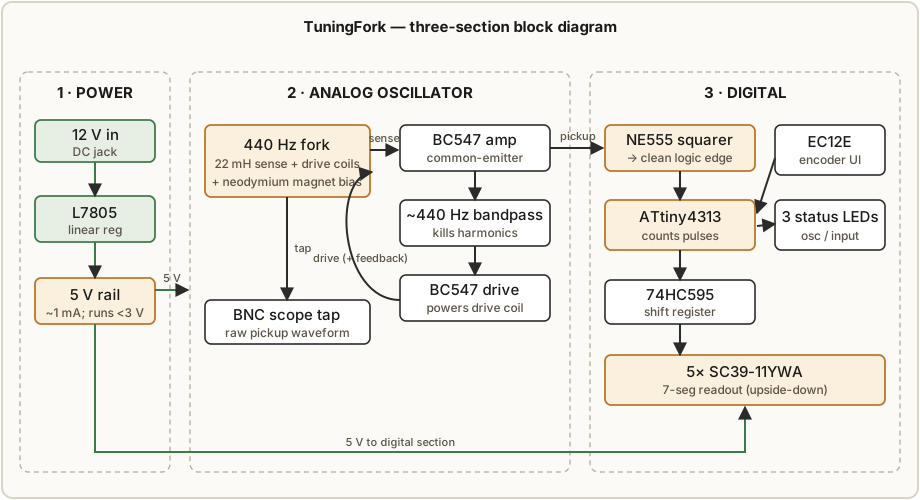
The designer’s article walks the board in three blocks, which the schematic (Assy/Schematic.pdf)
mirrors:
- Power section — the L7805 drops the input to a clean 5 V. The whole clock sustains the fork on roughly 1 mA, and the oscillator keeps running down to under 3 V.
- Analog oscillator / sustaining amplifier — this is the clever part. The fork has no field of its own, so a neodymium magnet sits in the printed mount and biases two 22 mH coils; one acts as the sense coil, one as the drive coil, exactly like a guitar pickup. The sense coil’s signal is amplified by a single-stage common-emitter stage (BC547), passed through a passive bandpass centred near 440 Hz to kill harmonics, then a second transistor stage powers the drive coil — positive feedback in phase keeps the fork ringing. The designer notes it is self-starting at 5 V (no need to tap the fork) and the BNC lets you scope the raw pickup waveform.
- Digital section — the sense signal also feeds the NE555, which squares it into a clean digital edge for the MCU pin. The ATtiny4313 counts those edges; the 74HC595 shifts out the segment data to the five multiplexed SC39-11YWA displays. Three LEDs (not on the main schematic sheet) show oscillator status and input feedback.
9.2.5 The home-etched PCB
This is a deliberately home-etchable double-sided FR-4 board, and the design choices all serve that:
- Wide tracks and maximum track spacing to survive an imperfect etch.
- Vias minimised by jumping layers through existing component pins wherever possible; the vias that remain are enlarged so a wire can be threaded and soldered through them — the board has no plated-through holes, so every layer transition is a hand-soldered wire.
- Layout accounts for DIP sockets obscuring the top copper, keeping connections accessible.
- The artwork was applied by cold toner transfer using nail-polish remover (acetone) as the solvent — printouts taped over a cleaned board, soaked, pressed until dry, then the paper soaked off leaving toner as etch resist. The front silkscreen was a second cold-toner pass.
- Etchant was a home brew of 10 % acetic acid, 1 % sodium chloride, 1 % hydrogen peroxide in distilled water — slower than ferric chloride (~30–45 min) but made from grocery/pharmacy materials. The designer notes a hair-salon-grade (12 %) peroxide contained a chelating stabiliser that precipitated as “fluffy white” mess but did no real harm; a couple of scratched traces were repaired by hand afterward. Etchant safety is in Vol 6.
9.2.6 Firmware architecture
The firmware (code/clock.c, avr-gcc) runs at F_CPU = 1 MHz and is built around two timers and
a sleeping main loop. The designer started on an ATtiny2313 but moved to the 4313 for the
flash room the serial protocol needed.
- Timer1 = timekeeping. It counts fork pulses.
OCR1A = pulses_per_minute(default 440 × 60 = 26 400) fires once a minute and rolls minutes → hours;OCR1B = pulses_per_second(default 440) fires once a second for the blinking separator, the per-second serial push, and the minute “progress bar.” Counting per minute rather than per second was a deliberate choice — the larger count (26 400) gives finer rate trim when calibrating. - Timer0 = display + housekeeping.
ISR(TIMER0_COMPA_vect)scans the five digits one at a time (display %= 5), handles input-timeout/LED feedback, drives the per-second pulse output, and — importantly — watches the oscillator: if the squared fork signal stops toggling (clock_timeoutdecays), it clearsrunningand drops the clock intoMODE_ERROR. A dead fork is detected, not silently ignored. - Main loop handles only non-timing-critical work — serial command parsing and
send_time— thensleep_mode()(idle) to save power until the next interrupt. - Calibration (
pulses_per_minute) is stored in EEPROM at address0x00and reloaded on boot; an erased cell (0xffff) falls back to the 26 400 default.
The clock has five modes, an enum keyed to their serial letters: D time display, H
set-hours, M set-minutes, T pulses-per-minute tune, E error. The rotary encoder’s
push (INT0) advances through set-hours → set-minutes → run; holding the button ~2.5 s jumps
straight into tune mode; rotating (INT1) increments hours/minutes or nudges
pulses_per_minute by ±1 in tune mode (committing to EEPROM on the next press).
9.2.7 The serial protocol
code/README.md documents a 9600-baud line protocol: a single uppercase letter, then either a
value (to set) or ? (to query), terminated by newline; each command is answered with =OK or
=ERR:<code>.
Table 4 — 9.2.7 The serial protocol
| Cmd | Access | Action |
|---|---|---|
E | write | Echo on/off (E0/E1) |
A | write | Auto-send the time every second (A0/A1) |
C | write | Charset: C0 = PAWScript (the Elian glyphs), C1 = ordinary numerals |
T | read/write | T? → HH:MM:SS; T12:34 sets hours+minutes |
P | read/write | P? → pulses/minute; P26400 sets it (the calibration handle) |
M | read | M? → current mode letter (D/H/M/T/E) |
R | read/write | R? → running 0/1; R1 starts it and clears errors |
Error codes: :UC unknown command, :INV invalid parameter. (Two minor doc quirks worth
noting if you script against it: the README’s R example mistypes the set form as P1 where the
firmware accepts R1, and T? returns seconds while a write only takes HH:MM.)
9.2.8 The Elian charset trick
The signature aesthetic. The designer adapted a personal writing system — a simplified Elian
Script (“PAWScript”) in which each numeral uses only four possible strokes and a dot. Those
map cleanly onto a 7-segment display, except the dot wanted to sit close to the numeral, so the
designer mounts the displays upside-down: the numeral is drawn on the upper four segments,
freeing the lower segments to render a per-minute progress bar (char_bar) that fills as
the minute advances — see the MODE_TIME branch in the scan ISR, which lights char_bar on digit
n once seconds ≥ 10·(n+1). chars.h holds the PAWScript bitmaps (digits_paw) and chars_human.h
the ordinary numerals (digits_human); the C command swaps between them at runtime. The tl;dr
from the designer: it hums quietly, is self-starting, and holds within a couple of seconds per day
after tuning.
9.3 Aviation — three instrument gauges driven by an ESP32
9.3.1 Origin
Nobby123’s “ESP32 3D Printed Aviator Clock” (Instructables, 14 steps) drives three real instrument-style gauge needles — seconds, minutes, hours — behind printed 120 mm aircraft/ power-station dials with 95 mm wide-angle faces. The designer built an earlier version using small 90° analog voltmeters and found them “very hard to read accurately,” so this build uses purpose-designed stepper-driven gauges with wide swing instead (large genuine 270° panel meters, the designer notes, run ~£500). Time is fetched over Wi-Fi from an NTP server, with a DS3231 RTC present as well.
9.3.2 The schematic walk-through
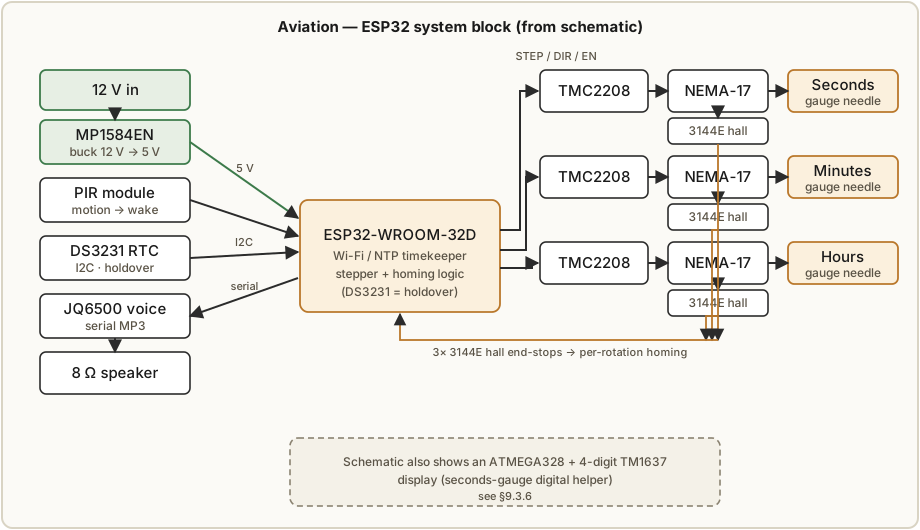
02-inputs/Aviation/schematic01.jpg is dense; reading it left-to-right:
- Three NEMA-17 pancake steppers (42×23 mm, 17HS4023, 1.5 A) — one each for Seconds, Hours, Minutes — sit behind the three gauge dials on the left.
- Each stepper is driven by its own TMC2208 microstepping driver (the schematic labels them TMC2208 and annotates “1/8th Micro Stepping”; see the ambiguity note in 9.3.6).
- An MP1584EN buck converter (the “4R7” module) steps 12 V down to 5 V for the logic and modules; the build notes it is unnecessary if you feed the clock from a 5 V 2 A supply directly.
- An ESP32-WROOM-32D (38-pin) sits centre as the main brain, with a
wifi Get On Pinnet, a decoupling network, and anMP3 Fail Rstline to the audio module. - Three 3144E hall-effect “End Stop” sensors (Seconds / Hour / Minute) provide per-gauge homing, plus a fourth 3144E hall sensor block on the sheet.
- A DS3231 RTC module sits top-right on the I²C bus.
- A JQ6500 voice module drives an 8 Ω speaker for the chimes and spoken prompts.
- A PIR module (bottom) wakes the display on motion.
- Notably, the sheet also carries an ATMEGA328 (“RKAT28C MCC”) and a 4-digit TM1637 7-segment display — see 9.3.6 for what these do and the genuine ambiguity around the two-brain split.
- An inset table gives the MS1/MS2 microstep configuration for the step drivers.
- A schematic note warns that
INPUT_PULLUPis not allowed on pins 35, 34, 36 & 39, so external pull-ups are required on those ESP32 input-only pins.
9.3.3 The parts, from the Supplies step
- ESP32 38-pin WROOM-32 — main microprocessor, programmed from the Arduino IDE.
- ATMEGA328 (kit “RKAT28C”) — secondary microprocessor on a kit PCB; an Arduino Uno/Nano in kit form. Drives the TM1637 4-digit display in the seconds gauge (a small digital seconds readout at the centre of the analog seconds dial). Per the Supplies text, the DS3231 RTC connects to this Nano/ATMEGA328 to keep time.
- 3× NEMA-17 (17HS4023 pancake) — the gauge actuators.
- 3× TMC2208 / TMC2209 stepper drivers (the Supplies list says TMC2209; the schematic says TMC2208 — see 9.3.6).
- JQ6500-16P MP3 module — connects to the ESP32 over serial, 2 MB onboard memory for chimes and spoken prompts.
- MP1584EN 3 A buck — 12 V → 5 V.
- TM1637 7-segment 4-digit — the seconds-gauge digital insert.
- PIR, 10 kΩ pot (function selector), select switch, 8 Ω speaker, status LEDs, and the usual passives.
- Hardware — M2/M3 hex bolts, M1.4/M2 self-tappers, threaded inserts; 100 mm × 2 mm round Perspex for each bezel glass.
9.3.4 The printed bodies
The FreeCAD .FCStd sources and matching .stl exports live in two mirrored copies:
02-inputs/Aviation/New Download 3_31_2025/ and .../Nobby123/esp32-aviator-clock-using-three- aviation-style-gauges/. The major parts and their roles:
Table 5 — aviation-style-gauges/. The major parts and their roles
| Part(s) | Role |
|---|---|
Base, PlinthFoot, PlinthFootCut | The wooden-plinth-mounted base / feet |
NemaMount, NemaRear04, NemaRearMinHour04 | Stepper mounts (seconds vs min/hour variants) |
NemaRotorHall01 | Rotor that carries the homing magnet past the hall sensor |
NemaSpindleCon14mm, HandStraight1_5mm | Spindle-to-hand coupler + the printed needle |
NemaBezelChamfer01, MeterOuterGlass04 | Gauge bezel + the Perspex-glass retainer |
NemaDialLED, PanelLED | Dial back-lighting carriers |
ContrilPanel04 (+ alt, 11x12_4sw) | The control panel face (selector pot, switch, PIR) |
Crossmember, CrossmemberBracket, BracketSpacer | Internal structure tying the three gauges together |
HallSwitchBracket | Holds each 3144E end-stop sensor |
Lid, LidSpacer, RearCover03, RearCoverCap, RearCoverFix | Enclosure top + rear |
RTC_Holder, SpeakerHolder | Module carriers |
ClockMount02, VeroSupport* | Vero-board (the electronics) mounting |
The full part set is also published on the designer’s Cults3D page (cults3d.com/:2834225).
9.3.5 Gauge decals and firmware variants
Decals. The dial faces are printed onto white waterslide decal paper (explicitly not
clear) and applied to panels primed matte black. The hub holds the face artwork as JPGs at the
Aviation/ root — VoltmeterHourBlack01ABlack.jpg, VoltmetersMinutesBlack01Black.jpg,
VoltmetersSecondBlack01Black.jpg, VoltmetersSecondBlackDecal.jpg, and the panel decal
ControlPanelBlack04Print.jpg. The “Voltmeter” filenames are a holdover from the designer’s earlier
analog-meter version; here they are the aviation-style 95 mm dials.
Firmware. Three code archives are present:
VoltmeterClock_v73web.zip— the current ESP32 firmware (“v73”). Step 7 shows its NTP block:int TIMEZONE = 0(UK),#define NTP_SERVER "uk.pool.ntp.org", an optionalWIFI_SMARTCONFIG, and hard-codedWIFI_SSID/WIFI_PASS(the designer left their own home Wi-Fi credentials in the example — strip these before flashing).SecondsClock05.zip— the ATMEGA328/Nano sketch that runs the seconds-gauge TM1637 digital readout.esp32-aviator-clock-using-three-aviation-style-gaug20250322-1-9if4u.zip— a dated full source export.
Audio packs: DCF77ChimeShort.zip and JQ6500_English_MusicDownload_V1_2.zip are the chime/voice
files loaded into the JQ6500 via its special upload utility.
The UI is a single rotary potentiometer + select switch on the control panel, with spoken feedback: positions are SEL (normal running), SEC (analog seconds refresh: 2/3/5 s), BELL (chime off / timer 6 am–11 pm / 24-7), WIN/SUM (winter/summer time), VOL+/VOL-, RST (reset). You rotate to a position, press Select, the clock speaks the option, press again to change it. Two LEDs signal state: red = time not yet fetched from NTP (steady = never fetched); purple flashes while fetching, then every other second once running; red flashes on a hall-sensor fault (too many steps detected); purple steady while re-homing after sleep. Power: ~1 W idle, ~3 W when a motor steps, ~80 mA in PIR sleep; steppers run in blocking mode so only one moves at a time, capping draw.
9.3.6 Homing, microstepping, and the honest ambiguities
Homing. Each gauge synchronises to zero on every rotation — hours at 01:00/13:00, minutes every hour, seconds every minute. The stepper drives the needle until the rotor magnet trips the 3144E hall switch, which is the mechanical zero. The needle is fixed to the printed spindle by a single M2 self-tapper; you zero a gauge by loosening that screw, moving the hand to the painted zero, and re-tightening while gripping the spindle (designed slightly oversize so thin pliers can hold it). The designer found one of three otherwise-identical gauges needed its step count reduced by 1 to stay aligned — a per-gauge calibration handle.
Three things are genuinely ambiguous or contradictory in the collected files, and are flagged honestly rather than papered over:
- TMC2208 vs TMC2209. The schematic labels the drivers TMC2208 (“1/8th micro-stepping”), but the Supplies step lists “TMC2209 Stepper Motor Driver 3 off” and says the NEMA-17s are “set to run in 32 microsteps.” Eight vs thirty-two micro-steps and 2208 vs 2209 cannot both be right; the MS1/MS2 table on the schematic explicitly notes the two drivers configure differently. Treat the driver part number and microstep depth as build-time choices to verify against the firmware’s steps-per-revolution constant, not settled facts. (Vol 1 and the engineering volumes standardise on TMC2208 for this thread.)
- The two-brain split. The clock has two microcontrollers: an ESP32 (Wi-Fi/NTP, the three steppers, JQ6500 audio, PIR, status LEDs) and a secondary ATMEGA328/Nano. The Supplies text says the DS3231 RTC connects to the ATMEGA328 and that the 328 “drives the TM1637 in the seconds gauge.” Yet Step 7 makes the ESP32 fetch time over NTP. The most consistent reading is that the ESP32 is the timekeeper (NTP-primary, DS3231 as holdover) and the ATMEGA328 is a slave that only renders the digital seconds readout — but the files do not state the inter-processor link explicitly, so exactly how the 328 learns the time (shared I²C RTC? a serial line from the ESP32?) is not fully determined from what is on disk.
- “DCF77” is a chime, not a receiver. Despite the
DCF77ChimeShort.zipfilename, there is no DCF77 radio-clock receiver in the BOM or schematic. Time comes from NTP (Step 7); the DS3231 is the local holdover. “DCF77” here names an audio chime theme loaded into the JQ6500 — not a long-wave time-signal receiver. Do not expect radio time sync from this build.
9.4 Cross-project comparison
The three designs sit at three corners of the “mechanical clock” space — a printed gear train, a counted resonator, and stepper-driven instruments — and the table makes the contrast concrete.
Table 6 — 9.4 Cross-project comparison
| PlanetaryGear | TuningFork | Aviation | |
|---|---|---|---|
| Brain | Any Arduino (AVR) | ATtiny4313 (1 MHz) | ESP32-WROOM-32D (+ ATMEGA328 slave) |
| Timebase | DS3231 RTC (CR2032-backed) | 440 Hz steel fork, counted | NTP over Wi-Fi (+ DS3231 holdover) |
| Actuator | 1× 1.8°/step NEMA stepper | Magnet + 2× 22 mH drive/sense coils | 3× NEMA-17 pancake steppers |
| Driver | L293D H-bridge | BC547 sustaining amp + NE555 squarer | 3× TMC2208/2209 (microstepping) |
| Readout | Printed hour + minute hands on a 1:12 epicyclic train | 5× SC39-11 7-seg, Elian glyphs, upside-down | 3 gauge needles (95 mm dials) + TM1637 secs |
| Reduction | 3:1 GT2 belt → 12:1 planetary | n/a (direct count) | per-gauge microstep + gear, hall-homed |
| Fabrication | 3D-printed gears + laser-cut acrylic plates; ordered PCB | home-etched double-sided FR-4 | 3D-printed bodies (FreeCAD) + Vero board |
| UI | 4 push buttons (OneButton) | 1 EC12E rotary-encoder + push | 1 selector pot + Select switch, spoken |
| Homing | A3144 hall + magnet, polarity-critical | n/a | 3× 3144E hall end-stops, per-rotation |
| Source | Instructables “Planetary-Gear-Clock” | github.com/NuclearLighthouseStudios (firmware + KiCad) | Instructables “ESP32-3D-Printed-Aviator-Clock”; Cults3D :2834225 |
The through-line, as Vol 1 framed it: in all three, position is the display, and the engineering worth respecting is not the timekeeping (a DS3231 or NTP is effortless) but the mechanism — meshing a printed gear train without binding, sustaining and counting a real 440 Hz oscillation, or homing three needles to a repeatable zero. Build any of them with the original files open alongside (Vol 6 for the step-by-step, Vols 3–5 for why each part is shaped the way it is).
Comments (0)