Mechanical · Volume 6
Build It Yourself
Three complete worked builds — print the planetary movement, etch and bring up the fork PCB, wire the ESP32 gauge clock — plus the consolidated category safety section
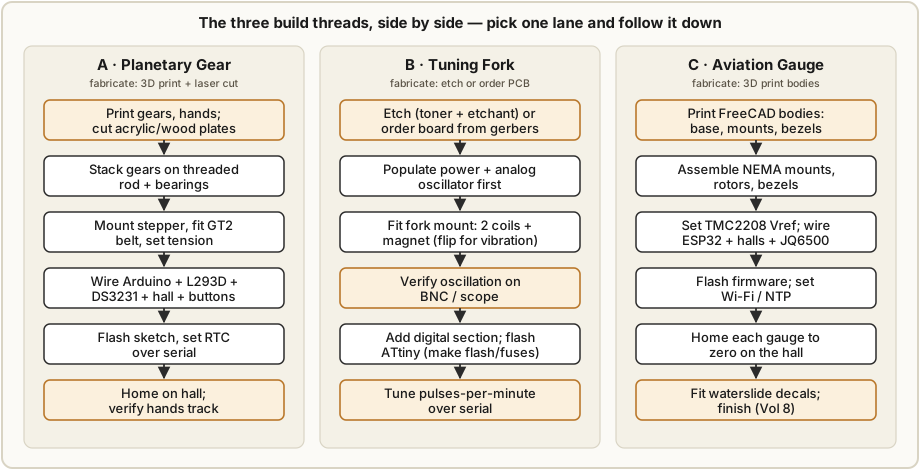
This is the volume where the three collected designs stop being reference material and become things on your bench. It holds three independent build procedures — the PlanetaryGear clock, the TuningFork clock, and the Aviation gauge clock — each written as an ordered start-to-finish thread. They share almost nothing in fabrication: one is a printed and laser-cut gear stack, one is a home-etched analog/digital PCB around a humming steel fork, one is a 3D-printed instrument panel driven by an ESP32. Pick the one whose mechanism excited you in the Vol 1 decision tree, follow that section, and ignore the other two — they do not build on each other.
What this volume is not is a substitute for the original designers’ files. The engineering why lives in Vols 3–5 (gear math and backlash in Vol 3, motors/coils/drivers in Vol 4, timebases and counting in Vol 5); the complete file inventory and per-project walk-through live in Vol 9. This volume is the doing: settings, assembly order, the gotchas that bite at the bench, and where to stop and verify before moving on. Build with the canonical Instructables / KiCad / FreeCAD files open alongside.
The consolidated safety section (§6.5) is the mandatory one for the whole Mechanical category. Because these clocks are low-voltage, the hazards are in the fabrication — the etchant chemistry, the soldering, the hot ends, the shop tools — not the running clock, so the category’s safety treatment is housed here at the point of use rather than in its own volume.
6.1 Before you start — the three builds at a glance
All three are achievable on the lab Vol 1 assumes (multiple 3D printers, a laser cutter, a CNC, and a full electronics bench), but they ask for different kinds of skill. The planetary clock is a mechanical-assembly and print-tuning job with friendly electronics; the tuning fork is an analog-electronics and PCB-fabrication job; the aviation clock is a print-heavy motion-control and firmware job.
Table 1 — 6.1 Before you start — the three builds at a glance
| Build | Fabrication needed | Electronics skill | Rough time | Rough cost |
|---|---|---|---|---|
| A · Planetary Gear | FDM printing (gears, hands) + laser-cut acrylic/wood plates | low — Arduino + L293D module wiring | a weekend of printing + a day to assemble & tune | $ (filament, a stepper, GT2 parts, modules) |
| B · Tuning Fork | double-sided PCB (home-etch or order) + a little FDM (fork mount) | medium–high — analog oscillator bring-up, AVR flashing | 1–2 days etching/populating + tuning | $–$$ (FR-4, fork, coils, ICs) |
| C · Aviation Gauge | heavy FDM (case, 3 gauge bodies, mounts, rotors, bezels) | medium — ESP32 firmware, TMC2208 tuning, NTP setup | several days of printing + 1–2 days wiring/homing | $$ (3 NEMA-17 + drivers, ESP32, modules, Perspex) |
6.1.1 Tools you will want on the bench
Common to all three: a decent soldering iron and fume extraction, a multimeter, a small hex/driver set, side cutters, and calipers. Build-specific additions:
- A (Planetary): an FDM printer dialed in for dimensional accuracy (gears live or die on
it), a laser cutter or a source for cut plates, thin CA glue and threadlocker, and a magnet
- Arduino for the hall-sensor test circuit.
- B (Tuning Fork): for the home-etch path — a laser printer (toner transfer), acetone or
nail-polish remover, an etch tub, nitrile gloves, goggles, and ventilation; for everyone —
an oscilloscope (the BNC bring-up check is not optional), an AVR programmer (ISP), and
avr-gcc/avrdude. - C (Aviation): a printer with enough bed for the case bodies, a USB cable + Arduino IDE for the ESP32, a small screwdriver to set TMC2208 Vref against a meter, and waterslide decal paper for the dials.
6.1.2 Which to pick
The Vol 1 decision tree (§1.5) is the authority; in one line each: choose A if you love gears and print tuning and want the friendliest electronics; choose B if the analog craft of sustaining and counting a real 440 Hz oscillation is the draw and you want to etch a board; choose C if instruments, panels, and motion control are the appeal and you do not mind a lot of printing. If you want the clock with no building, you are in the wrong volume — see Vol 7 (buy a kit or a vintage Accutron).
6.2 Build A — the Planetary Gear Clock
A 3D-printed epicyclic (sun/planet/ring/carrier) train turns one stepper shaft into correctly paced hour and minute hands. The original is Looman_projects’ six-step Instructables build; the steps below add the bench detail and point to where the rendered Instructables figures help. The gear-ratio derivation and the backlash/tolerance theory are Vol 3 — do not re-derive them here.
6.2.1 Print the gears, hands, and case
Print the STL set: Sun_gear, Planet_gear, Ring_gear, Carrier_back, Hour_hand,
Minute_hand, and (if printing rather than laser-cutting) Clock_front / Clock_back.
Suggested FDM settings for a meshing gear train:
- Layer height 0.12–0.16 mm — finer layers give cleaner tooth flanks and quieter, smoother running; the hands and case can print coarser (0.2 mm).
- Walls / perimeters at least 3–4 so tooth faces are solid wall, not infill bleed-through.
- Infill 20–30 % is plenty for gears (they are nearly all perimeter anyway); 15 % for the plates.
- Clearance / horizontal expansion is the whole game. Printed gears come out fat — the nominal tooth profile grows by the extrusion’s elephant-foot and over-extrusion. Tune a slight negative horizontal expansion (≈ −0.05 to −0.10 mm) or dial in the right backlash so the train turns freely without slop. The backlash/clearance target and how to measure it is Vol 3 (§3 on printed-gear tolerance) — set it there, then print.
- Material: PLA prints crisp teeth and is fine indoors; PETG is more wear-tolerant if you expect long running. Print gears flat on the bed (teeth in the XY plane) for the most uniform profile.
Laser-cut the Clock_front and Clock_back plates from 5 mm wood and acrylic per the
supplied DXF (the supply list calls for 5 mm sheet). If you lack a laser, the plates can be
printed instead.
The Instructables “Step 1: Designing and Making the Gears” page is worth reading for the ratio sketch and the note that the gear count sets the reduction; the math behind it is Vol 3.
6.2.2 Assemble the gear stack on the threaded rod and bearings
Build the epicyclic stack onto the M5×50 threaded rod running through the plates, carried on the bearings (3× 5×16×5 mm plus 2× 5×16×5 mm flanged). Working order, from the Instructables “Step 2: Assembly of the Gear System”:
- Press the bearings into the carrier and the front/back plates; the flanged pair locate the rod axially.
- Seat the ring gear in the front plate, drop in the planets on their posts in the carrier, and engage them with the sun.
- Run the M5×50 threaded rod as the central axle; use M5 nuts/washers and the countersunk M5 bolts to clamp the plate sandwich without binding.
- Spin the train by hand. It must turn freely with no tight spot through a full rotation. A tight spot means a fat gear or a misaligned bearing — fix it now (re-print with more negative expansion, or ream the bore) before any motor goes near it. Backlash you can live with; binding you cannot.
Fit the Hour_hand and Minute_hand to their respective outputs last so they do not
get in the way during alignment.
6.2.3 Mount the stepper and set GT2 belt tension
The train is driven through a GT2 belt pre-reduction: a 20-tooth pulley on the 1.8°/step stepper shaft and a 60-tooth pulley on the train input — a 3:1 reduction — closed by the 400 mm GT2 belt. Mount the stepper to the back plate with M3 screws, fit the pulleys, loop the belt, and slide the stepper to take up slack.
- Set tension so the belt is firm but not twangy — you should be able to deflect a span a few millimetres with light finger pressure. Too loose and it skips teeth (the hands lose position); too tight and it loads the stepper bearing and adds audible whine.
- Lock the stepper position once tension is right. Re-spin the whole train (now through the belt) by hand to confirm nothing binds.
The motor, microstepping, and why a 1.8° stepper through 3:1 gives the resolution it does are Vol 4.
6.2.4 Wire the Arduino, L293D, DS3231, hall sensor, and buttons
Per the Instructables “Step 4: The Electronics That Make the Clock Tick,” the electronics are deliberately simple. Wire:
- Stepper → L293D → Arduino. The L293D dual H-bridge drives the bipolar stepper from Arduino digital pins (the original mounts everything on a custom PCB with an Uno-shield header footprint, but a breadboard/L293D module is fine first).
- DS3231 RTC → I2C (SDA/SCL), with its CR2032 backup cell fitted so the time survives power-down.
- A3144 hall sensor positioned to see a 5 mm neodymium magnet carried on a rotating member — this is the homing reference (next step).
- Buttons for user input wired to use the Arduino internal pull-ups (the original uses 4 buttons this way to simplify wiring).
- Power: a 5 V 2 A supply through the DC jack; a 10 K resistor and a 100 µF 25 V cap are on the supply/sensor side per the parts list.
6.2.4.1 Set the hall sensor + magnet polarity (do this before gluing)
The A3144 is polarity-sensitive — it only triggers on one magnetic-field direction. Per the Instructables note, glue the sensor first, then with a test LED/Arduino circuit verify which face of the magnet trips it, and only then glue the magnet in the correct orientation. Getting this backwards means the clock can never find home.
6.2.5 Flash the sketch, set the RTC, home, and verify
- Flash the supplied Arduino sketch (attached to the Instructables; thoroughly commented, uploadable as-is).
- Set the RTC. On first run the DS3231 is read; the firmware logic (Instructables “Step 5: Programming the Arduino”) checks the RTC against the target, computes the difference, and drives the stepper to catch up — so set the correct time into the DS3231 and let the clock converge.
- Home. On power-up the train rotates until the hall sensor sees the magnet, establishing the zero the hands are referenced from. Confirm it finds home repeatably.
- Verify tracking. Let it run and confirm the minute hand advances correctly and the hour hand tracks at 1/12 the rate, with no skipped belt teeth over a few hours.
The counting logic and how the firmware divides the RTC down to hand motion is Vol 5.
6.3 Build B — the Tuning Fork Clock
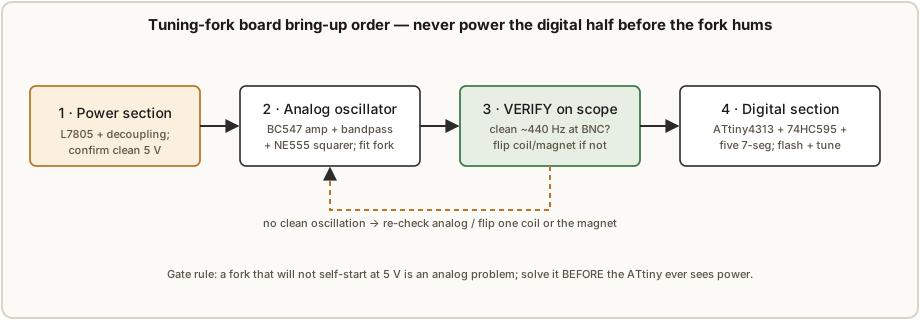
This is the analog-electronics build: a 440 Hz steel fork kept ringing by a transistor sustaining amplifier and counted by an ATtiny4313. The board is the original’s home-etched double-sided FR-4, with enlarged vias for hand-soldered wire links (no plated-through holes). The defining discipline is bring-up order: power, then analog, verify the fork hums on the scope, then digital — never the other way round.
6.3.1 Make or order the PCB — two paths
6.3.1.1 Path 1 — order it from the gerbers (the easy path)
The hub holds the KiCad project including gerbers. Send them to any fab. You lose the hand-etched character but gain plated-through holes (so the enlarged-via wire links the original needs become unnecessary) and a proper solder mask. This is the recommended path if you do not specifically want the etching experience. The remainder of §6.3 applies unchanged except you skip the wire-link vias.
6.3.1.2 Path 2 — home-etch by cold toner transfer (the original method)
The original board was etched at home, and the design was prepared for that: wide track spacing, vias avoided where existing pins can jump layers, and all required vias enlarged so a wire can be soldered through to connect the two layers (the home board has no plated-through holes, and DIP sockets obscure the top, so links are intended). Process, from the article verbatim in spirit:
- Toner-transfer the artwork (cold method). Laser-print both layers. Align the two printouts, tape them together, and slide the cleaned bare copper-clad FR-4 between them. Soak both sides in nail-polish remover / acetone and apply pressure until the solvent has evaporated. Soak the sandwich in water, then carefully peel the paper away, leaving the toner behind as etch resist. (The cold solvent method avoids the heat-and-alignment fight of an iron on a double-sided board.)
- Etch. The original used a grocery-store/pharmacy etchant: a mix of ~10 % acetic acid,
~1 % sodium chloride, and ~1 % hydrogen peroxide in distilled water. It is slower than
ferric chloride (the original etch took ~30–45 minutes) but uses readily available
materials. Ferric chloride is the faster, standard alternative. Either etchant is
corrosive — see §6.5 before mixing anything.
- Practical note from the original build: 12 % salon-grade hydrogen peroxide often contains a chelating stabiliser that reacts with the dissolved copper and drops out as a fluffy white precipitate. It does not stop the etch but makes a mess; expect it.
- Agitate gently and watch for the resist getting scratched off by anything in the tub — the original lost a couple of connections to a bump and fixed them by hand afterward.
- Apply the front silkscreen with a second round of cold toner transfer to help with assembly (optional but the original did it).
- Drill and inspect. Drill the holes; inspect every trace under light; bridge any etch-resist damage with a fine wire and solder. On the home board, the enlarged vias get a short wire link soldered through to connect top and bottom layers.
6.3.2 Populate power + analog first, then verify oscillation
Follow the bring-up order in Figure 6.2 exactly. The original assembled the power supply and analog sections first and confirmed correct oscillator function before adding the digital section — do the same.
- Power. Fit the L7805 regulator and its decoupling (the 100 µF electrolytic + the 100 nF ceramics). Power it and confirm a clean 5 V rail before anything else goes in.
- Analog oscillator. Populate the BC547 transistor amplifier chain, the ~440 Hz passive bandpass, and the NE555 squarer. The sense-coil signal is amplified by a common-emitter stage, bandpass-filtered around 440 Hz, fed to a second stage that powers the drive coil, and finally squared by the 555 into a clean logic-level pulse train. (The full circuit theory — the positive-feedback loop, the guitar-pickup analogy, why it self-starts at 5 V — is Vol 4.)
- Fit the fork mount (next subsection) so there is a fork to oscillate.
- VERIFY on the scope. Connect the on-board BNC to a scope and look for a clean ~440 Hz waveform from the pickup. This gate is mandatory. A fork that will not self-start or gives a dirty waveform is an analog problem; solve it here. The original circuit sustains the fork down to under 3 V drawing ~1 mA, and is self-starting at 5 V — so at 5 V a healthy build should ring without tapping.
6.3.3 Assemble the fork mount — coils, magnet, and the polarity experiment
The 3D-printed fork mount (FreeCAD/STL in the fork mount directory) holds the fork and the
sense/drive hardware. Into the base part, insert:
- Two 22 mH (11 mm diameter) inductors — one drive coil, one sense coil, used like a guitar pickup.
- One 15×5 mm neodymium rod magnet to provide the external field the moving fork disturbs.
Expect to experiment with polarity. The inductors’ winding polarity is not consistent from the factory, so the build will not hum well on the first orientation in many cases. Flipping one inductor or the magnet usually produces much better vibration — this is normal and expected, not a fault. Iterate against the scope (§6.3.2 step 4) until the waveform is clean and the fork self-starts.
6.3.4 Add the digital section and flash the ATtiny4313
Only after the oscillator is verified, populate the digital half: the ATtiny4313, the 74HC595 shift register, the five SC39-11YWA 7-segment displays, the EC12E rotary encoder/switch, and the three status LEDs. Then flash:
make flash     # builds clock.hex and programs it via avrdude (needs an ISP programmer)
make fuses     # sets the correct fuse bits on the ATtiny4313
A prebuilt clock.hex is in the hub if you do not want to compile. The firmware uses one timer
to count the fork pulses (deriving a per-second and a per-minute overflow) and a second
timer to scan the displays and handle input; the main loop handles the 9600-baud serial
protocol.
6.3.5 Calibrate pulses-per-minute
The clock keeps time by counting pulses per minute — nominally 26 400 (440 Hz × 60 s).
Counting per minute rather than per second gives finer adjustment resolution. Tune it over
the serial port (9600 baud): P? reads the current setting, P26400 sets it; T? reads the
time, T12:34 sets it. Adjust the pulses-per-minute value until the clock holds time over a
day (the original lands within a couple of seconds per day after tuning). The full
calibration procedure and the counting-logic theory are Vol 5.
6.4 Build C — the Aviation Gauge Clock
Three NEMA-17 steppers sweep needles behind printed aviation dials, driven by an ESP32 that gets its time from Wi-Fi/NTP (with a DS3231 backup) and homes each gauge on a hall sensor. The original is Nobby123’s 14-step Instructables build. This is print-heavy: budget most of the calendar time for the FDM bodies.
6.4.1 Print the FreeCAD bodies
Print the body set (FreeCAD sources + STLs in the hub): the Base/plinth, ClockMount, the NEMA mount / rear / rotor parts, the gauge bezels, the ControlPanel, and the Lid, times three for the three 120 mm gauges with 95 mm dials. Use the assorted M2/M3 hex bolts, M1.4/M2 self-tappers, and threaded inserts the original calls for. The bezel glass is 100 mm × 2 mm round Perspex. This is a lot of printing across several bodies — start it early.
6.4.2 Assemble the NEMA mounts, rotors, and bezels
Per Instructables “Step 6: 3D Parts Assembly,” assemble each gauge: stepper into its NEMA mount, rotor onto the spindle, bezel and Perspex onto the body. The hand fixes to the NEMA spindle connector by a single M2 self-tapping screw — important, because that loosened screw is exactly how you will zero the needle later (§6.4.5). The original made the spindle slightly larger than the hand so it can be gripped with thin pliers while tightening.
6.4.3 Set the TMC2208 Vref and wire the electronics
The steppers run through TMC2208 microstepping drivers.1 Set each driver’s Vref (the current-limit trim) to the NEMA-17’s rating before powering the motors — too high cooks the driver/motor, too low loses steps. Setting Vref and the microstepping math are Vol 4.
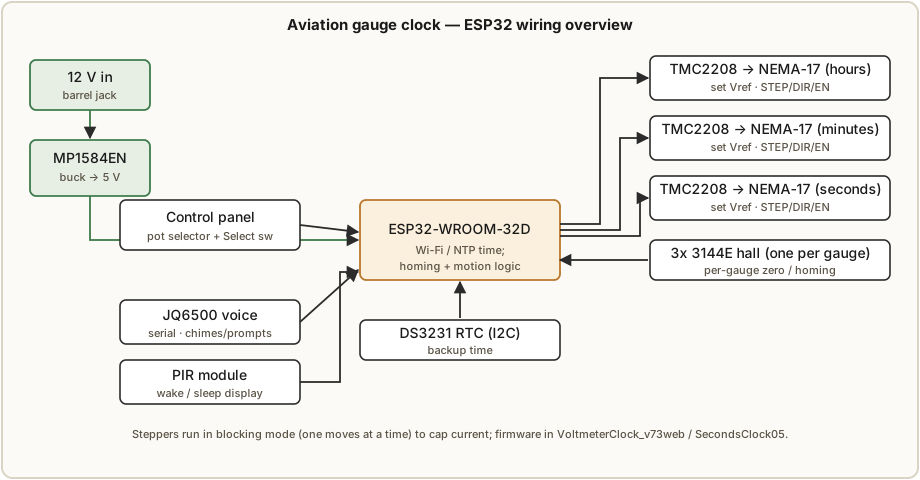
Wire per Figure 6.3 and the original schematic:
- Power: 12 V in → MP1584EN buck → 5 V for the logic/modules. (If you feed a regulated 5 V 2 A supply directly, the buck is not needed.)
- ESP32-WROOM-32D as the main controller: STEP/DIR/EN to the three TMC2208s.
- 3× 3144E hall sensors, one per gauge, for homing.
- JQ6500 voice module on serial for the chimes/spoken prompts (its audio files are uploaded separately with the vendor’s upload tool — see Vol 9).
- PIR module to wake the display and drop the clock to low power after ~15 min of no motion.
- DS3231 RTC on I2C for backup time.
- Control panel: a selector potentiometer (SEL / SEC / BELL / WIN / SUM / VOL± / RST positions) plus a Select switch, mounted in the plinth.
Note the original runs the steppers in blocking mode — only one motor moves at a time — to hold the peak current (and supply size) down; max draw is ~500 mA while a hand moves, ~65 mA idle.
6.4.4 Flash the ESP32 firmware and set Wi-Fi / NTP
Flash the firmware from the hub (VoltmeterClock_v73web.zip for the main board;
SecondsClock05.zip for the seconds gauge’s helper) using the Arduino IDE for the ESP32
38-pin WROOM-32 target. Before building, edit the // NTP settings block:
int TIMEZONE = 0;                 // GMT=0; adjust for your zone (1 = GMT summertime)
#define NTP_SERVER "uk.pool.ntp.org"   // your local NTP pool
#define WIFI_SMARTCONFIG false
#define WIFI_SSID "YourSSID"           // your Wi-Fi SSID
#define WIFI_PASS "YourPassword"       // your Wi-Fi password
On boot the clock fetches time from NTP (the status LEDs report progress — red = not yet fetched, purple flashing = attempting, steady purple/red = states described in the Instructables). The DS3231 holds time if Wi-Fi is unavailable.
6.4.5 Home the gauges and fit the decals
- Home / zero each gauge. The clock synchronizes to zero on every rotation (hours at 01:00/13:00, minutes each hour, seconds each minute): the stepper drives the hand toward zero until the magnet on the rotor is sensed by the hall switch, then stops. To set the mechanical zero, power up, let all gauges find their stop, power off, loosen the M2 screw, move the hand exactly to the dial zero, and re-tighten while holding the spindle with thin pliers. Power up again and confirm all three point to zero.
- Trim step rates if needed. If a needle drifts out of alignment as it rotates, adjust that motor’s step count — the original found one of three identical gauges needed its step rate decreased by 1.
- Fit the dials and panel decals. Print the hour/minute/second dials onto white waterslide decal paper (not clear), at the size where the 85 mm marks line up with the printed bezel; prime/paint the control panel matt black before applying its decal. Finishing detail — paints, the aviation-panel aesthetic, the plinth — is Vol 8.
6.5 Safety — consolidated for the Mechanical category
This is the mandatory safety section for the whole Mechanical category, housed here
because the category is low-voltage: the three collected clocks all run from 5 V (or a 12 V
input bucked to 5 V) and have no high-voltage rail of the kind that makes the Nixie or
Scope/CRT clocks dangerous (see _shared/safety.md for the hub
hazard tiers — Mechanical sits in the Low tier). The real hazards here are in the
fabrication, and they are concentrated in the builds above. Read the relevant part before
the step that needs it.
6.5.1 Mains and wall-wart discipline
The running clocks are low-voltage, but their supplies plug into the wall and your bench tools run on mains. Use a properly rated, enclosed wall-wart or supply; do not run a clock from an unfused bare transformer; keep mains wiring away from the low-voltage side; and unplug soldering irons, hot plates, and the laser/CNC when not in use. A few traditional or synchronous-motor movements (not these three builds) run directly from line voltage — those demand full mains discipline and are out of scope here.
6.5.2 Etchant chemistry (Build B) — the real chemical hazard
Both etch routes are corrosive and demand respect:
- Acetic acid / hydrogen peroxide / salt (the original’s grocery-store etchant) is an acidic oxidiser; concentrated peroxide (the 12 % salon grade used) is a skin and eye hazard.
- Ferric chloride (the standard alternative) is corrosive, stains everything permanently, and is an irritant.
Rules: work in a well-ventilated area; wear nitrile gloves and splash goggles (an apron too); mix peroxide and acid carefully and never near heat; keep the etch tub stable so nothing bumps it (a knock both ruins the resist and risks a splash). Disposal: never pour metal-laden etchant down the drain. Spent etchant is full of dissolved copper — neutralize it (ferric chloride and the acid etchant can be neutralized with a base such as sodium carbonate / washing soda until pH-neutral, and the copper precipitated out) and dispose of the residue as hazardous waste per your local rules. Treat the chelating-agent precipitate from salon peroxide as part of that waste.
6.5.3 Soldering — fumes and hot iron
All three builds involve soldering; Build B involves a lot of it. Solder in ventilation or with a fume extractor (rosin-flux fumes are a respiratory irritant); wash hands before eating (lead-bearing solder); and respect the iron — it is hot enough for a serious burn and will happily set down on a cable. Tin the tip, park it in the stand, and unplug it when done.
6.5.4 3D printing — hot ends, beds, and particulate
Builds A and C print a lot. The hot end (200 °C+) and heated bed cause contact burns — keep fingers clear and let parts cool. FDM printing emits ultrafine particulate and VOCs; PLA is the mildest, but ABS and resin printing must be ventilated/enclosed (resin also demands gloves and skin/eye protection for the uncured liquid). Run printers in a ventilated space, not a sealed bedroom.
6.5.5 Laser and CNC — shop hazards for the enclosures
Cutting the planetary plates (laser) or machining any enclosure (CNC) brings the usual shop hazards: laser fume extraction is mandatory (cutting acrylic/wood produces harmful smoke, and acrylic must never be confused with PVC, which releases chlorine gas), eye protection against the beam, and fire watch (never leave a running laser unattended). For CNC: eye protection, secure workholding, no loose clothing/sleeves near the spindle, and dust extraction.
6.5.6 Mechanical pinch points and stored spring energy
The planetary train (Build A) has meshing gears — keep fingers clear of the mesh when it is under power; a printed gear will not take a finger off, but it will pinch and can strip if you stall it. The aviation gauges have small moving parts and pliers-tightened spindles — mind the pinch. And although these three builds have no mainspring, kit skeleton movements (Vol 7) store real energy in a wound spring: never let a wound movement “run away,” keep fingers and tools out of a spring under tension, and let it down in a controlled way before servicing.
References
- PlanetaryGear — Looman_projects, “Planetary Gear Clock,” Instructables (6 steps): Supplies; Step 1 Designing/Making the Gears; Step 2 Assembly of the Gear System; Step 3 Connecting the Stepper and Sensor; Step 4 The Electronics; Step 5 Programming the Arduino; Step 6 result. STL/DXF set + build PDF held in
02-inputs/PlanetaryGear/. Gerbers on the designer’s Google Drive (linked from the Instructable). - TuningFork — NuclearLighthouseStudios, “Tuning Fork Clock.” KiCad project (schematic, PCB, gerbers), BOM, fork-mount CAD/STL, and the article
The tuning fork clock.docxheld in02-inputs/TuningFork/. Firmware (C source,Makefile, prebuiltclock.hex, serial protocol) in thecode/subfolder and at NuclearLighthouseStudios/Tuning-Fork-Clock-Firmware. Build video: https://www.youtube.com/watch?v=TgB_1jr5b_c. - Aviation — Nobby123, “ESP32 3D Printed Aviator Clock” (14 steps), Instructables. FreeCAD bodies + STLs (Cults3D), gauge decals, schematic, JQ6500 audio, and firmware zips (
VoltmeterClock_v73web,SecondsClock05) held in02-inputs/Aviation/. - Engineering cross-references: gear math and printed-gear tolerance/backlash — Vol 3; motors, microstepping, the fork sustaining amplifier, and hall homing — Vol 4; timebases, the fork pulse count, and calibration — Vol 5; finishing and the aviation-panel aesthetic — Vol 8; full per-project file inventory and walk-throughs — Vol 9.
- Hub safety baseline:
_shared/safety.md.
Footnotes
-
The shared project facts and Vol 1 specify TMC2208 microstepping drivers for the aviation clock, and that is the part used throughout this series; the original Nobby123 Instructables parts list names the closely related TMC2209 (pin- and software-compatible for this STEP/DIR use, with a higher current rating and optional UART/StallGuard features). Either works for this build; set Vref to the NEMA-17 rating regardless of which you fit. ↩
Comments (0)